 Summary Box [In a hurry? Just read this⚡]
- Qwen-Image-2.0 by Alibaba was launched on February 10, 2026 with native 2K resolution support and a 20B parameter MMDiT architecture, positioning it as a serious competitor to Flux.
- It excels at bilingual English/Chinese text rendering inside images, handles up to 1,000-token prompts, and performs especially well on posters, multi-panel comics, and structured visual content where Flux often struggles.
- The full BF16 model needs 48GB+ VRAM, but GGUF quantized versions make it runnable on consumer GPUs: Q3_K_M / Q4_0 on RTX 4060 (8GB), and FP8 as the sweet spot on RTX 3090/4090 (24GB) for ~5-second generations.
- Common ComfyUI setup issues include the “Red Node” error (fix: update Diffusers library), “Missing Models” (check file downloads), and “seed rigidity” (adjust CFG scale to 7–10 and use prompt weighting for more variation).
- Developers face a clear choice: self-hosting offers maximum control and customization but requires high-VRAM hardware or cloud costs, while Alibaba’s DashScope API provides pay-per-use convenience and better scaling for commercial applications.
Alibaba’s Qwen-Image-2.0 burst onto the scene on February 10, 2026, sending ripples through the AI image generation community with its promise of revolutionizing text-to-image workflows.
Developed by the Qwen team at Alibaba, this open-source powerhouse isn’t just another model—it’s a sophisticated tool designed to tackle the limitations plaguing current leaders like Black Forest Labs’ Flux.

At its core, Qwen-Image-2.0 boasts a native 2K resolution capability, allowing for incredibly detailed outputs right out of the box, without the need for upscaling hacks that often degrade quality.
This means users can generate sharp, high-fidelity images at resolutions like 1328×1328 or even 1664×928 in various aspect ratios, making it ideal for professional applications such as digital art, marketing materials, and visual storytelling.
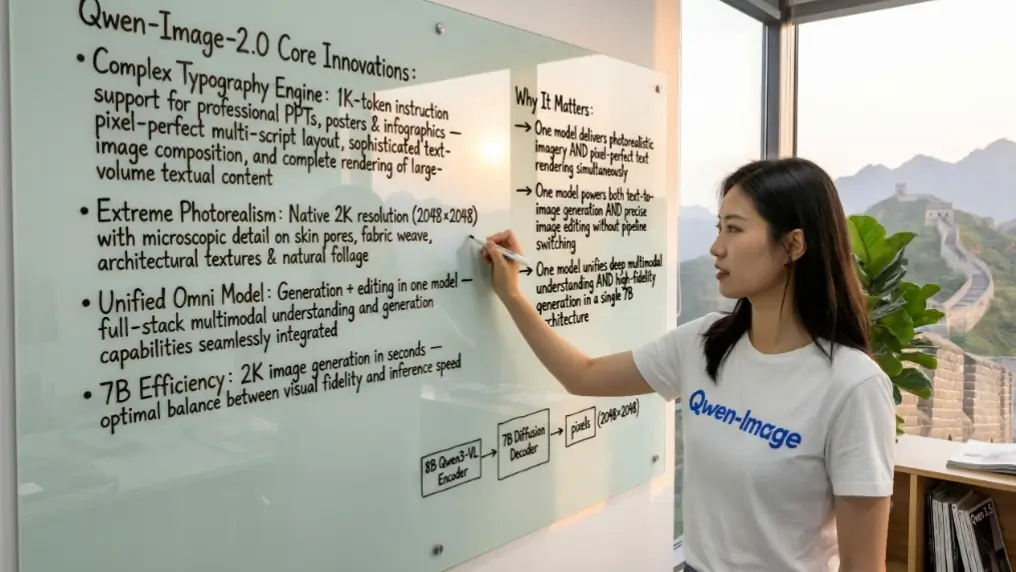
What truly sets Qwen-Image-2.0 apart is its 20 billion parameter MMDiT (Multimodal Diffusion Transformer) architecture, a refined design that emphasizes efficiency and precision.
Unlike predecessors that prioritized sheer scale, this model integrates advanced multimodal processing to handle complex instructions seamlessly.
The launch hype centers on its ability to render intricate text within images with unprecedented accuracy, supporting both English and Chinese languages flawlessly.
Imagine crafting a poster with embedded bilingual slogans or a comic strip with multi-panel narratives, all generated in one go. But does it live up to the “Flux-killer” moniker?
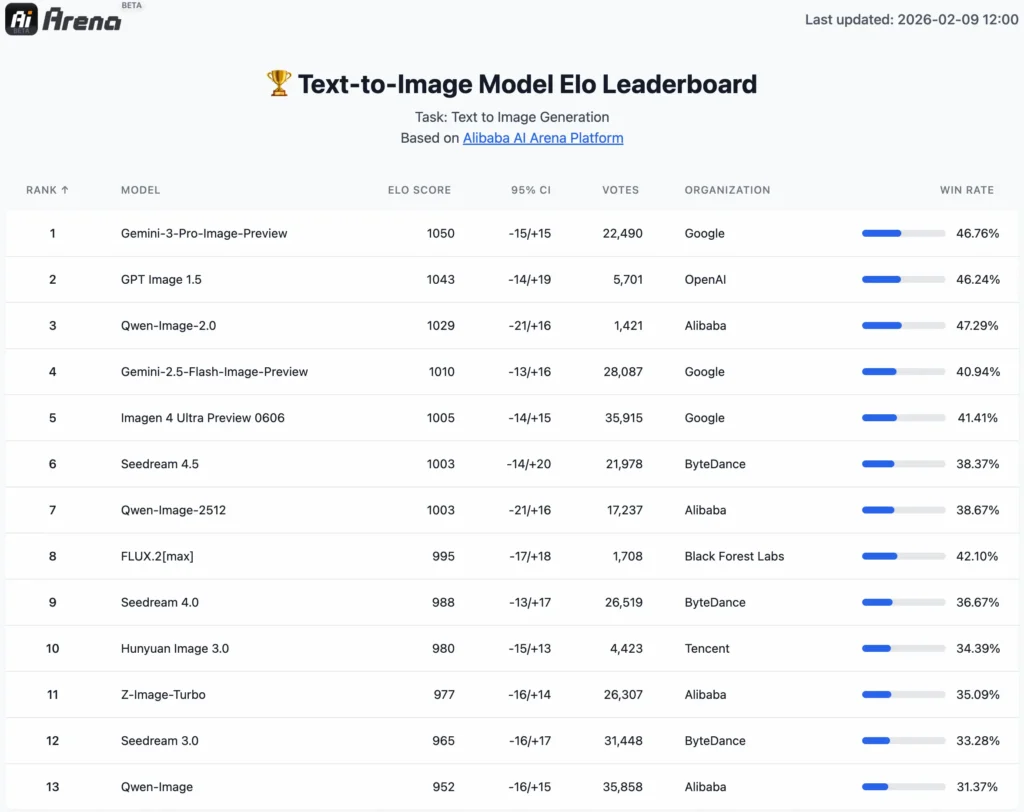
Early benchmarks suggest yes, particularly in scenarios where Flux falters, such as long-form prompts and structured visual compositions.
As we dive deeper, we’ll explore whether this model truly outshines its competitors or if it’s just another flash in the pan.
The excitement around Qwen-Image-2.0 stems from its evolution from earlier Qwen iterations. Building on the foundation of Qwen-Image-2512, this version unifies image generation and editing into a single framework, eliminating the need for separate pipelines.
This unification not only streamlines workflows but also enhances consistency across tasks.
For creators frustrated with models that produce inconsistent results, Qwen-Image-2.0 offers stronger semantic adherence, meaning it better understands and follows user prompts without veering off course.
Its support for 1,000-token prompts allows for detailed, narrative-driven instructions, enabling outputs like elaborate infographics or sequential comics that Flux often mangles due to prompt length limitations.
In practical terms, the model’s lighter architecture facilitates faster inference compared to bulkier alternatives, though it still demands robust hardware.
Released under the Apache 2.0 license, it’s fully open-source, available on platforms like Hugging Face, GitHub, and ModelScope.
This accessibility invites developers and artists to fine-tune and integrate it into custom tools, fostering a vibrant ecosystem. However, the real question remains: in a head-to-head battle with Flux, does Qwen-Image-2.0 deliver the knockout punch? Let’s break it down.
Qwen-Image-2.0 vs. Flux: The Ultimate Text-to-Image kShowdown
When pitting Qwen-Image-2.0 against Flux, the comparison reveals stark differences in how each handles core text-to-image challenges, particularly in bilingual text rendering and complex prompt processing.
Flux, with its 12 billion parameters, has earned praise for its speed and versatility, especially in the Flux.1 Dev and Schnell variants, which excel in quick generations and stylized outputs.
However, Qwen-Image-2.0‘s 20 billion parameter MMDiT structure gives it an edge in precision, especially for tasks requiring intricate text integration.
Take bilingual text rendering, for instance. Qwen-Image-2.0 shines here, seamlessly incorporating English and Chinese scripts into images with typographic fidelity.
This is crucial for global creators producing multilingual content, such as advertisements or educational materials. In tests, Qwen generates clean, legible text in diverse fonts and layouts, even in crowded scenes like posters or infographics.
Flux, while competent in English, often struggles with non-Latin scripts, resulting in garbled or misaligned Chinese characters.
This limitation stems from Flux’s reliance on a CLIP + T5 text encoder, which handles long prompts but lacks the multimodal depth of Qwen’s Qwen2.5-VL integration.
As a result, Qwen produces more coherent bilingual outputs, reducing the need for post-editing.
A key fact underscoring Qwen’s superiority is its support for 1,000-token prompts, allowing users to input elaborate descriptions that Flux frequently mishandles.
For example, when tasked with creating a multi-panel comic strip depicting a historical event with detailed dialogue and scene transitions, Qwen-Image-2.0 maintains narrative flow and visual consistency across panels.
Flux, limited by its prompt processing, might generate disjointed elements or ignore subtle instructions, leading to revisions. This makes Qwen particularly adept at professional workflows like designing posters, PPT slides, or comics, where structured content is paramount.
Beyond text, Qwen’s native 2K resolution enables richer details in photorealistic scenes, surpassing Flux’s standard 1024×1024 base. In realism benchmarks, Qwen edges out with better facial details, environmental contexts, and lighting nuances.
However, Flux counters with faster generation times in its Turbo LoRA variants, appealing to users prioritizing speed over depth.
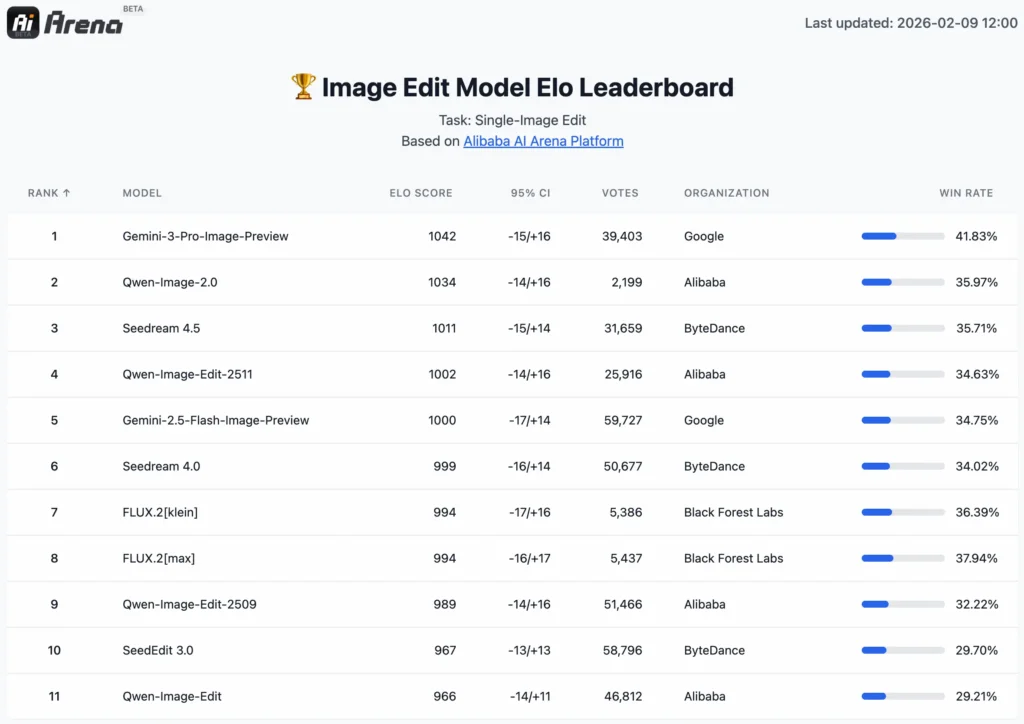
Overall, while Flux remains a solid choice for casual or rapid prototyping, Qwen-Image-2.0 emerges as the better option for high-stakes, detail-oriented projects, potentially dethroning Flux in the open-source arena.
To illustrate, consider a scenario where a designer needs a bilingual promotional poster for a tech product.
With Qwen, a prompt like “Create a vibrant poster for a new smartphone, featuring English slogan ‘Innovation in Your Hands’ and Chinese equivalent, with product images, specs list, and futuristic background” yields a polished, error-free result.

Flux might distort the Chinese text or simplify the layout, requiring manual fixes. This gap highlights Qwen’s advanced semantic understanding, derived from its unified generation-editing pipeline.
In editing tasks, Qwen’s dual-path input (visual semantics via Qwen2.5-VL and appearance control via VAE Encoder) ensures precise modifications, such as object insertion or style transfer, outperforming Flux’s sequence concatenation approach in consistency.
Real-world evaluations on benchmarks like GenEval and ImgEdit confirm Qwen’s lead, with scores indicating superior prompt adherence and output quality.
Hardware Reality Check: Can You Run It?
Running Qwen-Image-2.0 demands careful consideration of hardware, as its 20 billion parameters push the boundaries of consumer setups.
The full model in BF16 precision requires over 48GB of VRAM, placing it firmly in the realm of professional-grade GPUs like NVIDIA A100 or H100.
This high demand arises from the model’s dense architecture and high-resolution capabilities, which process vast amounts of data during inference.
For enthusiasts without enterprise hardware, this poses a significant barrier, often leading to out-of-memory errors on standard consumer cards.
Fortunately, community-driven solutions bridge this gap through GGUF quantization, which compresses the model while preserving much of its performance.
These quantized versions reduce VRAM usage dramatically, making Qwen-Image-2.0 accessible on everyday GPUs.
For an RTX 4060 with 8GB VRAM, opt for Q3_K_M or Q4_0 quantizations, these strike a balance between quality and efficiency, allowing generations in around 10-15 seconds per image at lower resolutions.
Users report minimal degradation in text rendering, though fine details in complex scenes might soften slightly.
Stepping up to RTX 3090 or 4090 with 24GB VRAM, FP8 quantization emerges as the sweet spot. This level enables 5-second generations at native 2K, retaining the model’s sharpness and prompt fidelity.
Tools like DiffSynth-Studio facilitate these quantizations, with users achieving near-full precision outputs. For even better optimization, integrate vLLM-Omni for parallel processing or LightX2V for up to 42x speedups across various hardware.
In practice, testing on a 4090 with FP8 yields stunning results for workflows like comic creation, where rapid iterations are key. However, monitor temperature and power draw, as intensive sessions can strain systems. If local hardware falls short, cloud options like AWS or Google Colab provide scalable access, though at a cost of $1-2 per hour for suitable instances.
Troubleshooting the ComfyUI Setup: Fixing “Missing Models”
Setting up Qwen-Image-2.0 in ComfyUI can be straightforward, but common pitfalls often derail newcomers, leading to frustrating errors like the infamous “Red Node” issue. This typically occurs when users overlook updating the Diffusers library or run an outdated ComfyUI version.
To resolve, always install the latest Diffusers via pip install git+https://github.com/huggingface/diffusers, ensuring compatibility with Qwen’s MMDiT requirements. Additionally, verify that Transformers is at least version 4.51.3 to support Qwen2.5-VL.
Another frequent headache is “Missing Models” errors during workflow loading. This stems from incomplete downloads from Hugging Face—double-check that all components, including the VAE and text encoders, are in the correct directories.
If black images appear, it’s often due to mismatched quantizations; switch to a supported level like Q8 for higher fidelity testing.
Users also encounter “seed rigidity,” where outputs show low variation despite changing seeds. This can stem from over-optimized prompts or default CFG scales.
To fix, adjust the CFG scale to 7-10 and incorporate prompt weighting techniques, such as emphasizing key elements with (important:1.2). This breaks the rigidity loop, introducing more diversity without sacrificing quality.
For seamless integration, leverage community workflows from ComfyUI repositories, which include pre-configured nodes for prompt enhancement using DASHSCOPE_API_KEY. If issues persist, enable verbose logging in ComfyUI to pinpoint mismatches.
Developer Choice: Self-Hosting vs. DashScope API
For developers, choosing between self-hosting Qwen-Image-2.0 and Alibaba’s DashScope API hinges on scale, cost, and control. Self-hosting offers full customization, ideal for integrating into apps via Diffusers or Gradio interfaces.
However, it requires substantial infrastructure—cloud options like AWS EC2 with A100 instances cost $3-5 per hour, escalating for production loads. Quantized versions mitigate this, but ongoing maintenance for updates adds overhead.
In contrast, DashScope API provides a hassle-free alternative with pay-per-use pricing, starting at $0.01 per 1,000 tokens for generation tasks.
This scales efficiently for commercial apps, handling high traffic without local hardware worries. While API limits flexibility in fine-tuning, it excels in reliability and multilingual support, making it preferable for enterprise deployments.
Ultimately, self-hosting suits innovators needing tweaks, while DashScope favors rapid prototyping and cost efficiency.