


Zelili AI

Bing Image Creator

Free AI Image Generator Powered by DALL·E 3 and GPT-4o – Create Stunning Visuals from Text in Seconds
Tool Release Date

Mar 2023

Tool Users
200 Million
0.0
👁 134

About This AI

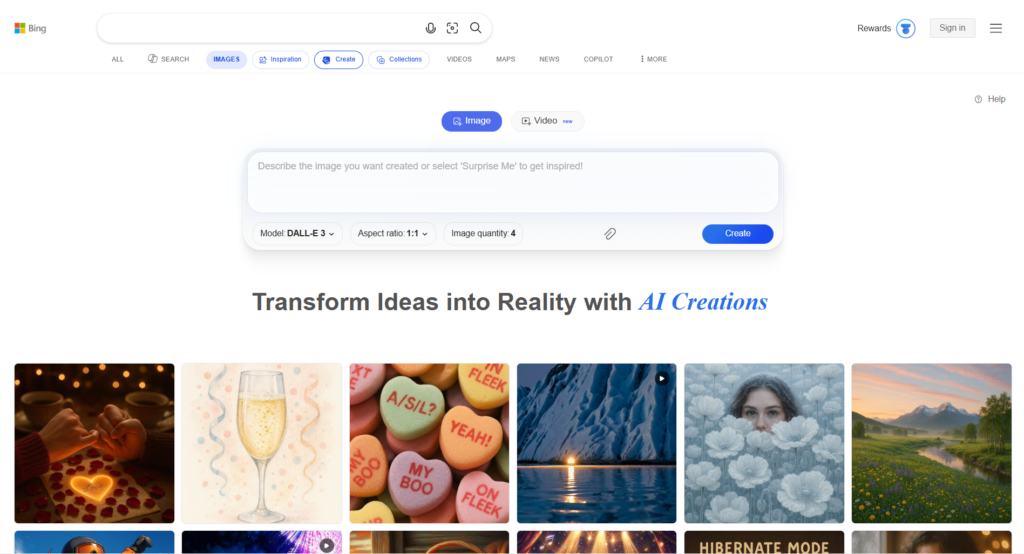
Bing Image Creator is Microsoft’s free, web-based AI-powered tool that transforms text prompts into high-quality images instantly.

Accessible at bing.com/images/create, it leverages advanced models including DALL·E 3 and GPT-4o (with options like MAI-Image-1 in some cases) to generate lifelike photos, artistic illustrations, creative designs, and more from simple descriptions.

Users sign in with a Microsoft account to start creating, with features like aspect ratio selection, style choices, and the ability to refine or regenerate variations.

It supports fast generations (using boosts) and unlimited standard-speed creations, making it accessible for casual users, content creators, educators, and designers.

The tool includes safeguards for content moderation, preventing inappropriate or harmful outputs while allowing broad creative freedom.

Integrated seamlessly with Microsoft ecosystem tools like Copilot and Designer, it offers a straightforward interface for quick ideation and visual content production.

As of 2026, it remains one of the most popular free text-to-image generators, benefiting from ongoing model improvements and Microsoft Rewards integration for extra fast boosts.

Perfect for social media graphics, blog visuals, educational materials, marketing assets, or fun personal projects, Bing Image Creator delivers reliable, high-quality AI art without subscriptions for core use.

Key Features

  1. Text-to-image generation: Turn detailed prompts into custom images using DALL·E 3, GPT-4o, or other leading models
  2. Multiple model selection: Choose between DALL·E 3 for photorealism, GPT-4o for creative versatility, and others like MAI-Image-1
  3. Fast and standard speeds: Fast generations use boosts (limited daily free), standard are unlimited and free
  4. Aspect ratio customization: Select square, landscape, portrait, or custom ratios for different uses
  5. Style and mood options: Apply artistic styles, lighting, or themes directly in prompts or interface
  6. Image variations and regeneration: Generate multiple options from one prompt and refine or upscale favorites
  7. Microsoft Rewards integration: Earn points to unlock extra fast boosts beyond daily free allowance
  8. Content safety filters: Built-in moderation to block harmful, explicit, or copyrighted content
  9. Seamless Copilot/Designer integration: Use generated images in Microsoft tools for editing or further creation
  10. Upload reference images: In some modes, use uploaded photos as inspiration or for editing/guidance

Price Plans

  1. Free ($0): Unlimited standard-speed image generations, 15 daily fast boosts (resets daily), full access to models like DALL·E 3 and GPT-4o, no subscription needed
  2. Microsoft Rewards Boosts (Points-based): Earn or spend Rewards points for additional fast generations beyond daily limit (typically 10 points per extra boost)
  3. Copilot Pro / Microsoft 365 (Paid tiers, ~$20/Month+): Higher priority access, more boosts in integrated tools, advanced editing in Designer (not direct to Image Creator but enhances workflow)

Pros

  1. Completely free core access: Unlimited standard-speed generations with no subscription required
  2. High-quality outputs: Powered by top models like DALL·E 3 and GPT-4o for realistic and creative results
  3. Easy to use interface: Simple prompt entry with preview, variations, and quick downloads
  4. Daily free fast boosts: 15 fast generations per day (resets daily) for quicker results
  5. Strong content moderation balance: Allows broad creativity while preventing misuse
  6. Microsoft ecosystem synergy: Works well with Edge, Copilot, Designer for seamless workflows
  7. Frequent model updates: Benefits from Microsoft's ongoing improvements and OpenAI partnership
  8. No watermarks on downloads: Clean images ready for personal or commercial use (per terms)

Cons

  1. Limited daily fast boosts: Only 15 free fast generations per day; extras require Rewards points
  2. Web-only access: No dedicated mobile app, though works in mobile browsers
  3. Occasional quality variability: Model rollouts or updates can temporarily affect consistency
  4. Strict content policies: Blocks celebrity likenesses, violence, or certain sensitive topics
  5. Requires Microsoft account: Sign-in needed for full use and boosts tracking
  6. Slower standard speed: Unlimited but takes longer than boosted generations
  7. Regional restrictions: Not available in some countries like China or Russia

Use Cases

  1. Social media content: Create eye-catching posts, thumbnails, memes, or Reels visuals
  2. Blog and website graphics: Generate custom illustrations, headers, or featured images
  3. Educational materials: Produce diagrams, historical scenes, or concept visuals for teaching
  4. Marketing and advertising: Design product mockups, banners, or campaign creatives
  5. Personal projects: Make custom art, avatars, wallpapers, or gift ideas
  6. Brainstorming ideas: Visualize concepts quickly during creative sessions
  7. Prototyping designs: Mock up logos, UI elements, or packaging concepts

Target Audience

  1. Content creators and social media users: Needing quick visuals for posts and stories
  2. Bloggers and web publishers: Looking for free custom images without stock photo costs
  3. Students and educators: Creating visual aids for lessons or assignments
  4. Marketers and small businesses: Producing promotional graphics affordably
  5. Casual hobbyists: Experimenting with AI art for fun or personal use
  6. Designers on a budget: Using it for inspiration or rapid prototyping

How To Use

  1. Visit the site: Go to https://www.bing.com/images/create in any browser
  2. Sign in: Use or create a Microsoft account to access boosts and save creations
  3. Enter prompt: Type a detailed description of the image you want (e.g., 'cyberpunk city at night with neon lights')
  4. Customize options: Select aspect ratio, style if available, or choose model (DALL·E 3/GPT-4o)
  5. Generate: Click Create; choose fast (uses boost) or standard speed
  6. Review and refine: View results, generate variations, download favorites, or regenerate
  7. Manage boosts: Check daily fast boosts at top; earn more via Microsoft Rewards

How we rated Bing Image Creator

  • Performance: 4.4/5
  • Accuracy: 4.5/5
  • Features: 4.3/5
  • Cost-Efficiency: 5.0/5
  • Ease of Use: 4.8/5
  • Customization: 4.2/5
  • Data Privacy: 4.4/5
  • Support: 4.3/5
  • Integration: 4.6/5
  • Overall Score: 4.5/5

Bing Image Creator integration with other tools

  1. Bing Chat/Copilot: Seamless prompt refinement and iterative creation within Bing ecosystem
  2. Microsoft Edge Browser: Native sidebar access and quick image generation from searches
  3. Microsoft Rewards: Earn points for boosts through daily searches, quizzes, and activities
  4. Microsoft 365 Apps: Insert generated images directly into Word, PowerPoint, or Teams
  5. Windows Copilot: Potential integration for desktop AI image requests in future updates

Best prompts optimised for Bing Image Creator

  1. A futuristic cyberpunk city at night, neon lights reflecting on wet streets, flying cars in the sky, dramatic rain, high detail, cinematic lighting, 8k resolution
  2. Photorealistic portrait of a majestic lion in golden hour savanna, intense eyes, detailed fur texture, shallow depth of field, professional wildlife photography style
  3. Surreal dreamscape with floating islands, waterfalls cascading into the void, vibrant colors, ethereal mist, fantasy digital art, ultra detailed
  4. Vintage 1950s diner interior at dusk, neon signs glowing, classic cars outside window, warm retro lighting, nostalgic atmosphere, photorealistic
  5. Elegant minimalist logo design for a tech company, geometric shapes in blue and silver, modern flat style, high contrast, vector art quality
Bing Image Creator remains one of the best free text-to-image tools in 2026, combining powerful models like DALL·E 3 and GPT-4o with an easy interface and generous unlimited standard generations. The daily fast boosts provide quick results for most users, while Rewards integration offers a smart way to extend capacity without paying directly. It excels at high-quality, safe outputs ideal for everyday creative needs, though heavy users may hit limits on speed. For anyone wanting professional-grade AI images without subscriptions, it’s a top recommendation, especially when integrated with Microsoft’s broader tools.

FAQs

  • What is Bing Image Creator?

    Bing Image Creator is Microsoft’s free AI tool at bing.com/images/create that generates high-quality images from text prompts using models like DALL·E 3 and GPT-4o.

  • Is Bing Image Creator free?

    Yes, it’s completely free with unlimited standard-speed generations and 15 daily fast boosts; extra fast generations use Microsoft Rewards points.

  • What models does Bing Image Creator use?

    It supports DALL·E 3 for photorealistic results, GPT-4o for creative versatility, and sometimes MAI-Image-1 or other options depending on updates.

  • How many images can I generate for free per day?

    Unlimited at standard speed; 15 fast (quick) generations per day with boosts that reset daily.

  • Do I need a Microsoft account for Bing Image Creator?

    Yes, sign in with a Microsoft account to use it fully, track boosts, and save/download images.

  • Can Bing Image Creator generate images from photos?

    It primarily uses text prompts but supports image uploads as references or for editing in some integrated modes.

  • Is Bing Image Creator available worldwide?

    Available globally except in restricted regions like China and Russia; requires a personal Microsoft account (not work/school Entra ID).

  • How does Bing Image Creator compare to other AI image generators?

    It stands out for being free with unlimited slow generations, strong model options, and Microsoft integration, though paid tools like Midjourney offer more advanced controls.


Newly Added Tools​

Qwen-Image-2.0

$0/Month

Qodo AI

$0/Month

Codiga

$10/Month

Tabnine

$59/Month
Bing Image Creator Alternatives

Qwen-Image-2.0

$0/Month

GLM-OCR

$0/Month

Lummi AI

$10/Month

Bing Image Creator Reviews

0.0
0.0 out of 5 stars (based on 0 reviews)
Excellent0%
Very good0%
Average0%
Poor0%
Terrible0%

There are no reviews yet. Be the first one to write one.