
What is ByteCap?
ByteCap is an AI video editor for creating viral shorts on TikTok, Instagram Reels, and YouTube Shorts, with auto captions, B-roll, magic clips, subtitles, and thumbnail generation.
Is ByteCap free to use?
Yes, it has a Free Forever plan with no credit card required and basic features; paid plans start around $14/month for more credits, unlimited use, and advanced options like 4K exports.
What are ByteCap’s main features?
Key features include customizable AI captions (99% accurate), auto B-roll insertion, smart subtitles in 40+ languages, Magic Clips for viral highlights, face tracking, one-click edits, and AI thumbnail generator.
How does ByteCap work?
Paste a YouTube/TikTok link or upload video; AI analyzes and generates captions, B-roll, clips, subtitles, and thumbnails automatically; customize and export or publish directly.
Who is ByteCap best for?
Content creators, social media marketers, podcasters, gamers, and businesses producing short-form videos for TikTok, Reels, Shorts, or faceless channels.
Does ByteCap support multiple languages?
Yes, smart subtitles and captions work in over 40 languages with animated effects and emoji placement.
Can I use ByteCap for commercial purposes?
Yes, paid plans support commercial use with higher resolutions, unlimited credits, and professional features; free tier may have restrictions.
What platforms does ByteCap integrate with?
It syncs with TikTok, Instagram, YouTube for import/export/publishing, plus supports general video workflows.

ByteCap

About This AI
ByteCap is an all-in-one AI video editing platform optimized for creating engaging short-form content for TikTok, Instagram Reels, and YouTube Shorts.
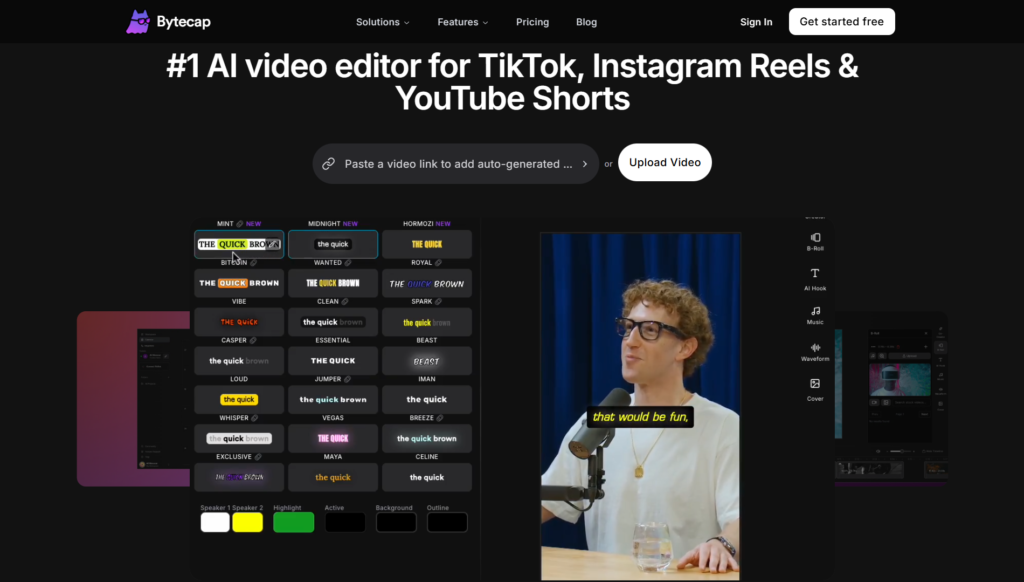
It transforms raw videos or links into polished, viral-ready clips with features like 99% accurate customizable AI captions, automatic B-roll insertion (stock footage, transitions, sound effects), smart subtitles in over 40 languages with animated effects and emoji placement, and Magic Clips that detect viral moments using face tracking and genre logic.
Additional capabilities include universal clipping from podcasts/gaming (visual analysis without dialogue), dynamic face tracking for reframing, one-click smart edits (remove fillers/silences, add zooms), Automation Hub for platform syncing/import/publishing, and an AI Thumbnail Generator that creates high-CTR designs in styles like Viral Beast or Mobile 9:16.
Users can paste YouTube/TikTok links for instant viral clip extraction or upload videos to generate faceless AI videos with voiceovers from prompts.
The tool emphasizes speed (under 60 seconds for thumbnails/clips) and customization for retention and accessibility, targeting creators and businesses.
It offers a Free Forever plan with no credit card required, plus paid tiers for unlimited credits, higher resolutions, advanced features, and commercial use.
Trusted by thousands of creators worldwide, ByteCap streamlines short-video production from raw content to multi-platform masterpieces.
Key Features
- Customizable AI Captions: 99% accurate word-level captions with 20+ viral templates, auto-highlight keywords, and full styling control
- Auto B-Roll Insertion: Adds contextual stock footage, transitions, and sound effects based on key moments
- Smart Subtitles: Animated captions in 40+ languages with automated emoji placement and timing
- Magic Clips: Detects viral peaks using face tracking and genre logic for optimal reframing
- Universal Clipping: Creates highlights from podcasts, gaming, or non-verbal content via visual analysis
- Face Tracking and Reframing: Dynamic centering of speakers, handles multi-guest layouts
- Smart Editing Tools: One-click removal of filler words/silences, auto zooms for engagement
- Automation Hub: Syncs platforms for import, AI editing, and cross-publishing
- AI Thumbnail Generator: Creates CTR-optimized thumbnails in various styles from video frames or links
- Faceless Video Generation: Produces AI videos with voiceovers from text prompts or uploads
Price Plans
- Free Forever ($0): Basic access to core features with credit limits; no credit card required
- Lite/Creator ($14/Month or discounted annual): 100 credits/month or 3600/year, more tools and higher limits
- Pro/Business (Higher tiers ~$35+/Month): Unlimited credits, 4K/60FPS exports, asset library, custom fonts, advanced automation, and commercial priority
Pros
- High accuracy and customization: Excellent captions/subtitles with viral templates and multi-language support
- Time-saving automation: Auto B-roll, clips, edits, and thumbnails reduce manual work dramatically
- Versatile for shorts: Handles diverse sources like podcasts/gaming with visual intelligence
- Fast processing: Many features complete in under 60 seconds
- Free tier available: Forever free plan with no card required for basic use
- Platform-focused: Tailored for TikTok/Reels/Shorts success
- Growing adoption: Trusted by thousands of creators and businesses
Cons
- Credit limits on free: Basic plan has caps; heavy use requires paid upgrade
- Paid for full power: Higher resolutions (4K/60FPS), unlimited credits, and advanced features locked behind Pro
- Short-form focus: Less ideal for long videos or non-social content
- Potential artifacts: AI B-roll or edits may need tweaks in complex scenes
- Web-based only: No native desktop/mobile apps mentioned
- Language dependency: Best performance likely in supported languages
- Queue/wait times: Free users may experience delays during peak usage
Use Cases
- Social media content creation: Turn long videos into viral shorts with captions and B-roll
- Marketing and ads: Generate product demos, explainer clips, or promo shorts quickly
- Podcast to video: Clip highlights from audio-only content with visual enhancements
- Gaming highlights: Create engaging clips from gameplay without dialogue reliance
- Faceless YouTube/TikTok channels: Produce AI-voiced videos from prompts
- Thumbnail optimization: Design high-CTR thumbnails for better click-through
- Cross-platform publishing: Automate editing and posting across social channels
Target Audience
- Content creators and influencers: Making TikTok/Reels/Shorts efficiently
- Marketers and businesses: Producing promotional shorts and ads
- Podcasters and streamers: Repurposing content into visual clips
- Gamers and YouTubers: Clipping highlights with captions and effects
- Faceless channel operators: Generating AI-driven videos from text
- Social media managers: Automating bulk short-form production
How To Use
- Sign up: Visit bytecap.io and start with Free Forever plan (no card needed)
- Input content: Paste YouTube/TikTok link for viral clip extraction or upload video
- Auto-process: Let AI generate captions, B-roll, subtitles, and clips automatically
- Customize: Edit captions, adjust styles, add/remove elements, or tweak thumbnails
- Generate thumbnails: Use AI tool to create optimized designs from frames
- Export and publish: Download or sync to platforms via Automation Hub
- Upgrade if needed: Move to paid for unlimited credits and advanced features
How we rated ByteCap
- Performance: 4.6/5
- Accuracy: 4.7/5
- Features: 4.8/5
- Cost-Efficiency: 4.5/5
- Ease of Use: 4.8/5
- Customization: 4.7/5
- Data Privacy: 4.4/5
- Support: 4.3/5
- Integration: 4.5/5
- Overall Score: 4.6/5
ByteCap integration with other tools
- Platform Sync: Automation Hub connects to TikTok, Instagram, YouTube for import, editing, and direct publishing
- Video Sources: Supports YouTube/TikTok links and uploads for clip extraction
- Social Media: Optimized exports and auto-posting for short-form platforms
- Content Tools: Compatible with editing workflows for further refinement in external software
- Browser-Based: Works seamlessly in web browsers with no additional installs
Best prompts optimised for ByteCap
- Create a viral TikTok short from this podcast episode [upload/link], add engaging B-roll of related visuals, animated captions with emojis, and auto zooms on key moments
- Generate faceless motivational video from this script: [insert text], use inspirational stock footage, calm AI voiceover, and dynamic captions in blue theme
- Extract top 3 highlights from this gaming stream [link], add face tracking reframing, funny subtitles, and gaming-style thumbnails
- Turn this product demo video into Reels-ready clips with auto captions highlighting benefits, transitions, and upbeat music effects
- Produce YouTube Shorts from webinar recording [upload], focus on key tips with animated text overlays and professional B-roll insertions
FAQs
Newly Added Tools







About Author