



Zelili AI

Cabina AI

All-in-One AI Workspace – Chat with Multiple LLMs, Generate Text Image Video Audio in One Platform
Tool Release Date

Sep 2024

Tool Users
N/A
0.0
๐Ÿ‘ 56

About This AI

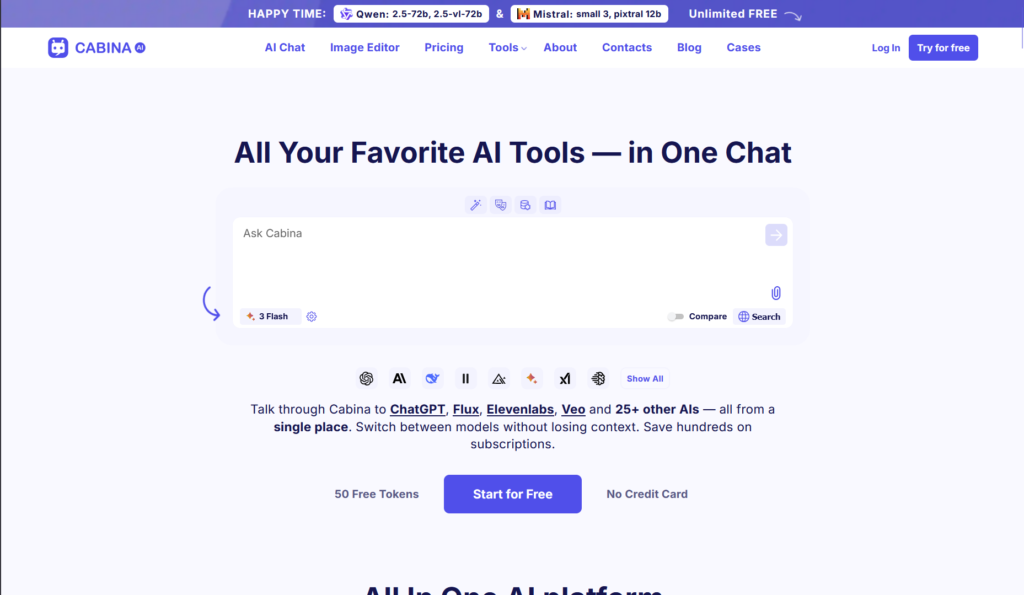
Cabina AI is a universal AI assistant platform that combines multiple leading AI models and tools into a single chat workspace for efficient content creation.

Users can interact with various LLMs (like ChatGPT, Claude, Gemini, Grok, Llama, Mistral, Qwen, DeepSeek) in one conversation, compare responses from different models/versions, retain shared context, and generate text, images, videos, audio, and more without switching apps.

Key capabilities include real-time multi-model chatting, image generation (text-to-image, img2img, ultra-realistic with Flux, Stable Diffusion, Ideogram), video creation (via Runway, Luma, Pika, Hailuo Minimax), audio transcription (Whisper for mp3/m4a/Zoom files), file chatting (PDFs, images, videos), summarization, translation, text humanization, prompt/hashtag creation, AI tables/charts from data, RAG for large files, image editing (edit/expand/variations), and customizable agents/roles for tasks like marketing or SMM.

Features organized chats with folders/labels, custom shareable actions, and integrations to streamline workflows.

Founded by a Ukrainian team of three founders and eight AI innovators in 2024, it offers a free tier with tokens (50 initial plus daily), pay-as-you-go from $3, and subscriptions starting at $4.99/month (up to $99.99/month) with annual discounts up to 30%.

Designed for productivity, it helps users save on separate subscriptions, create content faster (3-10 results per prompt), and boost efficiency in content generation, marketing, consulting, and creative work.

Key Features

  1. Multi-LLM Chat: Interact with multiple models (ChatGPT, Claude, Gemini, Grok, Mistral, Qwen, Llama) in one window with shared context
  2. Response Comparison: Get and compare outputs from different LLMs or versions simultaneously
  3. Image Generation: Text-to-image, image-to-image, ultra-realistic photos with models like Flux, Stable Diffusion, Ideogram
  4. Video Generation: Create videos from text or images using Runway, Luma, Pika, Hailuo Minimax
  5. Audio Transcription: One-click transcription of audio files (mp3, m4a, Zoom) via Whisper
  6. File Chatting and RAG: Upload PDFs, images, videos, or multiple files for AI analysis and conversation
  7. Text Tools: Summarize, translate, explain, humanize text, create posts, prompts, hashtags
  8. Image Editing: Edit, expand, generate variations, turn sketches to images
  9. Custom Agents/Roles: Create personalized AI assistants for specific tasks (marketing, SMM, consulting)
  10. Organized Chats: Folders, labels, search for managing conversations and projects

Price Plans

  1. Free ($0): 50 initial tokens plus daily credits, access to core models (Qwen/Mistral unlimited free in some cases), basic features with usage limits
  2. Pay-As-You-Go (from $3): Buy tokens as needed (e.g., $3 for 249 tokens, $20 for 1800), full features without subscription
  3. Subscriptions (from $4.99/Month): Starter $4.99 (450 tokens), higher tiers $9.99, $19.99, $99.99/month with more tokens, priority support, unlimited access; annual from $4.72/month discounted

Pros

  1. Cost savings: Access many premium AIs in one place instead of multiple subscriptions
  2. Productivity boost: Compare responses, get multiple results per prompt, retain context
  3. Versatile content creation: Text, image, video, audio generation and editing all in one
  4. Free entry point: Generous free tokens and daily credits to start without payment
  5. Flexible pricing: Pay-as-you-go or subscriptions with annual discounts up to 30%
  6. Customizable: Build agents, organize chats, and create shareable actions
  7. Multimodal support: Handles files, RAG, and various generation types seamlessly

Cons

  1. Token-based limits: Free and lower plans cap usage; heavy users need higher tiers
  2. Learning curve: Managing multiple models and tools may overwhelm beginners
  3. Variable quality: Depends on underlying models; some outputs may need refinement
  4. No native apps: Primarily web-based; no dedicated mobile/desktop mentioned
  5. Recent launch: Some features/models still evolving or in development
  6. Token confusion: Pricing via tokens may be less transparent than flat rates
  7. Limited stats: No public user numbers or widespread reviews yet

Use Cases

  1. Content creation: Generate text posts, images, videos for social media or marketing
  2. Research and comparison: Ask complex questions and compare answers from different LLMs
  3. Productivity workflows: Transcribe audio, summarize files, create to-dos or plans
  4. Creative brainstorming: Use custom agents for ideas in writing, design, or consulting
  5. Multilingual tasks: Translate, explain, or generate content across languages
  6. Business consulting: Analyze data, create charts/tables, humanize reports
  7. Personal projects: Edit images, generate art, or chat with specialized roles

Target Audience

  1. Content creators and marketers: Needing fast multi-modal generation and comparisons
  2. Professionals and consultants: Using AI for research, summaries, and productivity
  3. Developers and AI enthusiasts: Experimenting with multiple models in one place
  4. Small businesses: Saving on separate AI subscriptions while accessing premium tools
  5. Casual users: Starting free to generate text/images/videos without commitments
  6. Teams: Collaborating on organized chats and custom agents

How To Use

  1. Sign up: Visit cabina.ai and create free account (50 tokens awarded)
  2. Start chat: Type prompt in main workspace to query multiple AIs at once
  3. Select models: Choose or compare LLMs (GPT, Claude, Gemini, etc.) for responses
  4. Generate media: Use image/video/audio tools via prompts or file uploads
  5. Organize: Create folders/labels for chats, add custom actions/roles
  6. Upgrade if needed: Buy tokens or subscribe for more usage and priority
  7. Export/share: Download results or share custom agents/actions

How we rated Cabina AI

  • Performance: 4.5/5
  • Accuracy: 4.4/5
  • Features: 4.7/5
  • Cost-Efficiency: 4.6/5
  • Ease of Use: 4.6/5
  • Customization: 4.5/5
  • Data Privacy: 4.4/5
  • Support: 4.3/5
  • Integration: 4.7/5
  • Overall Score: 4.6/5

Cabina AI integration with other tools

  1. Multiple LLM Providers: Built-in access to OpenAI, Anthropic, Google, Meta, xAI, Mistral, DeepSeek, Qwen and more in one interface
  2. Image/Video Tools: Integrates Flux, Stable Diffusion, Ideogram, Runway, Luma, Pika, Hailuo Minimax for generation
  3. Audio Processing: Whisper integration for transcription and audio tools
  4. File Support: Handles PDFs, images, videos, audio for RAG and chatting
  5. Custom Actions: Shareable user-created tools and agents for extended functionality

Best prompts optimised for Cabina AI

  1. Compare answers from GPT-4o, Claude 3.5, Gemini 1.5 Pro, and Grok on the topic of AI ethics in 2026, provide pros/cons for each
  2. Generate 4 ultra-realistic product photos of a wireless earbuds case in different colors using Flux, high detail 8k, studio lighting
  3. Transcribe this uploaded Zoom meeting audio and create a concise summary with action items and follow-ups
  4. Create a short promotional video script for a fitness app launch, then generate a 5-second teaser clip using Runway
  5. Humanize this formal business email draft to make it warmer and more engaging while keeping professional tone
Cabina AI offers a convenient all-in-one workspace to access and compare multiple top LLMs plus image/video/audio tools in a single chat, saving on separate subscriptions. The free tier with tokens lets users start easily, while paid plans from $4.99/month unlock more power for content creators and professionals. Great for productivity and multi-model experimentation, though token system may feel limiting for heavy use.

FAQs

  • What is Cabina AI?

    Cabina AI is an all-in-one AI platform that lets users chat with multiple LLMs (ChatGPT, Claude, Gemini, Grok, etc.) in one workspace, generate text/images/videos/audio, compare responses, and access tools like transcription and editing.

  • Is Cabina AI free to use?

    Yes, it has a free plan with 50 initial tokens plus daily credits; paid options include pay-as-you-go from $3 and subscriptions starting at $4.99/month with more tokens and features.

  • What AI models does Cabina AI support?

    It integrates many top models including OpenAI (GPT), Anthropic (Claude), Google (Gemini), xAI (Grok), Meta (Llama), Mistral, Qwen, DeepSeek, plus image/video tools like Flux, Runway, Luma, Pika.

  • What are the pricing plans for Cabina AI?

    Free with limited tokens; Pay-As-You-Go from $3; subscriptions from $4.99/month (Starter) up to $99.99/month (Premium), with annual plans discounted up to 30%.

  • Who is behind Cabina AI?

    It’s developed by a Ukrainian team with three founders and eight AI innovators, focused on making multi-AI access simple and productive.

  • Can I generate images and videos with Cabina AI?

    Yes, it supports text-to-image, img2img, video generation via integrated tools (Flux, Stable Diffusion, Runway, Luma, Pika, etc.) in one platform.

  • Does Cabina AI have transcription features?

    Yes, it offers one-click audio transcription using Whisper for formats like mp3, m4a, and Zoom recordings.

  • What makes Cabina AI unique?

    It combines multiple AI models for comparison, shared context, and diverse generation (text/image/video/audio) in one workspace to save time and money.


Newly Added Toolsโ€‹

Qwen-Image-2.0

$0/Month

Qodo AI

$0/Month

Codiga

$10/Month

Tabnine

$59/Month
Cabina AI Alternatives

Cognosys AI

$0/Month

AI Perfect Assistant

$17/Month

Intern-S1-Pro

$0/Month

Cabina AI Reviews

0.0
0.0 out of 5 stars (based on 0 reviews)
Excellent0%
Very good0%
Average0%
Poor0%
Terrible0%

There are no reviews yet. Be the first one to write one.