




Zelili AI

ChatGPT Codex

OpenAI’s Advanced AI Coding Agent – Autonomous Software Engineering with Multi-Agent Tasks and GitHub Integration
Tool Release Date

16 May 2025

Tool Users
1 Million+
0.0
๐Ÿ‘ 49

About This AI

ChatGPT Codex is OpenAI’s powerful cloud-based software engineering agent integrated into ChatGPT, designed for complex, long-running coding tasks.

Powered by specialized models like codex-1 (optimized from o3/o4 series) and later GPT-5.2-Codex, it writes features, fixes bugs, runs tests iteratively, proposes pull requests, and manages parallel tasks in secure sandboxes.

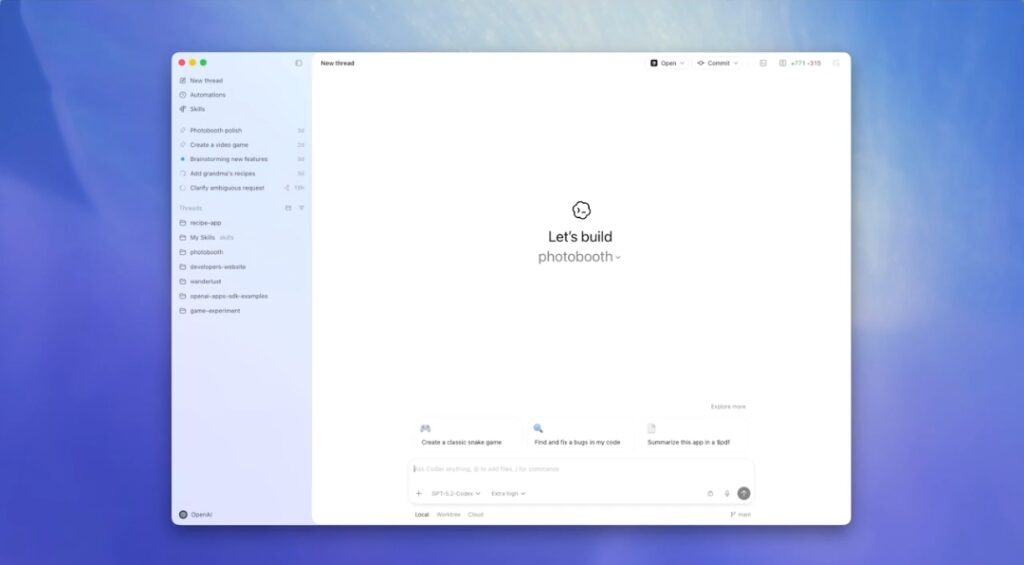
The Codex app (macOS launched February 2, 2026) serves as a command center for multi-agent orchestration, worktrees, skills (e.g., web game dev, Figma implementation, cloud deployment), automations, and customizable personalities.

It connects to GitHub repositories, supports IDE extensions, CLI, web interface, and ChatGPT iOS app for seamless workflows.

Key strengths include cleaner code mirroring human style, precise instruction adherence, verifiable logs, and skills extending beyond coding (image gen, document creation, API integration).

Released initially in May 2025 as research preview for Pro/Enterprise/Team users, expanded to Plus in June 2025, with macOS app in 2026.

Included in ChatGPT subscriptions (Plus $20/month, Pro $200/month, etc.) with generous limits initially and rate-limited access later; temporary free/Go access in some periods.

Over a million developers used it in recent months post-GPT-5.2-Codex launch, making it a leading agentic coding tool for professional development.

Key Features

  1. Multi-agent orchestration: Manage parallel agents via project threads, review diffs, comment, and resolve conflicts with worktrees
  2. Skills extension: Beyond coding - image generation, web game dev, Figma to code, project management in Linear, cloud deployment
  3. Automations: Schedule background tasks like issue triage or CI failure summaries with review queue results
  4. Personalities: Switch between terse/pragmatic or conversational/empathetic styles via commands
  5. GitHub integration: Clone repos, commit changes, open PRs, run tests in sandboxed environments
  6. Verifiable execution: Provides terminal logs, test outputs, and transparent step-by-step process
  7. IDE and CLI support: Extensions for VS Code/Neovim, Codex CLI for local harness, web sidebar in ChatGPT
  8. Secure sandboxing: Limited access with permission rules to protect codebases
  9. Long-running tasks: Handles extended workflows (e.g., full game creation with 7M tokens)
  10. Model upgrades: Powered by codex-1, GPT-5-Codex, GPT-5.2-Codex for improved reasoning and code quality

Price Plans

  1. Free/Go (Limited): Temporary access with restrictions; basic or trial use in some periods
  2. ChatGPT Plus ($20/Month): Includes Codex with generous limits, web/CLI/app access, suitable for focused sessions
  3. ChatGPT Pro ($200/Month): Expanded priority-speed access, higher usage, ideal for daily full-time development
  4. Business/Enterprise (Custom): Team features, higher limits, API priority, security controls

Pros

  1. Autonomous agentic power: Handles end-to-end tasks, parallel work, and iterations without constant supervision
  2. High code quality: Mirrors human style, adheres precisely to instructions, runs tests until passing
  3. Seamless ecosystem: Unified across ChatGPT web/app, CLI, IDE extensions, and GitHub
  4. Extended skills: Non-coding capabilities make it a full development collaborator
  5. Security focus: Sandboxing and permission controls for safe repo interactions
  6. Accessibility in plans: Included in Plus ($20/month) with generous limits, expanded from Pro/Enterprise
  7. Rapid adoption: Over a million developers used it recently, showing real-world value

Cons

  1. Paid access priority: Full features and high limits require Plus/Pro/Enterprise subscriptions
  2. Rate limits apply: Even paid tiers have caps; additional credits purchasable
  3. macOS-only app currently: Windows support planned but not yet available
  4. Potential hallucinations: Still possible in complex code or edge cases
  5. Compute-intensive: Long tasks can take minutes to hours
  6. Dependency on OpenAI: Cloud-based for most features; CLI local but limited
  7. Learning curve: Managing agents, skills, and automations requires familiarity

Use Cases

  1. Feature development: Write new code, implement specs, and submit PRs autonomously
  2. Bug fixing and refactoring: Analyze issues, propose fixes, run tests iteratively
  3. Project prototyping: Build full apps/games with multi-skill agents (code + images + deployment)
  4. Code review: Catch bugs, suggest improvements with detailed logs
  5. Automation scripting: Schedule background tasks like CI summaries or issue triage
  6. Learning and experimentation: Explore codebases, ask questions, generate examples
  7. Team collaboration: Manage parallel agents for distributed development

Target Audience

  1. Software developers: Individuals or teams needing agentic coding help
  2. Full-stack engineers: Building features across code, UI, deployment
  3. Product managers: Prototyping ideas quickly with multi-skill agents
  4. Startups and indie devs: Accelerating development without large teams
  5. Enterprise teams: Using secure, scalable agent workflows
  6. AI enthusiasts: Experimenting with frontier coding agents

How To Use

  1. Access in ChatGPT: Log into chatgpt.com, open Codex sidebar (or app on macOS)
  2. Connect repo: Link GitHub repository for agent to work on codebase
  3. Assign tasks: Describe work in natural language (e.g., 'Implement user auth feature')
  4. Review progress: Monitor threads, diffs, logs; comment or approve changes
  5. Use skills: Invoke extensions like image gen or deployment via prompts
  6. Manage agents: Create parallel agents, set personalities, schedule automations
  7. Download app: Get macOS Codex app from OpenAI site for local command center

How we rated ChatGPT Codex

  • Performance: 4.8/5
  • Accuracy: 4.7/5
  • Features: 4.9/5
  • Cost-Efficiency: 4.5/5
  • Ease of Use: 4.4/5
  • Customization: 4.6/5
  • Data Privacy: 4.5/5
  • Support: 4.4/5
  • Integration: 4.8/5
  • Overall Score: 4.7/5

ChatGPT Codex integration with other tools

  1. GitHub: Direct repo access for cloning, committing, PRs, and issue management
  2. ChatGPT Ecosystem: Seamless within web, iOS app, and macOS Codex app
  3. Codex CLI and IDE Extensions: Local terminal harness and VS Code/Neovim plugins
  4. Cloud Platforms: Skills for deployment to Cloudflare, Netlify, Render, Vercel
  5. Other Tools: Linear for project management, Figma for design-to-code, Slack for notifications

Best prompts optimised for ChatGPT Codex

  1. Implement a full user authentication system with JWT, email verification, and password reset in Node.js Express, connect to MongoDB, and create GitHub PR with tests
  2. Fix the bug in this React component causing infinite re-renders; analyze the code [paste code], suggest fixes, run tests, and commit changes
  3. Build a simple 2D voxel racing game with player controls, obstacles, scoring, using Canvas; include GPT Image for assets and deploy to Vercel
  4. Review this pull request for security vulnerabilities, performance issues, and best practices; provide detailed feedback and suggested improvements
  5. Automate issue triage in my repo: summarize new GitHub issues daily, prioritize by severity, assign labels, and notify Slack
ChatGPT Codex is a powerful agentic coding tool from OpenAI, excelling at autonomous task handling, multi-agent workflows, and GitHub integration for real development. With skills extending to non-coding areas, it’s ideal for developers and teams. Included in Plus ($20/month) and higher plans, it offers strong value for professional coding acceleration despite some limits.

FAQs

  • What is ChatGPT Codex?

    ChatGPT Codex is OpenAI’s AI coding agent that performs complex software engineering tasks autonomously, managing multi-agent workflows, code writing, testing, PRs, and more in secure sandboxes.

  • When was ChatGPT Codex released?

    Initial research preview launched May 16, 2025; expanded to Plus users June 2025; macOS Codex app introduced February 2, 2026.

  • How much does ChatGPT Codex cost?

    Included in ChatGPT subscriptions: Plus $20/month (generous limits), Pro $200/month (higher usage), Business/Enterprise custom; temporary free/Go access in some periods.

  • What are the main features of ChatGPT Codex?

    Multi-agent management, skills (coding + image gen, deployment, etc.), automations, GitHub integration, personalities, secure sandboxing, and verifiable execution logs.

  • Who can use ChatGPT Codex?

    Available to ChatGPT Plus, Pro, Business, Enterprise users; temporary access for Free/Go in limited periods; over a million developers used it recently.

  • Does ChatGPT Codex support non-coding tasks?

    Yes, through skills it handles image generation, Figma to code, project management in Linear, cloud deployment, and document creation.

  • How does Codex integrate with development tools?

    Connects to GitHub for repos/PRs, supports IDE extensions (VS Code/Neovim), Codex CLI for local, and works in ChatGPT web/app.

  • Is there a Codex app?

    Yes, macOS Codex app launched February 2, 2026, as a command center for managing agents, threads, and workflows.


Newly Added Toolsโ€‹

Qodo AI

$0/Month

Codiga

$10/Month

Tabnine

$59/Month

CodeRabbit

$0/Month
ChatGPT Codex Alternatives

Qodo AI

$0/Month

Codiga

$10/Month

Tabnine

$59/Month

ChatGPT Codex Reviews

0.0
0.0 out of 5 stars (based on 0 reviews)
Excellent0%
Very good0%
Average0%
Poor0%
Terrible0%

There are no reviews yet. Be the first one to write one.




