




Zelili AI

ChatGPT Translate

Intelligent AI Translation Tool – Natural, Context-Aware Results with Tone and Style Control Across 50+ Languages
Tool Users
850 Million+
0.0
๐Ÿ‘ 105

About This AI

ChatGPT Translate is OpenAI’s dedicated standalone web-based translation tool launched quietly on January 15, 2026, at chatgpt.com/translate.

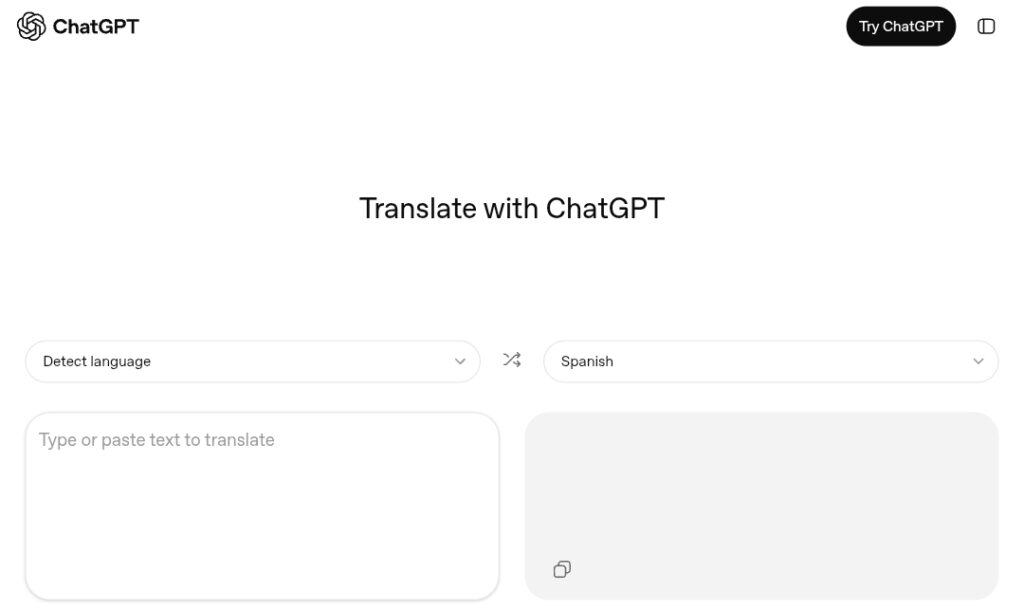
It provides a clean, dual-pane interface similar to Google Translate or DeepL, allowing users to translate text instantly while leveraging ChatGPT’s advanced AI for superior naturalness and understanding.

Powered by OpenAI’s latest models, it delivers translations that preserve context, idioms, cultural nuances, intent, and original tone far better than traditional tools.

Key highlights include automatic language detection, support for over 50 languages (with some additional unlisted ones working via model capabilities), and multimodal inputs: users can type or paste text, speak via microphone for voice translation, or upload photos of signs, menus, or documents for visual translation.

After displaying the translation, the tool offers one-click refinement options such as making it more fluent, business formal, academic, child-friendly, casual, or adapted to regional dialects.

These presets use generative AI to rewrite the output intelligently, ensuring the result fits specific audiences or purposes.

It also suggests follow-up prompts to further edit, explain, or expand the translated content directly in the main ChatGPT interface.

Completely free for basic use with no login required initially, it positions itself as a consumer-focused alternative emphasizing meaning-first translation over literal accuracy.

Perfect for travel, education, business emails, content localization, and everyday multilingual communication, ChatGPT Translate brings generative AI intelligence to practical translation needs.

Key Features

  1. Dual-pane translation layout: Familiar side-by-side source and target text boxes for quick input and output viewing
  2. Automatic language detection: Instantly identifies the source language without manual selection in most cases
  3. Support for over 50 languages: Includes major ones like English, Spanish, Chinese, Arabic, Japanese, French, German, and more, with some extras via underlying model
  4. Multimodal input options: Translate typed text, spoken voice input via microphone, or uploaded images/photos of real-world content
  5. Tone and style refinement presets: One-click buttons to rewrite translations as more fluent, business formal, academic, child-friendly, casual, or regional variants
  6. Context-aware and nuance preservation: Handles idioms, sarcasm, cultural references, and intent for highly natural-sounding results
  7. Follow-up prompt integration: Seamless links to full ChatGPT conversation for deeper editing, explanations, or repurposing of translated text
  8. Instant real-time translation: Fast processing with minimal delay even for medium-length inputs
  9. No account required for basic access: Use the standalone page immediately without signing in
  10. High performance on complex content: Excels at longer sentences, technical terms, creative phrasing, and non-literal translations

Price Plans

  1. Free ($0): Full access to standalone ChatGPT Translate interface including text, voice, image inputs, tone/style controls, and unlimited basic translations (fair usage applies)
  2. ChatGPT Plus ($20/Month): Higher rate limits, priority access, advanced models in main ChatGPT for bulk/heavy translation, and additional features like file uploads
  3. ChatGPT Pro/Enterprise (Custom): API access, volume pricing, and scalable integration for businesses needing high-volume or custom translation workflows

Pros

  1. Superior natural fluency: Produces human-like translations that read smoothly thanks to generative AI understanding
  2. Unique tone/style customization: Easy one-tap adaptations for audience-specific output unavailable in most free translators
  3. Free core functionality: No cost or subscription needed for the dedicated translation interface and refinements
  4. Multimodal versatility: Supports voice speaking and photo uploads for practical real-life use cases
  5. Strong contextual intelligence: Better at idioms, cultural adaptation, and avoiding awkward literal translations
  6. Quick and responsive interface: Clean design with fast results and intuitive refinement options
  7. Easy escalation to full ChatGPT: One-click handoff for advanced editing or creative follow-ups
  8. Ongoing improvements: Benefits from OpenAI's frequent model updates enhancing accuracy and coverage

Cons

  1. Web-only access: No native mobile or desktop app, limiting offline or on-the-go convenience
  2. Narrower language coverage: Supports 50+ languages but falls short of Google Translate's 200+
  3. No offline mode: Requires stable internet connection for all operations
  4. Potential usage limits on free tier: Heavy or very long translations may face rate limits without Plus subscription
  5. Limited enterprise features: Not optimized for high-volume, format-preserving, or professional localization workflows
  6. Occasional AI variability: Rare over-interpretation or minor inconsistencies in nuanced cases
  7. Privacy note for sensitive content: All inputs processed on OpenAI servers (check privacy policy)

Use Cases

  1. Travel assistance: Translate signs, menus, conversations, or spoken directions in foreign countries
  2. Educational purposes: Translate articles, study materials, lectures, or explain foreign concepts in native language
  3. Business communication: Convert emails, proposals, or messages to formal tone for international clients/partners
  4. Content localization: Adapt blog posts, social media captions, or marketing copy while keeping brand voice intact
  5. Research and reading: Understand foreign-language documents, news, or academic papers quickly
  6. Personal messaging: Bridge language gaps in chats, social media, or family/friend communications
  7. Creative adaptation: Translate stories, poems, or scripts with stylistic tweaks for different cultures/audiences

Target Audience

  1. International travelers and expats: For quick real-world translations of signs, speech, or documents
  2. Students and teachers: Handling multilingual study resources or teaching diverse classrooms
  3. Content creators and marketers: Producing or adapting global content with natural tone preservation
  4. Business professionals: Managing cross-border emails, contracts, or client interactions
  5. Casual everyday users: Anyone needing better nuance in free translations for personal use
  6. Language enthusiasts/learners: Comparing translations, understanding idioms, or practicing multilingual skills

How To Use

  1. Access the tool: Open any browser and visit https://chatgpt.com/translate
  2. Enter content: Type/paste text, speak into microphone for voice input, or upload photo/image of text to translate
  3. Choose languages: Select source (auto-detect usually works) and target language from dropdowns
  4. View translation: See instant result in the right-side pane
  5. Refine style: Click presets like 'more fluent', 'business formal', 'academic', 'child-friendly' to rewrite output
  6. Continue editing: Use suggested prompts or open in full ChatGPT for further adjustments/explanations
  7. Tips for best results: Add context in initial input if needed (e.g., 'translate formally for email')

How we rated ChatGPT Translate

  • Performance: 4.6/5
  • Accuracy: 4.7/5
  • Features: 4.8/5
  • Cost-Efficiency: 4.9/5
  • Ease of Use: 4.7/5
  • Customization: 4.8/5
  • Data Privacy: 4.5/5
  • Support: 4.4/5
  • Integration: 4.6/5
  • Overall Score: 4.7/5

ChatGPT Translate integration with other tools

  1. Main ChatGPT App: Seamless handoff to full ChatGPT conversation for further editing, explanations, or expansions
  2. OpenAI API: Developer access for custom translation apps or bulk processing workflows
  3. Browser Extensions: Potential compatibility with tools like Immersive Translate or similar that leverage ChatGPT
  4. Third-Party Platforms: Export translated text for use in Google Docs, Microsoft Word, or content management systems
  5. Social/Communication Apps: Copy-paste translated output into WhatsApp, email clients, or social media directly

Best prompts optimised for ChatGPT Translate

  1. Translate the following text from English to Spanish for a formal business email, maintaining professional tone and polite phrasing: [insert text here]
  2. Translate this casual social media post from French to English, making it sound natural and engaging for young audiences: [insert text]
  3. Translate the attached image of a menu from Japanese to English, focusing on accurate food names and descriptions, child-friendly if possible
  4. Translate this technical document excerpt from German to English using precise academic terminology and structure: [insert text]
  5. Translate the following paragraph from Chinese to English in a conversational style suitable for a travel blog: [insert text]
ChatGPT Translate stands out as a smart, free upgrade over traditional translators like Google Translate, thanks to its exceptional natural fluency, contextual understanding, and effortless tone/style adjustments. The one-click refinements make it incredibly useful for situations where nuance mattersโ€”business, education, creative work, or travel. While it lacks a mobile app, offline support, and broader language coverage, its generative AI edge delivers more human-like results that feel thoughtful rather than mechanical. For most everyday and professional translation needs, it’s a highly recommended free tool that brings real intelligence to language conversion.

FAQs

  • What is ChatGPT Translate?

    ChatGPT Translate is OpenAI’s standalone web tool launched January 15, 2026, offering fast, context-aware translation across 50+ languages with built-in tone and style customization.

  • Is ChatGPT Translate completely free?

    Yes, the dedicated tool at chatgpt.com/translate is free to use with no login required for basic translations, voice, and image inputs, higher limits come with ChatGPT Plus.

  • How many languages does ChatGPT Translate support?

    It officially supports over 50 languages including major global ones like English, Spanish, Chinese, Arabic, Japanese, and French, plus some additional ones handled by the model.

  • What makes ChatGPT Translate better than Google Translate?

    It excels at natural, human-like output, preserves idioms and cultural context, and lets you instantly refine translations for tone (formal, casual, academic, child-friendly) via one-click options.

  • Does ChatGPT Translate support voice or image translation?

    Yes, you can speak directly into the tool for voice translation or upload photos (e.g., signs, menus, documents) for visual text translation.

  • Can I adjust the translation style after it’s done?

    Absolutely, after translation, click presets like ‘make it more fluent’, ‘business formal’, ‘academic’, or ‘explain to a child’ to rewrite intelligently.

  • What are the main limitations of ChatGPT Translate?

    It’s currently web-only (no app), has fewer languages than Google Translate (50+ vs 200+), requires internet, and may have fair-usage limits on very heavy free use.


Newly Added Toolsโ€‹

Qodo AI

$0/Month

Codiga

$10/Month

Tabnine

$59/Month

CodeRabbit

$0/Month
ChatGPT Translate Alternatives

Cognosys AI

$0/Month

AI Perfect Assistant

$17/Month

Intern-S1-Pro

$0/Month

ChatGPT Translate Reviews

0.0
0.0 out of 5 stars (based on 0 reviews)
Excellent0%
Very good0%
Average0%
Poor0%
Terrible0%

There are no reviews yet. Be the first one to write one.