
What is Claude?
Claude is Anthropic’s advanced AI assistant family, with latest Claude 4.5 models (Opus, Sonnet, Haiku) for reasoning, coding, analysis, and creative work via claude.ai.
How many users does Claude have?
Claude has approximately 30 Million+ monthly active users worldwide as of mid-2025 to early 2026 estimates, with strong growth in website and app access.
Is Claude free to use?
Yes, free tier offers basic access with limits; Pro starts at $20/month for higher usage, advanced models, Artifacts, Projects, and priority features.
What are the latest Claude models?
Claude 4.5 series: Opus 4.5 (most capable), Sonnet 4.5 (versatile), Haiku 4.5 (fastest), released progressively through 2025.
What makes Claude different from ChatGPT?
Claude emphasizes safety, constitutional AI, reduced hallucinations, strong reasoning, Artifacts for interactive outputs, and enterprise reliability.
Does Claude support image analysis?
Yes, upload images/documents for analysis, insights, and generation support in chats (multimodal capabilities in 4.5 models).
What integrations does Claude offer?
Google Workspace (Drive/Docs/Gmail), Claude Code for development, API for custom tools, and compatibility with automation platforms.
Is Claude suitable for teams?
Yes, Team plan ($25–$30/user/month) provides collaborative Projects, shared knowledge, admin controls, and enterprise security features.

Claude

About This AI
Claude is Anthropic’s family of large language models, with the latest Claude 4.5 series (Opus 4.5, Sonnet 4.5, Haiku 4.5) delivering exceptional intelligence for complex tasks, deep research, coding, analysis, and creative work.
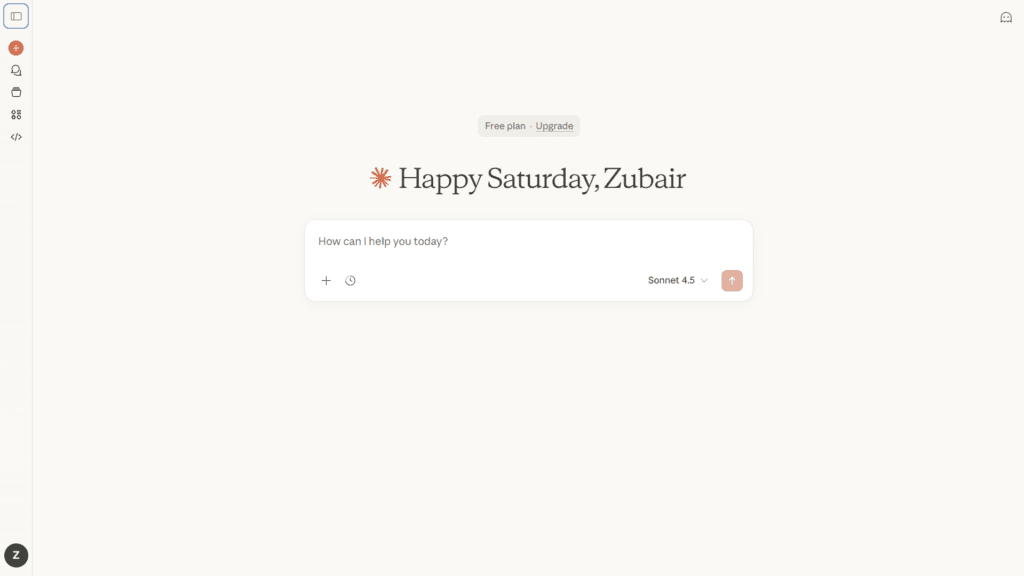
Available via claude.ai (web, iOS/Android apps), it features Artifacts for interactive previews (websites, code, graphics), extended thinking for step-by-step reasoning, Projects for organizing knowledge, web search integration, Google Workspace tools, Claude Code collaboration, and image/text analysis.
Claude 4.5 models excel in benchmarks for coding, math, science, long-context handling, tool use, and safety (constitutional AI principles to minimize harmful outputs).
Free tier provides access to basic models with usage limits; Pro unlocks higher capacity, more models (including Opus 4.5), priority features, and integrations; Max offers massive usage multipliers for power users.
Team and Enterprise plans support collaborative workspaces, custom tools, and secure deployment.
With strong emphasis on reliability, interpretability, and enterprise readiness, Claude powers professional workflows in coding, research, content creation, data analysis, and decision-making.
Launched initially in March 2023 (Claude 1), it has evolved rapidly through Claude 3/3.5 to 4.5 series by late 2025, becoming a top competitor to models like GPT-5 with a focus on helpfulness without unnecessary restrictions.
Key Features
- Claude 4.5 models: Opus 4.5 for complex projects, Sonnet 4.5 for versatile tasks, Haiku 4.5 for fast responses
- Artifacts: Interactive previews of code, websites, graphics, documents generated in real-time
- Extended thinking: Step-by-step reasoning with adjustable depth for accurate complex problem-solving
- Projects and knowledge: Organize chats, upload files/docs for persistent context and retrieval
- Web search integration: Pulls current information directly into responses
- Claude Code: Dedicated coding collaborator with debugging, refactoring, and IDE-like features
- Multimodal support: Analyze uploaded images, documents, charts for insights and generation
- Integrations: Google Workspace (Drive, Docs, Gmail), remote MCP tools, Excel support
- Safety and alignment: Constitutional AI ensures helpful, honest, harmless responses
- High context windows: Long-memory conversations and large document handling
Price Plans
- Free ($0): Basic access to lighter models, limited messages, core chat features, web search, image analysis
- Pro ($20/Month or $17/Month annual): 5x+ usage, access to advanced models (Opus 4.5), Artifacts, Projects, Claude Code, priority features
- Max ($100–$200/Month): 5x–20x Pro capacity, highest limits, early access, zero-latency priority
- Team ($25–$30/user/Month): Collaborative workspaces, shared Projects, admin controls (min 5 users)
- Enterprise (Custom): Dedicated support, SSO, compliance, custom models, high-volume API
Pros
- Superior reasoning and safety: Excels in complex analysis, coding, and math with low hallucination rates
- Powerful Artifacts: Real-time interactive outputs enhance creativity and productivity
- Strong enterprise focus: Reliable for professional use with integrations and team features
- Balanced personality: Helpful without excessive restrictions or verbosity
- High performance: Claude 4.5 series leads in many benchmarks for intelligence and speed
- Accessible tiers: Free solid for basics; Pro/Max scale for heavy users
- Ongoing innovation: Frequent updates and new capabilities like Claude Code
Cons
- Paid for full power: Best models and high limits require Pro ($20/mo) or Max ($100+)
- Usage limits on free: Caps on messages and model access push toward subscriptions
- No native offline mode: Fully web/app-based with internet required
- Context window trade-offs: While large, very long sessions may still need compaction
- Less multimodal than some: Strong vision but not as image-generation focused
- Enterprise pricing custom: Team/Enterprise costs scale with users/features
- Occasional conservatism: Safety focus can make some creative responses cautious
Use Cases
- Coding and software development: Generate, debug, refactor code with Claude Code
- Research and analysis: Deep dive into documents, data, scientific problems
- Content creation: Writing, editing, brainstorming with Artifacts previews
- Business productivity: Spreadsheets, slides, reports, decision support
- Learning and education: Explain concepts, solve problems step-by-step
- Team collaboration: Shared Projects for knowledge management and workflows
- Creative work: Storyboarding, design ideas, interactive prototypes
Target Audience
- Developers and engineers: Coding assistance and technical problem-solving
- Researchers and analysts: Data interpretation, literature review, complex reasoning
- Content creators and writers: Drafting, editing, idea generation
- Business professionals: Productivity tools for reports, planning, decisions
- Students and educators: Learning support and explanation
- Teams and enterprises: Collaborative AI with security and scale
How To Use
- Sign up: Visit claude.ai and create account (Google/email/SSO)
- Select model: Choose from available Claude 4.5 variants in picker (paid for full access)
- Start chatting: Type prompts; upload files/images for analysis
- Use Artifacts: Generate interactive previews (code runs, sites preview)
- Organize in Projects: Group chats/knowledge for persistent context
- Enable tools: Turn on web search, Google Workspace, or Claude Code
- Upgrade for more: Subscribe to Pro/Max for higher limits and advanced models
How we rated Claude
- Performance: 4.9/5
- Accuracy: 4.8/5
- Features: 4.9/5
- Cost-Efficiency: 4.5/5
- Ease of Use: 4.7/5
- Customization: 4.6/5
- Data Privacy: 4.8/5
- Support: 4.6/5
- Integration: 4.7/5
- Overall Score: 4.8/5
Claude integration with other tools
- Google Workspace: Connect Drive, Docs, Gmail, Calendar for direct file access and actions
- Claude Code: Integrated coding environment for development workflows
- Artifacts Framework: Build and preview interactive content in-chat
- API Access: Full Anthropic API for custom apps, agents, and enterprise integrations
- Third-Party Tools: Compatible with Zapier, Make, LangChain for automation and extensions
Best prompts optimised for Claude
FAQs
Newly Added Tools







About Author