
What is Clipfly?
Clipfly is an AI-powered creative platform for generating videos from text/images, editing content, enhancing visuals, and creating music/images in one easy browser-based tool.
Is Clipfly free to use?
Yes, it has a free plan with basic AI tools, 1080p watermark-free exports, and limited credits/storage; Pro starts around $50/year (or monthly equivalent) for higher res, more credits, and advanced features.
What AI models does Clipfly support?
It integrates multiple models including Veo 3, Flux, Wan 2.5, Seedance, Kling, and more for different styles and quality levels in video generation.
What are Clipfly’s main features?
Key tools include text-to-video, image-to-video, video editor, watermark/object remover, talking avatars, face swap, hairstyle changer, motion effects, AI music, and image generator.
Does Clipfly support commercial use?
Free tier is suitable for personal use; paid Pro/Business plans enable commercial licensing, higher resolutions, and team access for professional projects.
When was Clipfly launched?
Clipfly launched its AI video generator around March 2024, building on Fotor’s image editing success and expanding to full video creation.
Who is Clipfly best for?
Ideal for social media creators, marketers, educators, small businesses, and casual users needing quick AI videos, edits, or fun effects without complex software.
Does Clipfly have mobile support?
Yes, it offers iOS and Android apps alongside the web platform for on-the-go creation and editing.

Clipfly

About This AI
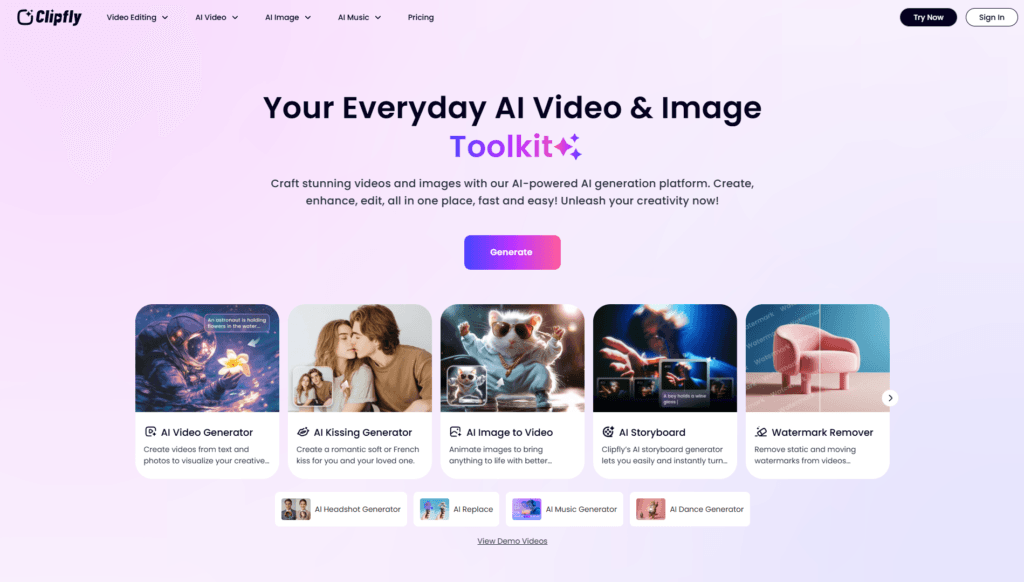
Clipfly is a browser-based AI creative platform that enables users to generate, edit, enhance, and produce videos, images, and music without advanced skills or expensive software.
Core focus is on AI video generation from text prompts or images, supporting multiple advanced models like Veo 3, Flux, Wan 2.5, Seedance, Kling, and more for diverse styles from cinematic realism to animation.
It includes tools for AI image generation, text-to-speech voiceovers, auto-captions, watermark/object/text removal, background replacement, video unblur/upscaling, face swap, hairstyle/cosplay changes, motion effects (dancing, hugging), talking avatars, and a full drag-and-drop video editor for merging clips, adding filters/transitions/stickers/music.
Specialized fun features like AI kissing generator, twerk generator, squish effect, and storyboarding turn scripts into movies instantly.
Exports are watermark-free in 1080p on free tier, with higher resolutions (2K/4K) and advanced options in paid plans.
Launched around 2024 as part of Fotor’s ecosystem, it targets content creators, marketers, social media users, educators, and businesses for quick promotional videos, Reels/TikToks, explainer content, product demos, and personal projects.
Freemium model with generous free access (basic tools, limited credits/storage) and paid Pro/Business plans for unlimited credits, priority features, team access, and commercial use.
Key Features
- AI Video Generator: Text-to-video and image-to-video using models like Veo 3, Kling, Flux for high-quality clips
- AI Image Generator: Create or transform images with styles like photography, anime, digital art
- Video Editor: Drag-and-drop merging, cropping, text/captions, filters, transitions, stickers, music addition
- Watermark/Object/Text Remover: Erase unwanted elements from videos or images instantly
- AI Talking Avatar: Animate photos into speaking characters with lip-sync and natural voices
- AI Enhancer/Unblur/Upscale: Improve video quality, fix blur, upscale to HD/4K
- Face Swap/Hairstyle/Cosplay: Swap faces, change hair, or turn into characters like Santa/Venom
- Motion Effects: Add dancing, hugging, twerking, squish, or other animations to images/videos
- AI Music Generator: Create background music or full tracks to match content
- Storyboard/Movie Maker: Turn scripts into complete videos or animated movies quickly
Price Plans
- Free ($0): Basic access to most AI tools, video/image generation, editing, 1080p watermark-free exports, 1GB storage, limited credits/usage
- Pro ($49.99/Year or equivalent monthly): Higher credits, 2K/4K exports, advanced models/effects, extended library, priority processing, team features
- Business ($389.99/Year): Large monthly credits, multiple user access, advanced tools like movie generation, suitable for teams/agencies
Pros
- All-in-one convenience: Combines generation, editing, enhancement, and effects in single platform
- Multiple AI models: Switch between Veo 3, Kling, Flux etc. for best style/results
- Watermark-free free tier: Export 1080p videos without watermarks even on free plan
- Fast and browser-based: No downloads needed; quick generation and intuitive interface
- Versatile for creators: Supports marketing, social media, education, personal fun content
- Affordable paid upgrades: Pro/Business plans unlock higher res, credits, team features
- Fun specialized tools: Kissing, twerk, cosplay generators add creative entertainment
Cons
- Credit limits on free: Heavy use requires paid credits/plans for more generations
- Variable quality: Output depends on prompt detail and chosen model; occasional artifacts
- No offline access: Fully web-based, requires internet connection
- Learning for advanced: Multiple models/settings may overwhelm beginners initially
- Storage caps: Free tier has 1GB cloud storage limit
- Regional pricing: Costs may vary; some features premium-locked
- Newer platform: Less established community/tutorials compared to older tools
Use Cases
- Social media content: Create Reels/TikToks/Shorts with text-to-video or animated images
- Marketing videos: Product demos, ads, explainer clips with voiceovers and effects
- Educational material: Animated tutorials, presentations, or story-based lessons
- Personal fun: Generate kissing/cosplay/twerk videos or talking avatars from photos
- Content enhancement: Remove watermarks/objects, upscale blurry videos, add motion
- Business presentations: Quick promo videos or visual storytelling without production
- Creative experiments: Test styles/models for films, animations, or memes
Target Audience
- Social media creators/influencers: Needing fast viral videos and effects
- Marketers and small businesses: Producing ads/promos on a budget
- Content educators/trainers: Making engaging visual learning materials
- Casual users/hobbyists: Fun photo animations or personal videos
- Teams/agencies: Using Business plan for collaborative high-volume creation
How To Use
- Visit site: Go to clipfly.ai and explore tools from dashboard
- Choose generator: Select AI Video Generator, Image Generator, or Editor
- Input content: Enter text prompt, upload image/video, or use template
- Customize: Pick model (Veo 3, Kling etc.), style, aspect ratio, quality
- Generate: Click create; preview results in moments
- Edit further: Use built-in editor for merges, captions, effects
- Export: Download watermark-free (free for 1080p); upgrade for higher res
How we rated Clipfly
- Performance: 4.6/5
- Accuracy: 4.5/5
- Features: 4.8/5
- Cost-Efficiency: 4.7/5
- Ease of Use: 4.9/5
- Customization: 4.6/5
- Data Privacy: 4.4/5
- Support: 4.3/5
- Integration: 4.5/5
- Overall Score: 4.6/5
Clipfly integration with other tools
- Social Media Export: Optimized formats and direct sharing for TikTok, Instagram Reels, YouTube Shorts
- Cloud Storage: Built-in 1GB free storage for assets and projects
- Browser-Based: Works seamlessly across Chrome, Safari, Edge without downloads
- Mobile Apps: iOS and Android apps for on-the-go creation and editing
- Third-Party Editors: Export MP4 files for import into Premiere Pro, CapCut, DaVinci Resolve
Best prompts optimised for Clipfly
- A futuristic cityscape at dusk with flying cars and neon lights, cinematic style, smooth camera pan, high detail, 4K, using Veo 3 model
- Young woman dancing in a cherry blossom garden during spring, anime aesthetic, gentle wind effects, emotional music implied, dynamic motion
- Product demo for wireless earbuds on a clean white background, professional rotation shot, text overlay features, realistic lighting
- Epic dragon battle in fantasy mountains, dramatic slow-motion, fire breaths, epic orchestral score, using Kling model for realism
- Casual vlog style talking head explaining AI tools, friendly avatar with natural gestures, subtitles, bright indoor setting
FAQs
Newly Added Tools







About Author