
What is Craiyon?
Craiyon is a free AI image generator that creates unique artwork from text prompts, formerly known as DALL·E mini, with unlimited generations and multiple style options.
Is Craiyon free to use?
Yes, Craiyon offers unlimited free image generations with base quality, wait times, watermarks, and ads; paid plans from $5/month remove limits, add HD, priority, and private images.
How many users does Craiyon have?
Craiyon has over 1 million monthly active users and has generated more than 3 billion images since launch.
When was Craiyon launched?
Craiyon launched in 2021 as DALL·E mini and was rebranded to Craiyon in 2022.
What styles does Craiyon support?
It offers styles like Artistic, Photo, Anime, Illustration, Vector, Raw, plus custom aspect ratios and negative prompts to exclude elements.
Can I use Craiyon images commercially?
Yes, images are usable for personal, academic, or commercial purposes; paid plans provide no attribution and private images for professional use.
Does Craiyon require an account?
No account is needed to generate images for free; sign up optional for saving favorites or accessing paid features.
How does Craiyon compare to DALL-E?
Craiyon is free and unlimited with simpler features; DALL-E (via ChatGPT) offers higher quality but with usage limits and paid access.

Craiyon

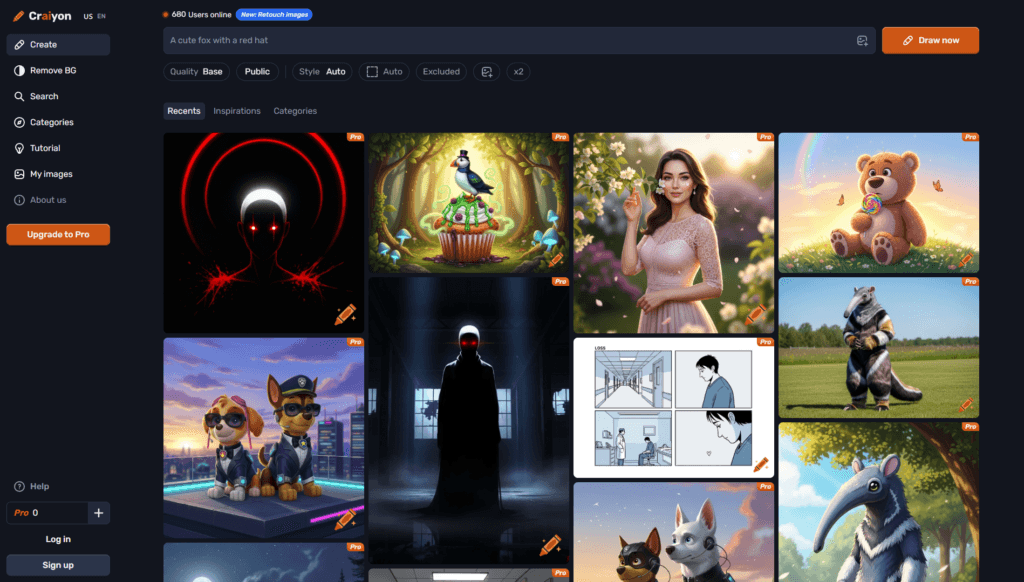
About This AI
Craiyon is a user-friendly AI image generator that transforms text prompts into unique artwork in seconds.
Formerly known as DALL·E mini, it uses custom diffusion models to produce 9 images per prompt with options for styles like Artistic, Photo, Anime, Illustration, Vector, or Raw.
Users can specify aspect ratios, exclude unwanted elements, and use multi-language prompts for global accessibility.
Features include unlimited free generations (with wait times and watermarks for free users), private images, HD downloads, editing credits, priority queue, and no attribution required in paid plans.
Launched in 2021 as DALL·E mini and rebranded to Craiyon in 2022, it has generated over 3 billion images with more than 1 million monthly active users as of recent data.
The platform emphasizes accessibility, daily model improvements, and community sharing of creations via search.
Free tier allows basic use without login; paid plans (Supporter, Professional, Ultra) remove limits, add features like no watermarks, faster processing, and higher quality.
Ideal for casual creators, social media content, quick concepts, educational illustrations, and anyone exploring AI art without subscriptions.
Key Features
- Text-to-Image Generation: Creates 9 images per prompt from descriptive text in seconds
- Style Selection: Options include Artistic, Photo, Anime, Illustration, Vector, Raw for varied aesthetics
- Aspect Ratio Control: Choose custom ratios for portraits, landscapes, squares, etc.
- Negative Prompts: Exclude unwanted elements via 'exclude' field
- Multi-Language Support: Prompts work in many languages for global users
- Unlimited Free Generations: No hard cap on images, though with wait times and watermarks
- Private Images: Option to keep generations private in paid plans
- HD Downloads: Higher resolution and quality in Supporter and above
- Priority Queue: Faster generation and no ads in paid tiers
- Editing Credits: Use credits to refine or upscale generated images in paid plans
Price Plans
- Free ($0): Unlimited generations with base quality, wait times, watermarks, ads, public images
- Supporter ($5/Month or $60/Year): Unlimited images, 100 edit credits, no watermarks, priority queue, private images, HD downloads
- Professional ($24/Month or $240/Year): Unlimited images, 220 edit credits, highest priority, advanced features
- Ultra (Higher Tier): Everything in Professional plus more editing credits and extras
Pros
- Completely free core access: Unlimited generations without mandatory payment or login
- Fast and simple: Quick results with minimal setup for beginners
- Strong community: Over 1 million monthly users and billions of images created
- Daily improvements: Models updated regularly for better quality
- Versatile styles: Good variety from realistic to artistic/anime
- No account needed: Start generating instantly on the web
- Affordable paid upgrades: Low-cost plans remove limits and add perks
Cons
- Wait times on free: Slower processing and possible queues during peak times
- Watermarks on free: Generated images include attribution/watermarks
- Lower base quality: Free outputs are standard resolution and quality
- Limited editing: Advanced refinements require paid credits
- Occasional inconsistencies: AI may misinterpret complex prompts
- Web-only: No dedicated mobile/desktop apps mentioned
- Ads in free tier: Displays ads to support the service
Use Cases
- Casual AI art creation: Fun experiments and quick visuals from ideas
- Social media content: Generate memes, avatars, illustrations for posts
- Concept ideation: Visual brainstorming for stories, products, designs
- Educational illustrations: Create diagrams, characters, scenes for learning
- Blog and marketing visuals: Custom images for articles or promotions
- Personal projects: Wallpapers, greeting cards, custom art
- Creative inspiration: Explore styles and prompts for artists
Target Audience
- Casual users and hobbyists: Anyone wanting free AI art without complexity
- Content creators: Social media influencers needing quick visuals
- Students and educators: Generating educational or illustrative images
- Marketers and bloggers: Custom graphics for web and campaigns
- Artists and designers: Exploring ideas or style references
- Developers experimenting: Testing text-to-image capabilities affordably
How To Use
- Visit site: Go to craiyon.com and enter your text prompt in the box
- Customize: Select style, aspect ratio, add negative prompts if desired
- Generate: Click 'Draw' to create 9 images in seconds to minutes
- Review results: View and select favorites from the grid
- Download: Save images (HD in paid plans; watermarked in free)
- Refine: Use edit credits (paid) to upscale or modify
- Upgrade if needed: Sign up for paid plan for priority and extras
How we rated Craiyon
- Performance: 4.2/5
- Accuracy: 4.0/5
- Features: 4.3/5
- Cost-Efficiency: 4.8/5
- Ease of Use: 4.9/5
- Customization: 4.1/5
- Data Privacy: 4.4/5
- Support: 4.0/5
- Integration: 4.2/5
- Overall Score: 4.4/5
Craiyon integration with other tools
- Web Browser Access: Works directly in any modern browser without installation
- Social Sharing: Easy export and share to platforms like Twitter, Instagram, Reddit
- Design Tools: Download images for import into Canva, Photoshop, Figma, or other editors
- Community Features: Search and browse millions of user-generated images on the site
- Mobile-Friendly: Responsive web interface usable on phones and tablets
Best prompts optimised for Craiyon
- A majestic dragon flying over misty mountains at sunset, cinematic lighting, highly detailed, fantasy art style
- Cyberpunk city street at night with neon signs and rain reflections, futuristic atmosphere, anime style
- Cute cartoon cat wearing sunglasses drinking coffee in a cozy cafe, vibrant colors, illustration style
- Realistic portrait of an elderly wizard casting a spell in an ancient library, dramatic lighting, photo style
- Abstract geometric landscape with floating islands and aurora sky, vector art, minimalist design
FAQs
Newly Added Tools





About Author