




Zelili AI

Cursor AI

AI-First Code Editor – Supercharge Development with Intelligent Autocomplete, Agent Mode, and Full Codebase Understanding
Tool Release Date

2023

Tool Users
1 Million+
0.0
๐Ÿ‘ 38

About This AI

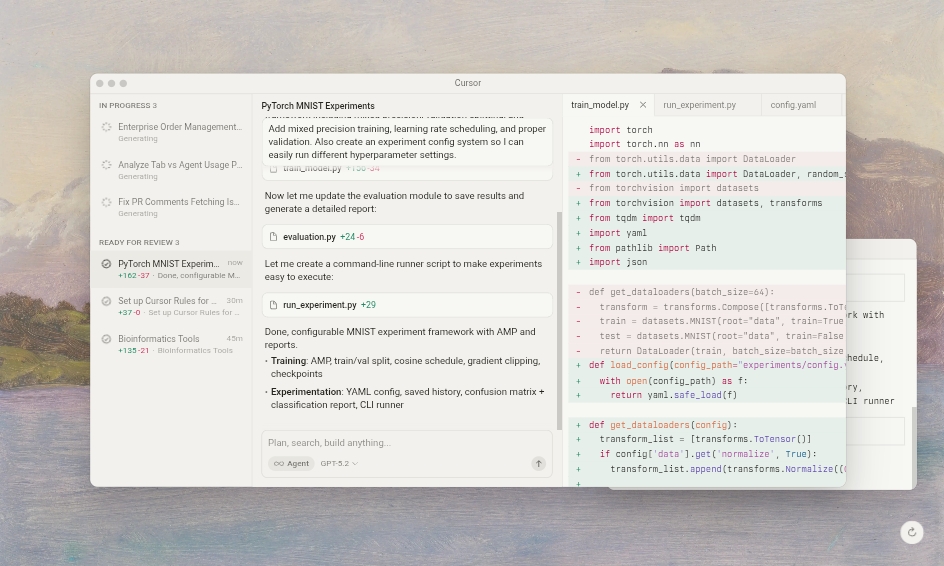
Cursor AI is an AI-powered code editor built as a fork of Visual Studio Code, designed to make developers dramatically more productive through deep AI integration.

It features ultra-fast autocomplete (Tab model with high acceptance rates), agent mode for autonomous task execution, semantic codebase indexing for whole-project understanding, multi-file editing, and support for top models from OpenAI, Anthropic, Gemini, and xAI.

Unique strengths include context-aware suggestions across large codebases, background agents, CLI integration, image generation in code workflows, and Bugbot for automated PR reviews.

Launched in 2023 by Anysphere (founded 2022 by MIT alumni Michael Truell, Sualeh Asif, Arvid Lunnemark, Aman Sanger), Cursor has grown rapidly to over 1 Million users and 360,000 paying customers by early 2025, with strong enterprise adoption including two-thirds of Fortune 1000 companies.

It supports custom rules, project-specific instructions, and seamless collaboration features like shared chats and analytics for teams.

With versions like 2.4 (January 2026) adding subagents, skills, and image gen, Cursor leads in AI-native IDE innovation.

Freemium model offers a solid Hobby free tier with limits, while Pro ($20/month) unlocks unlimited Tab, extended Agent, and maximum context; higher tiers like Ultra ($200/month) provide massive usage multipliers.

Ideal for individual developers, startups, and enterprises seeking faster coding, fewer bugs, and AI-assisted workflows without leaving their familiar VS Code environment.

Key Features

  1. AI Autocomplete (Tab): Lightning-fast, context-aware code predictions with high acceptance and low over-suggestion rates
  2. Agent Mode: Autonomous AI assistance for complex tasks, adjustable autonomy, and multi-step execution
  3. Semantic Codebase Indexing: Understands entire projects for accurate multi-file edits and queries
  4. Composer & Multi-Agent: Orchestrates multiple specialized agents for parallel task handling (v2.0+)
  5. Bugbot PR Reviews: Automated code reviews, bug fixes, and suggestions directly in GitHub
  6. Background Agents: Run tasks in parallel without blocking the editor
  7. Image Generation in Code: Create visuals/diagrams from prompts within workflows (v2.4+)
  8. Custom Rules & Instructions: Project-specific AI behavior via .cursor/rules files
  9. Model Flexibility: Bring your own or use OpenAI, Claude, Gemini, Grok models
  10. Team Analytics & Controls: Usage dashboards, privacy modes, SSO for business/enterprise

Price Plans

  1. Hobby ($0): Limited Agent requests, limited Tab completions, basic features
  2. Pro ($20/Month): Unlimited Tab, extended Agent limits, background agents, maximum context windows
  3. Pro+ ($60/Month): 3x usage on OpenAI/Claude/Gemini models, everything in Pro
  4. Ultra ($200/Month): 20x usage multipliers, priority new features, everything in Pro+
  5. Teams ($40/user/Month): Shared chats/rules, analytics, SSO, role-based access
  6. Enterprise (Custom): Pooled usage, invoice billing, SCIM, audit logs, priority support

Pros

  1. Superior productivity boost: Developers report 2-5x faster coding and fewer errors
  2. Deep codebase awareness: Handles large/monorepo projects better than traditional tools
  3. Agentic power: Autonomous multi-file edits and task completion save massive time
  4. VS Code familiarity: Forked from VS Code so extensions and workflow feel native
  5. Rapid iteration: Frequent updates with new models, features, and performance gains
  6. Strong enterprise adoption: Trusted by Fortune 500 and high-scale teams
  7. Freemium accessibility: Robust free tier for individuals to try full power

Cons

  1. Pro required for unlimited use: Free Hobby has strict limits on Agent/Tab requests
  2. Desktop-only focus: No native web/mobile version; relies on local install
  3. Heavy compute in agents: Complex tasks can be slower or token-intensive
  4. Learning curve for agents: Effective use of full autonomy requires good prompting
  5. Privacy considerations: Codebase indexing may raise concerns (enterprise mode available)
  6. Dependency on external models: Performance tied to API providers' availability/cost
  7. Occasional hallucinations: AI suggestions can need review in edge cases

Use Cases

  1. Rapid prototyping: Generate boilerplate, refactor, or add features in minutes
  2. Large codebase maintenance: Navigate, edit, and understand monorepos effortlessly
  3. Debugging and bug fixing: Use Bugbot for automated PR reviews and fixes
  4. Learning new codebases: Ask questions or get explanations across entire projects
  5. Team collaboration: Shared rules, analytics, and consistent AI behavior
  6. Enterprise development: Secure, scalable coding with Fortune 500-level adoption
  7. Creative coding: Use image gen and agents for UI/UX or visual prototyping

Target Audience

  1. Individual developers: Boosting personal productivity with AI assistance
  2. Startup engineers: Fast iteration and prototyping in small teams
  3. Enterprise teams: Large-scale codebases, security, and analytics needs
  4. AI/ML practitioners: Integrating custom models and agent workflows
  5. Open-source contributors: Quick edits and understanding across repos
  6. Code educators: Explaining and generating examples efficiently

How To Use

  1. Download and install: Get Cursor from cursor.com (Mac/Windows/Linux support)
  2. Open project: Load your codebase or start new; Cursor auto-indexes files
  3. Use Tab autocomplete: Press Tab for AI code completions (Pro for unlimited)
  4. Activate Agent: Cmd+L or chat sidebar to ask for edits, refactors, or features
  5. Multi-file edits: Select code or describe changes; agent applies across files
  6. Set rules: Add .cursor/rules files for project-specific AI instructions
  7. Review and apply: Preview diffs, accept/reject, or iterate with follow-ups

How we rated Cursor AI

  • Performance: 4.9/5
  • Accuracy: 4.8/5
  • Features: 4.9/5
  • Cost-Efficiency: 4.6/5
  • Ease of Use: 4.7/5
  • Customization: 4.8/5
  • Data Privacy: 4.5/5
  • Support: 4.6/5
  • Integration: 4.9/5
  • Overall Score: 4.8/5

Cursor AI integration with other tools

  1. GitHub: Bugbot for automated PR reviews, code suggestions, and fixes directly in repos
  2. VS Code Extensions: Inherits full VS Code marketplace compatibility and workflow
  3. Slack: #ask-cursor channels for team queries and shared AI assistance
  4. Custom Models: Bring your own API keys for OpenAI, Anthropic, Gemini, Grok, etc.
  5. CLI & Terminal: Agent mode supports command-line tasks and cloud handoff

Best prompts optimised for Cursor AI

  1. Refactor this entire component to use hooks instead of class, improve performance, add error handling, and follow our style guide in types.ts
  2. Implement a new feature: add dark mode toggle with system preference detection, persist in localStorage, update all components accordingly
  3. Debug this error: Type 'string | undefined' is not assignable to type 'string' on line 42 - fix types without changing API response structure
  4. Write comprehensive Jest tests for this validateEmail function including edge cases like null, empty string, international formats
  5. Generate a clean, responsive dashboard UI component using Tailwind and React, with loading states, error handling, and data fetching from our API
Cursor AI redefines coding with its AI-first approach, offering exceptional autocomplete, agentic editing, and deep codebase awareness that outpaces traditional tools. Adopted by over 1 million users and major enterprises, the Pro plan at $20/month unlocks unlimited power for serious developers. Ideal for anyone wanting faster, smarter coding without leaving a VS Code-like environment.

FAQs

  • What is Cursor AI?

    Cursor AI is an AI-powered code editor forked from VS Code, featuring intelligent autocomplete, agent mode, full codebase understanding, and multi-model support to accelerate development.

  • When was Cursor AI launched?

    Cursor was founded in 2022 and launched publicly in 2023 by Anysphere, with major updates like 2.4 in January 2026.

  • How many users does Cursor AI have?

    Cursor has over 1 Million total users and around 360,000 paying customers as reported in early 2025-2026 sources.

  • Is Cursor AI free to use?

    Yes, Hobby tier is free with limits; Pro starts at $20/month for unlimited Tab, extended Agent, and maximum context; higher tiers up to $200/month.

  • What makes Cursor different from VS Code + Copilot?

    Cursor is built AI-first with native agent mode, semantic indexing, multi-file edits, and higher context awareness for complex projects.

  • Does Cursor support custom AI models?

    Yes, you can bring your own API keys for OpenAI, Claude, Gemini, Grok, and others, with flexible model switching.

  • Is Cursor good for large codebases?

    Excellent – semantic indexing handles monorepos and large projects with accurate multi-file understanding and edits.

  • Who uses Cursor AI?

    Over half of Fortune 500 companies, many startups, and individual developers; strong adoption in engineering teams.


Newly Added Toolsโ€‹

Qodo AI

$0/Month

Codiga

$10/Month

Tabnine

$59/Month

CodeRabbit

$0/Month
Cursor AI Alternatives

Qodo AI

$0/Month

Codiga

$10/Month

Tabnine

$59/Month

Cursor AI Reviews

0.0
0.0 out of 5 stars (based on 0 reviews)
Excellent0%
Very good0%
Average0%
Poor0%
Terrible0%

There are no reviews yet. Be the first one to write one.




