
What is Cutout Pro?
Cutout Pro is an AI-powered visual design platform for automatic background removal, image/video enhancement, object removal, photo restoration, AI generation, and more for photos and videos.
Is Cutout Pro free to use?
Yes, it offers a free tier with limited credits/uses; paid plans start at around $5/month for 40 credits or $0.099 per credit, with higher tiers for more volume and quality.
When was Cutout Pro founded?
Cutout Pro was founded in 2018 in Hong Kong, focusing on AI and computer vision for visual content creation.
What are Cutout Pro’s main tools?
Key tools include background removal (photos/videos), object remover, image upscaler, photo restorer, AI art generator, cartoon effects, passport photo maker, and video background remover.
Does Cutout Pro have an API?
Yes, it provides an API for developers to integrate features like background removal and enhancement into apps with high uptime and security.
How many users or businesses use Cutout Pro?
It is trusted by over 25,000 businesses; historical data suggests large scale with a 2024 breach affecting 20 million user records.
Can Cutout Pro be used for e-commerce?
Yes, it’s optimized for e-commerce with batch background swaps, product enhancement, and clean images compliant for Amazon/Shopify listings.
What happened with Cutout Pro data breach?
In 2024, a breach exposed personal info of nearly 20 million users, including emails and hashed passwords; users should change passwords if affected.

Cutout Pro

About This AI
Cutout Pro is an AI-powered visual content creation and editing platform that automates complex image and video tasks using artificial intelligence and computer vision.
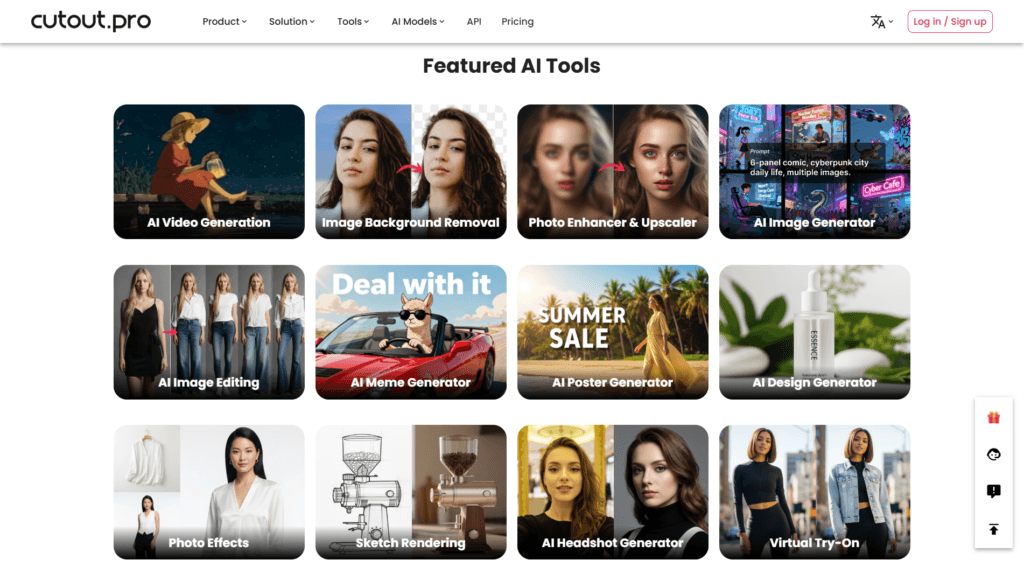
It specializes in automatic background removal for photos and videos with precise edge detection, object removal (people, blemishes, scratches), image upscaling and enhancement, photo restoration, cartoon/anime effects, passport/ID photo maker, AI art generation, meme/poster/design tools, virtual try-on, and more.
Video features include background removal without green screens, image-to-video generation, video enhancement to 4K, and unblurring.
Founded in 2018 in Hong Kong, it serves e-commerce sellers, photographers, designers, businesses, and creators with batch processing, high-quality results, and no need for manual tools like Photoshop.
Trusted by over 25,000 businesses and historically impacted by a 2024 breach affecting 20 million user records (indicating large scale), it offers a credit-based system with free limited use and paid subscriptions/credits for unlimited or high-volume processing.
API integration allows developers to embed features into apps with high uptime and security.
The platform streamlines workflows for e-commerce product images, old photo restoration, customized printing, interior design, and professional visual optimization, making advanced AI editing accessible to individuals and enterprises.
Key Features
- AI Background Removal: Automatic removal from photos and videos with superb edge details, no green screen needed
- Remove Unwanted Objects: Magically erase people, objects, scratches, skin blemishes, and imperfections
- Image Upscaler and Enhancer: Boost resolution, quality, detail recovery, and noise reduction up to 4K/16x
- Photo Restoration: Revive old images with face enhancement, colorization, background fixes, and detail recovery
- AI Image Generator: Create art, designs, posters, memes from text prompts with unlimited access in paid plans
- Face Cutout and Segmentation: Precise hair-level cutouts for humans (adults/kids) and pets (cats/dogs)
- AI Video Generation: Transform images into high-quality videos
- Video Background Removal: 100% automatic for MP4, WebM, MOV, GIF without masks or paths
- Passport/ID Photo Maker: Create professional photos with correct sizes, backgrounds, and suits
- Cartoon Selfie and Effects: Convert portraits to 3D cartoon, 2D anime, or apply various styles
- Virtual Try-On and Interior Tools: Try on items virtually or redesign rooms with AI staging/landscaping
- Batch Processing: Handle multiple images/videos at once for e-commerce or high-volume needs
Price Plans
- Free ($0): Limited access to tools with daily/monthly caps (e.g., few credits), possible watermarks, basic quality for testing/light use
- Subscription ($5/Month for 40 credits): Starts at $5 for 40 credits (~$0.125/credit), scaling to higher tiers (e.g., $9.90 for 100 credits at $0.099 each), unlimited in some plans, higher quality/no limits
- Pay-as-you-go ($0.099/credit or per image): Flexible credits for occasional use; bulk discounts available
- Business/Enterprise (Custom): Higher volumes, API priority, dedicated support, and tailored plans
Pros
- High automation and accuracy: Precise cutouts, enhancements, and removals save time compared to manual editing
- Wide tool variety: Covers photo/video editing, generation, restoration, and specialized tasks in one platform
- Free limited access: Basic tools usable without payment for testing or light use
- API for developers: Scalable integration with high uptime and security for apps/businesses
- E-commerce optimized: Batch background swaps, product imaging, and compliance for Amazon/Shopify
- No Photoshop needed: User-friendly for non-experts with professional results
- Trusted by businesses: Used by 25K+ companies including major brands
Cons
- Credit-based pricing: Free limited; paid requires buying credits or subscriptions for heavy use
- Potential watermarks/limits: Free outputs may have restrictions or lower quality
- Past data breach: 2024 incident exposed 20 million user records, raising privacy concerns
- Web-focused: Primarily browser-based; no strong mention of native apps
- Variable results: Complex images/videos may need retries or tweaks for perfect output
- No offline mode: Requires internet for AI processing
- API separate costs: Developer integration uses additional usage-based fees
Use Cases
- E-commerce product photos: Batch remove backgrounds, enhance, place on white/brand colors for listings
- Photo restoration: Fix old family photos with colorization, face enhancement, and detail recovery
- Graphic design: Generate memes, posters, AI art, or apply effects/cartoon styles
- Passport/ID photos: Create compliant professional images with background/suit changes
- Video editing: Remove backgrounds from clips or generate image-to-video content
- Marketing content: Upscale low-res assets, remove objects, or virtual try-on for ads
- Personal use: Cleanup selfies, blur backgrounds, or create cartoon versions
Target Audience
- E-commerce sellers: Amazon/Shopify users needing clean product images fast
- Photographers and designers: Quick edits, enhancements, and batch processing
- Small businesses: Professional visuals without expensive software
- Content creators: Social media graphics, memes, posters, AI art
- Developers: Integrating AI editing via API into apps
- Individuals: Restoring old photos or fun edits like cartoon selfies
How To Use
- Visit site: Go to cutout.pro and select a tool (e.g., remove-background, photo-enhancer)
- Upload file: Drag/drop image/video or browse to add content
- Process automatically: AI handles removal, enhancement, generation in seconds
- Customize if needed: Adjust settings or use brush for precise control in some tools
- Preview and download: View result; download HD (credits deducted if paid required)
- Batch mode: Upload multiple files for bulk processing in supported tools
- Sign up for more: Create account for saved projects, API key, or credit purchases
How we rated Cutout Pro
- Performance: 4.6/5
- Accuracy: 4.7/5
- Features: 4.8/5
- Cost-Efficiency: 4.5/5
- Ease of Use: 4.8/5
- Customization: 4.4/5
- Data Privacy: 4.2/5
- Support: 4.3/5
- Integration: 4.5/5
- Overall Score: 4.6/5
Cutout Pro integration with other tools
- API Access: Developer API for embedding background removal, enhancement, upscaling, and other tools into custom applications with high scalability
- E-commerce Platforms: Optimized for Amazon, Shopify workflows with batch processing and compliant product imaging
- Design Tools: Export results in standard formats for import into Photoshop, Canva, Figma, or other editors
- Printing Services: Seamless for customized printing overlays (T-shirts, mugs, etc.) after background removal
- Browser-Based: Works across Chrome/Edge/Firefox for web integrations and extensions
Best prompts optimised for Cutout Pro
- N/A - Cutout Pro is primarily a tool-based AI editor for images/videos (background removal, enhancement, etc.), not a prompt-based generative model like text-to-image/video. It uses uploads and automatic processing rather than text prompts for core features.
FAQs
Newly Added Tools






About Author