
What is DeepAI?
DeepAI is a long-standing AI platform offering free and paid tools for text-to-image generation, image enhancement, style transfer, super resolution, colorization, background removal, and more.
Is DeepAI free to use?
Yes, most tools are free with daily limits, watermarks on some outputs, and standard queue; Pro at $4.99/month removes limits, adds high-res, no watermarks, and API credits.
When was DeepAI launched?
DeepAI launched in 2017 and has been continuously updated with new models and features since then.
What are DeepAI’s most popular tools?
Top tools include Text to Image (various styles), Super Resolution (upscale to 4K), Style Transfer, Colorize, Inpainting/Outpainting, Face Swap, and Background Remover.
Does DeepAI require sign-up?
No sign-up needed for basic free use; account required only for Pro features, API access, or saving generations.
Can I use DeepAI commercially?
Free tier is generally for personal use; Pro plan supports commercial licensing and watermark-free high-res outputs for business projects.
Does DeepAI have an API?
Yes, DeepAI provides an API for developers to integrate text-to-image, upscaling, style transfer, and other tools with usage-based credits.
How does DeepAI compare to newer AI image tools?
It offers simplicity and variety but may lag in raw quality and prompt adherence compared to Midjourney, Flux, or Stable Diffusion 3; excels in accessibility and low cost.
DeepAI

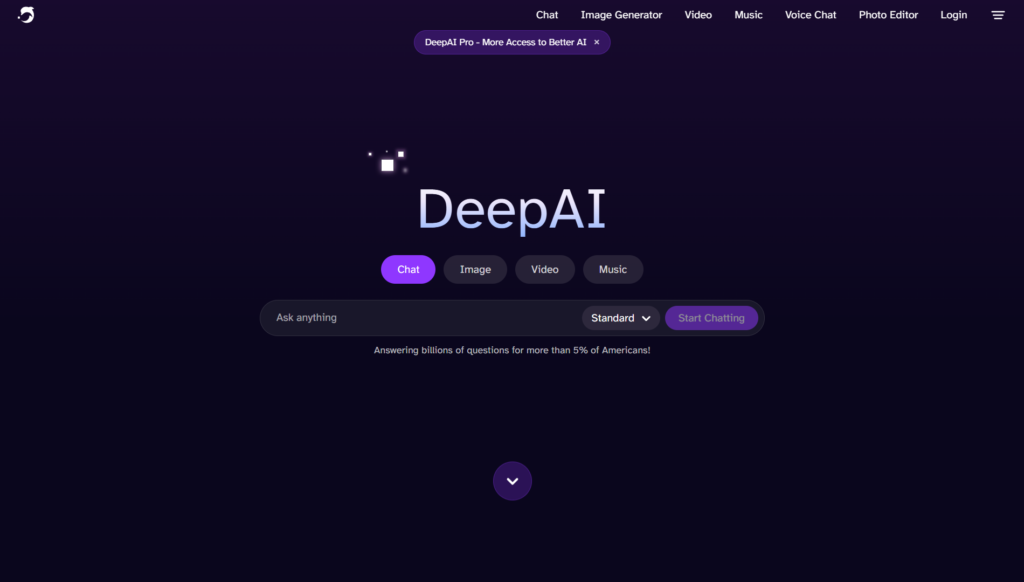
About This AI
DeepAI is one of the earliest and most established AI creative platforms, launched in 2017, offering a wide range of free and paid generative AI tools focused on visual content creation.
Core offerings include Text to Image (multiple models like realistic, anime, fantasy styles), AI Image Generator (from text prompts), Image Style Transfer (apply artistic styles to photos), Super Resolution (upscale low-res images up to 4K), Colorize (turn black-and-white photos to color), Inpainting/Outpainting (edit or extend images), Face Swap, Background Remover, and API access for developers.
The platform supports high-resolution outputs, batch processing in paid plans, and community-driven model training with user feedback.
Known for its simplicity—no sign-up required for basic free use—it has powered millions of generations and remains popular for quick creative experiments, meme making, art prototyping, photo enhancement, and casual AI fun.
With a freemium model, free tier provides generous daily generations (with watermarks and lower priority), while Pro unlocks unlimited high-res, no watermarks, faster queue, API credits, and commercial licensing.
DeepAI continues to update models and add features, maintaining relevance in the crowded AI image space through accessibility and variety rather than cutting-edge single-model dominance.
Key Features
- Text to Image Generation: Multiple models for realistic, anime, fantasy, cyberpunk, and custom styles from text prompts
- AI Image Enhancer: Upscale, sharpen, and improve image quality automatically
- Super Resolution: Increase resolution up to 4K with detail recovery and noise reduction
- Style Transfer: Apply artistic filters (Van Gogh, Picasso, etc.) or custom images to photos
- Colorize Photos: Convert black and white images to realistic or artistic color versions
- Inpainting and Outpainting: Fill missing parts or extend image borders intelligently
- Background Remover: Precise subject extraction with transparent PNG output
- Face Swap: Swap faces between images for fun or creative edits
- API Access: Developer-friendly API for integrating generation tools into apps
- Batch Processing: Generate multiple images at once in paid plans
Price Plans
- Free ($0): Unlimited basic access with daily generation limits, watermarks on some outputs, standard queue, and lower resolution options
- Pro ($4.99/Month or $49.99/Year): Unlimited generations, no watermarks, priority queue, high-res outputs, API credits, commercial use rights, and batch processing
Pros
- Extremely accessible: No login required for most free tools; instant web-based use
- Wide tool variety: Covers generation, editing, enhancement, and fun features in one place
- Generous free tier: Daily limits allow meaningful experimentation without payment
- Fast and simple: Quick generation times and easy-to-use interface for beginners
- Long-standing reliability: Operating since 2017 with consistent updates and uptime
- Affordable Pro plan: $5/month unlocks unlimited high-res and API credits
- Creative flexibility: Multiple style models and editing options for diverse outputs
Cons
- Free tier limits: Watermarks, queue times, and generation caps during peak hours
- Quality variability: Older models can produce artifacts or less coherent results vs newer competitors
- No advanced control: Limited prompt engineering depth compared to Midjourney or Flux
- Watermarks on free: Visible branding on outputs unless Pro subscribed
- API separate billing: Extra credits needed for heavy programmatic use
- Less cutting-edge: Not always first to adopt newest diffusion techniques
- Occasional downtime: High traffic can cause temporary unavailability
Use Cases
- Casual AI art creation: Generate fun images, memes, or concept art from text
- Photo restoration: Colorize old family photos or upscale low-res images
- Social media content: Quick edits, background removal, or style transfers for posts
- Graphic design prototyping: Test artistic styles or extend images for layouts
- Personal projects: Face swaps, inpainting fixes, or creative experiments
- Developer integration: Embed image generation into apps via API
- E-commerce visuals: Enhance product photos or create variations
Target Audience
- Casual users and hobbyists: Wanting free, no-signup AI image fun
- Social media creators: Needing quick edits and generations for content
- Photographers and restorers: Colorizing, upscaling, or cleaning old images
- Beginner designers: Prototyping ideas without advanced software
- Developers: Integrating simple AI image tools via API
- Budget-conscious creators: Seeking affordable unlimited access
How To Use
- Visit site: Go to deepai.org and select a tool (e.g., text2img, super-resolution)
- Input content: Type prompt for generation or upload image for editing/enhancement
- Customize options: Choose style/model where available or adjust settings
- Generate: Click create; wait for result (queue may apply on free)
- Download or edit: Save output or use another tool on the result
- Sign up for Pro: Create account for unlimited, no-watermark, priority access
- Use API: Get key from dashboard and integrate via code for custom apps
How we rated DeepAI
- Performance: 4.3/5
- Accuracy: 4.2/5
- Features: 4.5/5
- Cost-Efficiency: 4.6/5
- Ease of Use: 4.9/5
- Customization: 4.1/5
- Data Privacy: 4.4/5
- Support: 4.0/5
- Integration: 4.3/5
- Overall Score: 4.4/5
DeepAI integration with other tools
- API Access: Developer API for embedding text-to-image, super-resolution, style transfer, and other tools in custom applications
- Web Export: Easy download of PNG/JPG outputs for import into Canva, Photoshop, Figma, or other design software
- Browser-Based Workflow: Works directly in Chrome/Edge/Firefox; no installation needed for core use
- Social Sharing: Direct share buttons or optimized formats for Instagram, Twitter, Discord, and Reddit
- Third-Party Tools (Potential): Outputs compatible with Zapier or Make for automated image pipelines
Best prompts optimised for DeepAI
- A serene Japanese zen garden at sunrise, cherry blossoms falling gently, misty mountains in background, photorealistic, ultra detailed, 8k
- Cyberpunk samurai standing on rainy neon Tokyo rooftop, katana glowing, dramatic lighting, cinematic composition, anime style
- Vintage 1950s diner interior at night, neon signs, classic cars outside window, warm retro colors, highly detailed
- Majestic dragon perched on ancient castle tower under stormy sky, fantasy art, epic scale, intricate scales and wings
- Abstract surreal portrait of a woman made of colorful geometric shapes and flowing liquid metal, vibrant modern art style
FAQs
Newly Added Tools






About Author