




Zelili AI

Eigent

Open-Source Desktop Multi-Agent Workforce – Automate Complex Workflows with Parallel AI Agents and Full Privacy Control
Tool Release Date

29 Jul 2025

Tool Users
N/A
0.0
๐Ÿ‘ 67

About This AI

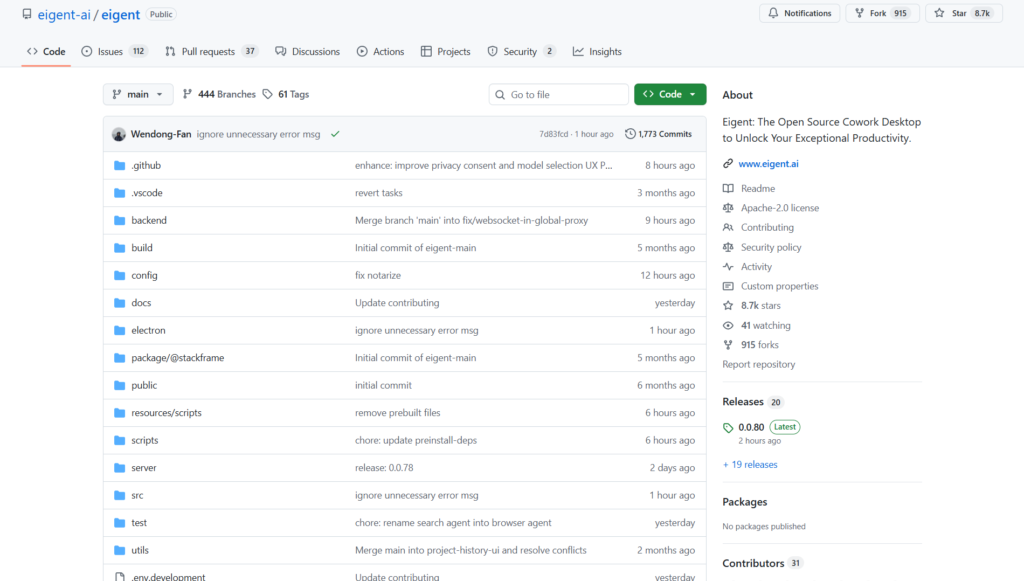
Eigent is an open-source desktop application that deploys a customizable multi-agent AI workforce locally on your machine to automate real-world tasks and boost productivity.

Built on the CAMEL-AI framework, it enables parallel execution of specialized agents that collaborate on complex, long-horizon workflows like browser automation, file management, data extraction, report generation, ERP interactions, market research, and more.

Key strengths include dynamic task decomposition, integration with 200 plus MCP tools (browser, terminal, SQL, etc.), bring-your-own-key/model support for local LLMs or APIs (Gemini, GPT, Claude, Ollama, vLLM), human-in-the-loop options, and complete data privacy since everything runs locally.

Users can build visual workflows, customize agents with specific roles/tools, and achieve faster/cheaper results than single-agent systems through coordinated parallel processing.

Launched around July-August 2025 with active development (releases as recent as January 2026), it is fully open-source under Apache 2.0, free to self-host, with optional paid tiers for hosted convenience, priority support, and higher credits.

Targeted at developers, teams, and enterprises needing secure, controllable automation for desktop/browser/enterprise systems without cloud dependency or data exposure.

It stands out as a privacy-first, local-first alternative to cloud-based agents, emphasizing scalability, customization, and real productivity gains in scenarios like procurement, SEO audits, ticket management, and trip planning.

Key Features

  1. Multi-Agent Workforce: Parallel execution of specialized agents for faster complex task completion
  2. Local-First Privacy: Runs entirely on desktop; data stays local with bring-your-own-key/models
  3. Visual Workflow Builder: Drag-drop interface to orchestrate agents and tasks
  4. 200 plus MCP Tools: Built-in integrations for browser automation, terminal, SQL, file ops, and custom extensions
  5. Custom Agent Creation: Define roles, tools, and behaviors for tailored automation
  6. Human-in-the-Loop: Optional oversight and intervention during agent runs
  7. Model Flexibility: Supports Gemini, GPT, Claude, local LLMs via Ollama/vLLM/SGLang
  8. Task Decomposition: Breaks down complex workflows into parallel subtasks automatically
  9. Enterprise Automation: Handles ERP (SAP), CRM, internal dashboards, and legacy browser systems
  10. Open-Source Core: Full Apache 2.0 code on GitHub for self-hosting and modifications

Price Plans

  1. Free Self-Host ($0): Full open-source version; host locally with your API keys or local models; unlimited use
  2. Free Hosted ($0): Limited daily credits (e.g., 200/day refresh) for hosted app; basic exploration
  3. Paid Hosted (From $10-50/Month tiers estimated): Higher credits, priority support, account management, no limits; 10 percent fee supports open-source
  4. Enterprise (Custom): Scaled deployment, dedicated support, advanced features for teams

Pros

  1. Complete Data Privacy: Local execution ensures no cloud data sharing
  2. Highly Customizable: Build infinite agent configurations with pluggable tools
  3. Cost-Effective: Free self-hosting; uses your own API keys or local models
  4. Parallel Performance: Outperforms single agents on long/complex tasks
  5. Enterprise-Ready: Automates real internal tools like SAP, dashboards, and procurement
  6. Active Open-Source: Frequent updates, community contributions, and roadmap transparency
  7. Developer-Friendly: GitHub repo, docs, and extensibility for custom integrations

Cons

  1. Requires Setup: Desktop install and configuration needed (not plug-and-play web app)
  2. Hardware Demands: Local models need capable GPU/CPU; cloud APIs incur separate costs
  3. Limited Hosted Free Tier: Hosted version has daily credits; full power via self-host
  4. Learning Curve: Building effective workflows requires understanding multi-agent design
  5. Early Ecosystem: Some features/tools still evolving; occasional bugs in releases
  6. No Mobile Support: Desktop-only (Mac/Windows) at launch
  7. Dependency on Models: Performance tied to chosen LLM (tool-calling capability required)

Use Cases

  1. Enterprise Workflow Automation: Automate SAP/ERP tasks, procurement, ticket management
  2. Market Research and Reporting: Scrape data, compile reports, analyze competitors
  3. Developer Productivity: File organization, code-related automations, GitHub interactions
  4. Business Operations: SEO audits, vendor shortlisting, trip planning with Slack summaries
  5. Data Extraction and Processing: Scrape websites, handle PDFs/CSV, generate insights
  6. Personal Automation: Daily task management, email summaries, browser routines
  7. Team Coordination: Parallel agents for research, planning, and execution

Target Audience

  1. Developers and Engineers: Building custom automations with open-source flexibility
  2. Business Professionals: Automating repetitive desktop/ERP/browser tasks
  3. Productivity Enthusiasts: Seeking local AI workforce for daily workflows
  4. Enterprises and Teams: Needing secure, controllable agent systems for operations
  5. Open-Source Community: Contributing to or extending the multi-agent framework
  6. Researchers in Agents: Experimenting with scalable multi-agent architectures

How To Use

  1. Download App: Get desktop installer for Mac/Windows from eigent.ai/download
  2. Install and Launch: Run the app; sign in or use anonymously (GitHub/Google optional)
  3. Configure Models: Add your API keys (Gemini, GPT, Claude) or connect local LLM (Ollama)
  4. Create Agents: Define roles/tools in visual builder or code; customize workflows
  5. Run Tasks: Input goal (e.g., 'research market and generate report'); agents execute in parallel
  6. Monitor and Interact: Use human-in-loop for oversight; review outputs/logs
  7. Integrate Outputs: Export results to Slack, files, or other tools via built-in MCPs

How we rated Eigent

  • Performance: 4.6/5
  • Accuracy: 4.5/5
  • Features: 4.8/5
  • Cost-Efficiency: 5.0/5
  • Ease of Use: 4.3/5
  • Customization: 4.9/5
  • Data Privacy: 5.0/5
  • Support: 4.4/5
  • Integration: 4.7/5
  • Overall Score: 4.7/5

Eigent integration with other tools

  1. Browser Automation: Controls Chrome/Edge for web tasks, scraping, dashboard interactions
  2. Terminal and Local Files: Executes commands, manages desktop files/folders
  3. ERP/CRM Systems: Automates SAP S/4HANA, internal tools via browser MCPs
  4. External APIs: Slack, Gmail, GitHub, SQL databases through 200 plus MCP tools
  5. Local LLMs: Ollama, vLLM, SGLang for privacy-focused deployment

Best prompts optimised for Eigent

  1. Research the top 10 AI productivity tools in 2026, compile a comparison table, and generate a detailed report with sources
  2. Automate procurement process: log into SAP S/4HANA, create purchase order for office supplies, submit for approval
  3. Scrape latest job listings from LinkedIn for AI engineer roles in India, extract key requirements into CSV
  4. Organize my desktop files: classify documents, move duplicates to trash, create folder structure by date
  5. Plan a 7-day trip to Uttarakhand: itinerary, budget, bookings research, send summary to Slack
Eigent delivers a powerful open-source multi-agent desktop workforce for automating complex workflows with privacy and customization at its core. Parallel execution and local deployment make it ideal for developers and enterprises seeking secure alternatives to cloud agents. Setup and learning curve exist, but the flexibility, cost-free self-hosting, and real-world task handling make it a standout productivity tool.

FAQs

  • What is Eigent?

    Eigent is an open-source desktop multi-agent AI workforce application that automates complex tasks through parallel agent collaboration, browser/terminal automation, and local privacy-focused execution.

  • Is Eigent free to use?

    Yes, the core product is fully open-source and free to self-host with your own API keys or local models; optional hosted tiers provide convenience credits and support.

  • When was Eigent launched?

    Eigent launched in July-August 2025, with active development and releases continuing into 2026 (latest around January 2026).

  • What makes Eigent different from other agent tools?

    It emphasizes local-first privacy, parallel multi-agent execution, infinite customization via MCP tools, and real desktop/browser automation without deep API needs.

  • What hardware is required for Eigent?

    Desktop app for Mac/Windows; local models need capable GPU/CPU; hosted version runs in cloud without local hardware demands.

  • Does Eigent support local LLMs?

    Yes, fully compatible with local models via Ollama, vLLM, SGLang; minimum requirement is tool-calling capable LLM.

  • Who is Eigent best for?

    Developers, teams, and enterprises needing secure, customizable automation for browser/desktop/ERP tasks with full data control.

  • How does Eigent handle privacy?

    Designed for local deployment where data never leaves your machine; open-source transparency ensures no hidden cloud sharing.


Newly Added Toolsโ€‹

Qwen-Image-2.0

$0/Month

Qodo AI

$0/Month

Codiga

$10/Month

Tabnine

$59/Month
Eigent Alternatives

Qodo AI

$0/Month

Codiga

$10/Month

Tabnine

$59/Month

Eigent Reviews

0.0
0.0 out of 5 stars (based on 0 reviews)
Excellent0%
Very good0%
Average0%
Poor0%
Terrible0%

There are no reviews yet. Be the first one to write one.




