
What is Fliki AI?
Fliki AI is an AI platform that converts text into professional videos with realistic voiceovers, avatars, and media, ideal for content creators, marketers, and educators.
When was Fliki AI founded?
Fliki AI was founded in 2021 and has grown rapidly with millions of videos created.
Is Fliki AI free to use?
Yes, free plan offers 5 minutes/month with limited voices and watermarked 720p videos; paid plans start at $28/month for premium features and no watermarks.
How many voices does Fliki AI have?
Over 2500 ultra-realistic AI voices across 80+ languages and 100+ dialects, including voice cloning and studio-quality options in paid tiers.
What can I create with Fliki AI?
Videos from ideas, blogs, PPTs, product listings; supports social media shorts, explainers, training, marketing, e-commerce demos, and more with avatars and subtitles.
Does Fliki AI support voice cloning?
Yes, voice cloning is available to personalize videos with your own voice; multiple clones supported in Premium plan.
What integrations does Fliki AI offer?
Make and Zapier for automation, mobile apps for on-the-go creation, and optimized exports for YouTube, TikTok, Instagram, etc.
Is Fliki AI good for commercial use?
Yes, paid plans (Standard and above) provide watermark-free videos, commercial rights, and high-res exports suitable for business and professional content.

Fliki AI

About This AI
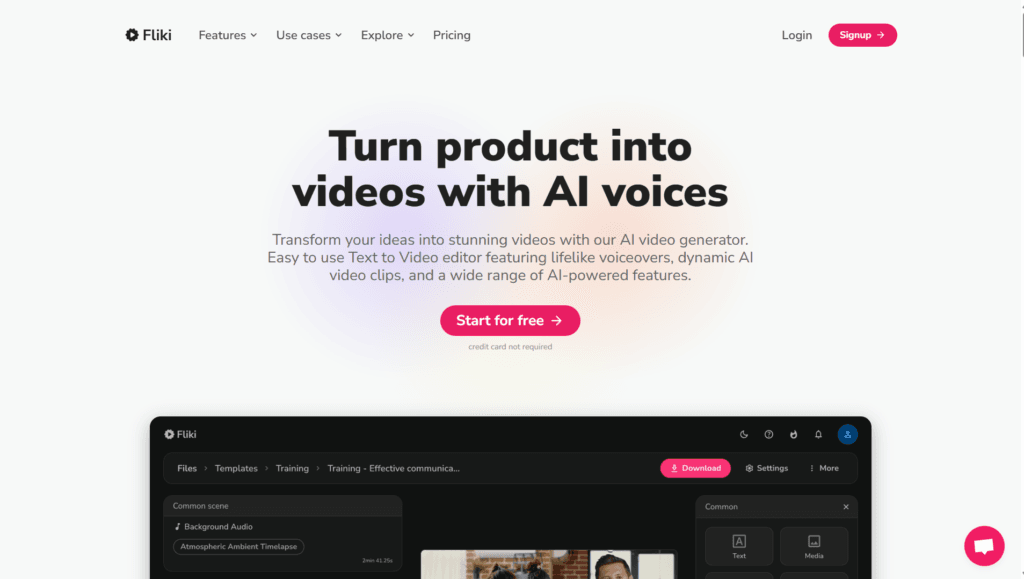
Fliki AI is a versatile AI platform that converts text into engaging videos with lifelike voiceovers, combining text-to-video and text-to-speech technologies in one easy-to-use tool.
Users can input scripts, ideas, blog posts, PPTs, product URLs, or raw clips to generate full videos featuring AI-generated visuals, stock media, music, subtitles, and thumbnails automatically.
It offers over 2500 ultra-realistic AI voices across 80+ languages and 100+ dialects, voice cloning for personalization, AI avatars (70+ options) to add faces without filming, and features like Idea to Video, Blog to Video, PPT to Video, Product to Video, Magic Edit, and Magic Record.
The platform supports HD/1080p exports, multilingual subtitles, custom branding, and commercial use in paid plans.
Founded in 2021 and headquartered in Dover, Delaware, Fliki has grown to serve millions, with 14.6 million videos created in 2025 and strong adoption for social media, marketing, education, e-commerce, and corporate content.
It provides a free tier with 5 minutes/month limited output, while paid plans unlock premium voices, longer durations, no watermarks, and advanced features.
Ideal for content creators, marketers, educators, businesses, and anyone needing quick, high-quality video production without editing skills or expensive equipment.
Key Features
- Text to Video Conversion: Turn scripts, blogs, ideas, PPTs, or product pages into complete videos automatically
- AI Voiceovers: Access 2500+ ultra-realistic voices in 80+ languages and 100+ dialects
- Voice Cloning: Clone your own voice for authentic, personalized narration
- AI Avatars: Add 70+ lifelike avatars to videos without appearing on camera
- Media Library: Millions of premium stock images, clips, stickers, music, and b-rolls
- Auto Subtitles and Thumbnails: Generate captions and eye-catching thumbnails instantly
- Idea to Video: Create videos directly from concepts or prompts
- Blog/PPT/Product to Video: Convert articles, slides, or listings into engaging content
- Magic Edit and Record: Advanced editing tools and screen recording integration
- Multilingual Support: Translate and localize content easily for global audiences
Price Plans
- Free ($0): 5 minutes per month, 300 limited voices, 720p low-res, watermarked videos, basic media access
- Standard ($28/Month or $21/Month yearly): 2160 minutes/year, 1000 voices (150 ultra-realistic), 1080p HD, up to 15 min videos, no watermark, commercial rights, integrations
- Premium ($88/Month or $66/Month yearly): 7200 minutes/year, 2000+ voices (1000 ultra-realistic), up to 40 min videos, multiple brand kits/voice clones, all avatars, priority support
- Enterprise (Custom): Custom credits, bulk discounts, API, dedicated manager, team collaboration, advanced models
Pros
- Extremely user-friendly: No editing skills needed; videos ready in minutes
- High-quality voices: Ultra-realistic AI voices and cloning for professional sound
- Versatile input options: Works with text, blogs, PPTs, URLs, and more
- Free tier available: 5 minutes/month for testing and light use
- Strong growth: Millions of users and 14.6 million videos created in 2025
- Commercial ready: Paid plans support watermark-free, high-res exports
- Mobile app support: Create on the go with iOS/Android apps
Cons
- Limited free minutes: Only 5 minutes/month; heavy users need paid plans quickly
- Paid starting high: Standard plan at $28/month for meaningful usage
- Potential artifacts: AI visuals/voices may have occasional inconsistencies
- Watermarks on free: Outputs include Fliki branding in free tier
- Duration caps: Free/low tiers limit video length; longer needs higher plans
- Internet required: No offline mode for generation
- Learning curve for advanced: Pro features like cloning need setup
Use Cases
- Social media content: Create Reels, Shorts, TikToks from scripts or ideas quickly
- Marketing videos: Produce product demos, ads, explainers with branded voiceovers
- Educational/training: Turn lessons, PPTs, or guides into engaging narrated videos
- E-commerce listings: Generate product videos from descriptions for Amazon/Airbnb
- Corporate communication: Internal updates, announcements, or training modules
- Blog to video: Repurpose articles into visual content for YouTube or social
- Personal projects: Fun stories, greetings, or hobby videos with custom voices
Target Audience
- Content creators and YouTubers: Needing fast video production for channels
- Marketers and businesses: Creating ads, demos, social content efficiently
- Educators and trainers: Converting materials into accessible video lessons
- E-commerce sellers: Enhancing product pages with professional videos
- Corporate teams: Handling internal/external communication videos
- Casual users: Making personal or hobby videos without editing skills
How To Use
- Sign up: Go to fliki.ai and create free account (no card needed for trial)
- Choose workflow: Select Idea to Video, Blog to Video, PPT to Video, or start from script
- Input content: Paste text, URL, upload PPT, or describe idea
- Select voice/avatar: Pick from 2500+ voices or clone your own; add avatar if desired
- Customize: Choose media, style, subtitles, music; edit scenes as needed
- Generate and preview: Let AI build video; preview and tweak with Magic Edit
- Export: Download HD MP4 (watermark-free in paid plans)
How we rated Fliki AI
- Performance: 4.6/5
- Accuracy: 4.5/5
- Features: 4.8/5
- Cost-Efficiency: 4.4/5
- Ease of Use: 4.9/5
- Customization: 4.7/5
- Data Privacy: 4.5/5
- Support: 4.4/5
- Integration: 4.6/5
- Overall Score: 4.6/5
Fliki AI integration with other tools
- Make and Zapier: Automate workflows to connect Fliki with thousands of apps for content distribution
- Social Media Platforms: Optimized exports for YouTube, TikTok, Instagram Reels, and Shorts
- Content Management Tools: Easy upload to CMS like WordPress or marketing platforms
- Mobile Apps: iOS and Android apps for on-the-go creation and editing
- Stock Media Libraries: Built-in access to millions of premium assets for seamless integration
Best prompts optimised for Fliki AI
- Create a professional explainer video for a new productivity app: highlight key features like task management, AI reminders, and team collaboration in engaging style with upbeat music and clear voiceover in American English
- Turn this blog post into a YouTube Short: [paste short article], make it fun and energetic for young audience, add trending effects, subtitles, and motivational voice in British accent
- Generate a product demo video from this Amazon listing: [paste product URL], focus on benefits, show usage scenarios with stock footage, professional female voice, 60 seconds duration
- Convert my PPT slides to narrated training video: [upload PPT], use corporate tone, add transitions, background music, and neutral English voice for e-learning course
- Make an inspirational story video from this idea: A young entrepreneur overcomes challenges to build a successful startup, cinematic visuals, emotional voiceover, motivational soundtrack
FAQs
Newly Added Tools







About Author