Zelili AI

Grok Imagine

Fast and Uncensored AI Image and Video Generator – Powered by Aurora for Photorealistic and Creative Outputs
Tool Release Date

9 Dec 2024

Tool Users
N/A
0.0
πŸ‘ 53

About This AI

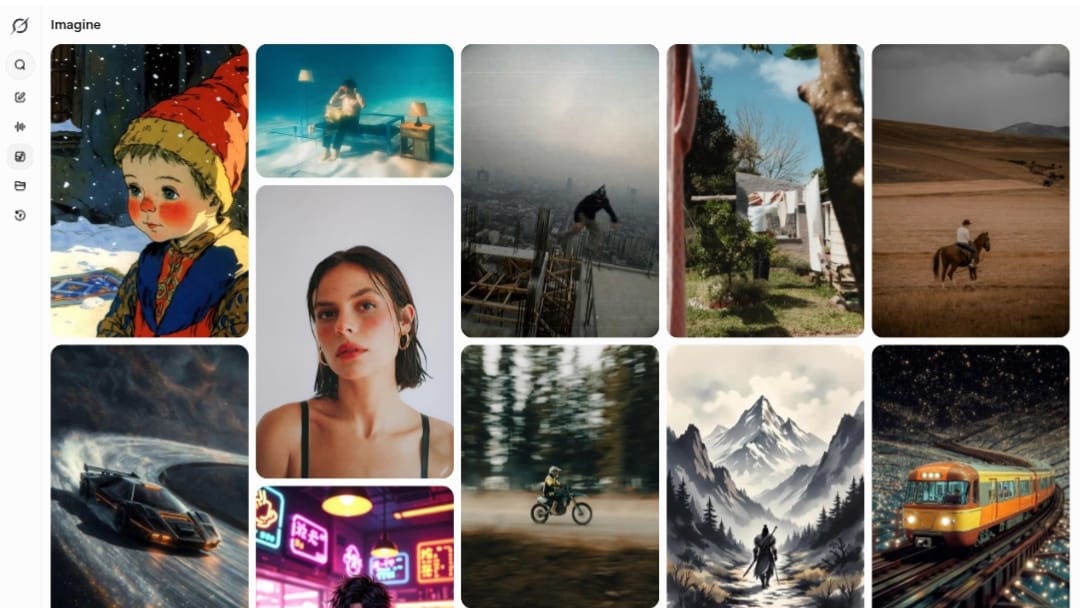
Grok Imagine is xAI’s dedicated image and video generation tool integrated with Grok, allowing users to create high-quality visuals from text prompts or images.

Powered by the Aurora autoregressive model, it excels at photorealistic images, artistic styles, and short video clips (up to 6 seconds with native audio in advanced modes), with strong prompt adherence and minimal restrictions.

Features include fast generation (often under 5 seconds for images), support for diverse styles (photorealistic, anime, cyberpunk, etc.), image editing/editing from uploads, and video extension or animation.

Launched initially in late 2024 with image focus and expanded to video in 2025, it became widely available on the Grok app (iOS/Android) and X platform by mid-2025, with API access added in early 2026.

As part of Grok’s ecosystem, it emphasizes real-time creativity, uncensored outputs (within safety guidelines), and integration for seamless use in chats or standalone.

Free users have limited daily generations, while paid X Premium/SuperGrok tiers unlock higher limits, priority, and full features like enhanced video with audio.

Ideal for creators, meme makers, designers, and casual users wanting quick, high-fidelity AI art without heavy moderation, Grok Imagine stands out for speed, quality, and playful uncensored edge.

Key Features

  1. Text-to-Image Generation: Create photorealistic or styled images from detailed prompts in seconds
  2. Image-to-Video Animation: Turn static images into short dynamic clips with motion and native audio
  3. Aurora Model Power: Autoregressive MoE network trained on vast data for high fidelity and creativity
  4. Fast Latency: Images in under 5 seconds, videos in ~30 seconds for premium users
  5. Style Flexibility: Supports photorealistic, anime, cyberpunk, artistic, and custom styles
  6. Uncensored Approach: Lenient guidelines allowing edgier, satirical, or creative outputs
  7. Image Editing: Refine or modify uploaded images with prompt-based changes
  8. Short Video with Audio: Generate 6-second clips with synced sound effects/voice in advanced modes
  9. Integration with Grok: Use directly in Grok chats or standalone Imagine interface
  10. Daily Limits and Priority: Higher generation quotas and faster queues for paid subscribers

Price Plans

  1. Free ($0): Very limited daily generations (e.g., few images/videos) or waitlist access; basic quality
  2. X Premium ($8/Month): Increased image/video limits, standard access, priority queue
  3. X Premium+ / SuperGrok ($30/Month): Higher quotas (e.g., 200+ images/videos daily), full features, enhanced models, priority support
  4. SuperGrok Heavy ($300/Month): Unlimited or maximum limits, early access, highest priority for advanced generations

Pros

  1. Blazing fast generation: Quick results make it ideal for iterative creative work
  2. High visual quality: Aurora delivers photorealism and strong prompt adherence
  3. Lenient content rules: Allows more freedom for satire, public figures, or bold ideas
  4. Multimodal evolution: Combines image/video with native audio for rich outputs
  5. Seamless Grok/X integration: Easy access within chat or app without switching tools
  6. Competitive pricing access: Available via X Premium starting at $8/month
  7. Continuous updates: Rapid improvements from xAI's frontier model releases

Cons

  1. Subscription required for full access: Free tier very limited or waitlisted; needs Premium/SuperGrok
  2. Short video limits: Clips typically 6 seconds; longer requires extensions or premium
  3. Platform tied: Best in Grok app/X; standalone may have fewer features
  4. Occasional inconsistencies: AI can misinterpret complex prompts or add artifacts
  5. Daily quotas apply: Even paid tiers have fair-use limits during peaks
  6. Ethical concerns: Uncensored nature raises risks for misuse or deepfakes
  7. No offline use: Requires internet and account for generation

Use Cases

  1. Meme and social content: Quick creation of funny or satirical images/videos for X/TikTok
  2. Creative brainstorming: Visualize ideas, concepts, or storyboards rapidly
  3. Marketing visuals: Generate product mockups, ads, or branded imagery
  4. Art and illustration: Produce anime, photoreal, or custom styles for personal/projects
  5. Video prototyping: Animate static concepts into short clips with motion/audio
  6. Uncensored creativity: Explore edgier or unrestricted themes for satire/art
  7. Daily fun: Casual experimentation with prompts in Grok chats

Target Audience

  1. Social media users: Creating memes, posts, or viral content on X
  2. Content creators: Needing fast visuals/videos for YouTube/TikTok
  3. Designers and artists: Prototyping ideas or generating styled assets
  4. X/Grok enthusiasts: Leveraging uncensored, integrated AI features
  5. Marketers and advertisers: Quick branded imagery without heavy tools
  6. Casual experimenters: Enjoying playful, high-quality AI generation

How To Use

  1. Access via Grok: Open grok.com/imagine or Grok app on iOS/Android/X platform
  2. Sign in: Use X account (Premium+ or SuperGrok recommended for full access)
  3. Enter prompt: Type detailed text description or upload image for editing/video
  4. Customize: Add style modifiers, aspect ratio, or mode (image/video)
  5. Generate: Submit; results appear in seconds to minutes depending on queue
  6. Refine: Edit prompt, regenerate, or extend video if available
  7. Download/share: Save or share directly on X or export for use

How we rated Grok Imagine

  • Performance: 4.7/5
  • Accuracy: 4.6/5
  • Features: 4.8/5
  • Cost-Efficiency: 4.4/5
  • Ease of Use: 4.8/5
  • Customization: 4.7/5
  • Data Privacy: 4.5/5
  • Support: 4.4/5
  • Integration: 4.6/5
  • Overall Score: 4.7/5

Grok Imagine integration with other tools

  1. X Platform: Direct generation and sharing within X posts, chats, or Grok conversations
  2. Grok App: Native iOS/Android app access for mobile image/video creation
  3. xAI API: Developer access for embedding Grok Imagine in custom apps or workflows
  4. Third-Party Editors: Export images/videos (PNG/MP4) for use in Photoshop, Premiere, CapCut, etc.
  5. Social Sharing: Optimized for quick posting to X, with potential future ties to other platforms

Best prompts optimised for Grok Imagine

  1. A cyberpunk city at night with neon lights reflecting on wet streets, flying cars, detailed futuristic architecture, cinematic lighting, high resolution, photorealistic
  2. Cute anthropomorphic cat wearing sunglasses and a leather jacket, sitting on a motorcycle in a desert sunset, anime style, vibrant colors, dynamic pose
  3. Epic fantasy landscape with ancient ruins overgrown by vines, massive dragon flying overhead, dramatic storm clouds, golden hour lighting, ultra detailed, cinematic
  4. Surreal portrait of a woman made of flowing water and flowers, ethereal atmosphere, soft pastel colors, dreamlike, high fashion photography style
  5. Minimalist black and white photo of a lone astronaut floating in space, Earth in background, dramatic lighting, sci-fi realism, high contrast
Grok Imagine delivers fast, high-quality AI image and short video generation with strong prompt adherence and a lenient approach to creative freedom. Integrated seamlessly with Grok/X, it’s excellent for quick visuals and memes. Paid tiers from $8/month unlock generous limits and priority, making it a top choice for uncensored, speedy AI art in 2026.

FAQs

  • What is Grok Imagine?

    Grok Imagine is xAI’s AI tool for generating high-quality images and short videos from text prompts or images, powered by the Aurora model with fast, uncensored creative capabilities.

  • When was Grok Imagine released?

    Image generation launched December 9, 2024, with video features added in 2025; full availability rolled out across Grok app and X by mid-2025.

  • Is Grok Imagine free to use?

    Free tier offers very limited daily generations; full access and higher limits require X Premium ($8/month) or SuperGrok ($30/month) subscriptions.

  • What can Grok Imagine generate?

    It creates photorealistic/artistic images quickly and short video clips (up to 6 seconds with native audio in premium modes), supporting diverse styles and prompt types.

  • How does Grok Imagine compare to other AI generators?

    It stands out for speed, uncensored approach, and integration with Grok/X, often rivaling Midjourney/DALL-E in quality while allowing more freedom for edgy content.

  • What are the generation limits?

    Free: very limited; X Premium: 100+ images/videos daily; SuperGrok/Premium+: 200+ or higher with priority queue; subject to fair use.

  • Does Grok Imagine support video?

    Yes, it generates short animated clips from text/images with motion and audio in premium tiers, with extensions possible for longer content.

  • How do I access Grok Imagine?

    Via grok.com/imagine, Grok iOS/Android app, or X platform; requires X account and preferred subscription for best experience.

Newly Added Tools​

CodeRabbit

$0/Month

Code Genius

$0/Month

AskCodi

$20/Month

PearAI

$0/Month
Grok Imagine Alternatives

GLM-OCR

$0/Month

Lummi AI

$10/Month

Bing Image Creator

$0/Month

Grok Imagine Reviews

0.0
0.0 out of 5 stars (based on 0 reviews)
Excellent0%
Very good0%
Average0%
Poor0%
Terrible0%

There are no reviews yet. Be the first one to write one.