
What is InfoCam AI?
InfoCam AI is an AI-powered video analytics tool that connects to existing CCTV systems to detect safety hazards, hygiene issues, SOP violations, theft, and operational problems in real-time.
Who develops InfoCam AI?
It is developed by Imagyn Technologies and associated with the AI360Pulse platform, focused on AI surveillance solutions.
Is InfoCam AI free to use?
It offers a one-week free trial; full access is via subscription (pricing custom/contact-based, likely per camera/site or usage).
What industries does InfoCam AI serve?
Primarily retail, FMCG, manufacturing, hospitality/restaurants, education institutions, and other workplace environments needing compliance and safety monitoring.
Does InfoCam AI require new cameras?
No, it works with existing CCTV/DVR/NVR systems; no rip-and-replace needed for deployment.
What kind of detections does InfoCam AI provide?
It identifies spills, wet floors, dropped trays, theft, trespassing, accidents, policy violations, and more, with instant alerts and reports.
How does InfoCam AI deliver insights?
Through real-time notifications, Excel reports, screenshots, short video clips, and a cloud dashboard for multi-site management.
Is InfoCam AI suitable for multi-site businesses?
Yes, it’s designed to scale across multiple locations with centralized cloud monitoring and customizable workflows.

InfoCam AI

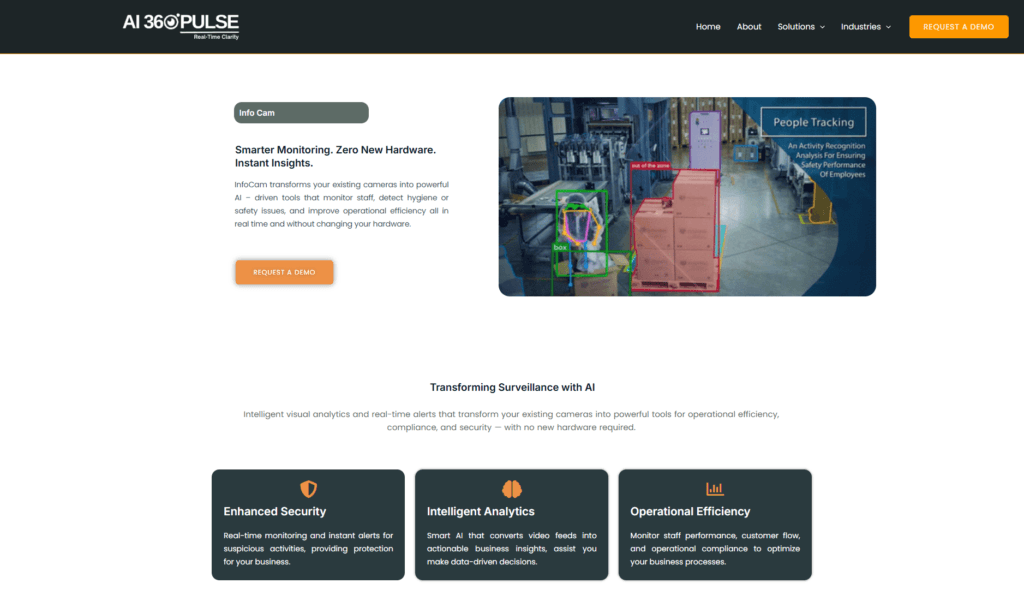
About This AI
InfoCam AI is an AI-driven surveillance solution that upgrades standard CCTV systems into intelligent monitoring tools without replacing hardware.
It connects to existing DVR/NVR cameras to detect hundreds of SOP violations, safety hazards, hygiene issues, theft, accidents, trespassing, and operational inefficiencies in real-time.
The system provides instant alerts, actionable insights, Excel reports, screenshots, short video clips, and performance tracking for industries like FMCG, retail, manufacturing, hospitality, education, and more.
Key capabilities include spill detection, wet floor alerts, staff monitoring, policy compliance checks, kitchen hazards, dropped trays, and brand protection against counterfeits.
It emphasizes proactive threat detection, efficiency gains, and data-driven decisions by turning raw video into structured reports and notifications.
Developed by Imagyn Technologies (or associated with AI360Pulse platform), it offers subscription-based pricing with optional customization and one-week free trials.
No rip-and-replace required; scalable across multiple sites with cloud-based processing for real-time visibility and compliance readiness.
Ideal for businesses seeking smarter, cost-effective surveillance to enhance safety, reduce losses, and improve operations through AI analytics.
Key Features
- Real-time violation detection: Identifies SOP breaches, safety risks, hygiene issues, theft, and accidents instantly
- Integration with existing CCTV: Works with current DVR/NVR systems; no hardware replacement needed
- Actionable insights and reports: Generates Excel reports, screenshots, video clips, and alerts for quick response
- Industry-specific monitoring: Tailored for retail, manufacturing, hospitality, education, FMCG, and more
- Proactive alerts: Instant notifications for spills, wet floors, dropped trays, trespassing, or policy violations
- Cloud-based scalability: Supports multi-site deployment with centralized management
- Compliance and safety focus: Ensures workplace standards, reduces risks, and protects brand integrity
- Performance tracking: Monitors operational efficiency and staff behavior through video analytics
Price Plans
- Free Trial ($0): One-week free trial to test core detection, alerts, and reporting features
- Subscription (Custom/Paid): Tiered subscription pricing for full access, multi-site scalability, and advanced analytics; contact for details (e.g., per camera/site or usage-based)
- Enterprise/Custom (Custom): Tailored plans with customization, support, and higher volume for large deployments
Pros
- No hardware upgrade needed: Leverages existing cameras for cost savings and easy adoption
- Real-time proactive detection: Prevents issues before they escalate with instant alerts
- Industry-tailored analytics: Strong in retail, hospitality, manufacturing, and education compliance
- Actionable reporting: Converts video data into useful reports and clips for decision-making
- Scalable and cloud-powered: Handles multiple locations without complexity
- Free trial available: One-week trial to test capabilities
- Focus on safety and efficiency: Reduces losses, improves operations, and ensures compliance
Cons
- Pricing not publicly detailed: Subscription model mentioned but exact starting costs unclear without inquiry
- Limited public info: Few independent reviews or user numbers available
- Cloud dependency: Requires internet for processing and alerts
- Potential privacy concerns: Staff monitoring and video analytics raise ethical/data issues
- Customization may add cost: Optional tailoring for specific workflows could increase pricing
- Industry-specific focus: Less versatile for non-surveillance or non-compliance use cases
- No offline mode: Relies on connected systems for full functionality
Use Cases
- Retail and FMCG monitoring: Detect theft, compliance violations, and operational issues
- Hospitality safety: Spot spills, kitchen hazards, wet floors, and staff performance
- Manufacturing compliance: Ensure SOP adherence, safety protocols, and accident prevention
- Education institutions: Monitor campuses for trespassing, safety, and policy enforcement
- Workplace efficiency: Track staff behavior and generate reports for better management
- Brand protection: Prevent counterfeits and operational risks through video insights
- Multi-site management: Centralized oversight for chains or distributed locations
Target Audience
- Retail and FMCG businesses: Needing theft prevention and compliance monitoring
- Hospitality and restaurant owners: Focused on safety, hygiene, and operational alerts
- Manufacturing facilities: Ensuring worker safety and SOP adherence
- Educational institutions: Campus security and policy enforcement
- Corporate security teams: Proactive risk detection without hardware changes
- Multi-site operators: Scalable cloud-based video analytics
How To Use
- Contact provider: Visit ai360pulse.com/info-cam or reach out via email/phone for demo/trial
- Connect cameras: Link existing CCTV/DVR/NVR to the platform (no replacement needed)
- Configure detections: Set up rules for violations, hazards, or custom SOP checks
- Monitor dashboard: View real-time alerts, video feeds, and analytics in cloud portal
- Receive notifications: Get instant alerts via app/email for detected issues
- Generate reports: Access Excel summaries, clips, and screenshots for review/action
- Scale deployment: Add more sites/cameras as needed with subscription
How we rated InfoCam AI
- Performance: 4.4/5
- Accuracy: 4.5/5
- Features: 4.6/5
- Cost-Efficiency: 4.3/5
- Ease of Use: 4.2/5
- Customization: 4.4/5
- Data Privacy: 4.0/5
- Support: 4.1/5
- Integration: 4.5/5
- Overall Score: 4.4/5
InfoCam AI integration with other tools
- Existing CCTV Systems: Direct connection to DVR/NVR/IP cameras for plug-and-play analytics
- Cloud Dashboard: Centralized web portal for multi-site monitoring, alerts, and reports
- Notification Channels: Email, SMS, or app alerts for instant incident reporting
- Reporting Tools: Exports to Excel and video clip formats for compliance documentation
- Potential Enterprise Systems: Custom integrations for HR, operations, or security management software (contact for details)
Best prompts optimised for InfoCam AI
- Not applicable - InfoCam AI is a surveillance analytics tool that works automatically on connected CCTV feeds; no text prompts required for core functionality as it uses pre-configured detection rules and AI models for video processing.
FAQs
Newly Added Tools







About Author