
What is Luma Ray 3?
Luma Ray 3 is Luma AI’s reasoning video generation model that creates cinematic, high-fidelity videos from text, images, or clips with advanced controls, native HDR, and Draft Mode for fast ideation.
When was Luma Ray 3 released?
Ray 3 launched on September 18, 2025, with major update Ray3.14 released January 26, 2026, adding native 1080p, 4x speed, and 3x lower cost.
Is Luma Ray 3 free to use?
Yes, free tier with limited credits in Dream Machine; paid plans start around $8/month for higher credits, unlimited relaxed mode, HDR, and commercial use.
What makes Ray 3 different from other AI video models?
It’s the first reasoning video model with multimodal thinking, native 16-bit HDR EXR, Draft Mode (5x faster/cheaper), and strong video-to-video controls like character reference and keyframes.
What resolutions and features does Ray 3 support?
Native 1080p (Ray3.14), up to 4K HDR up-res, Draft Mode, HDR EXR export, physics/motion realism, annotation, modify video, and high-fidelity consistency.
How many users does Luma AI have?
Luma AI’s Dream Machine platform powers creation for over 30 million users, with Ray 3 widely adopted in creative industries.
Can Ray 3 be used commercially?
Yes, paid plans (Pro and above) allow commercial use with watermark-free, high-res outputs suitable for ads, film, and gaming.
Where can I access Luma Ray 3?
Available in Dream Machine (lumalabs.ai), Adobe Firefly partner integration, and iOS/web apps for generation and editing.

Luma Ray 3

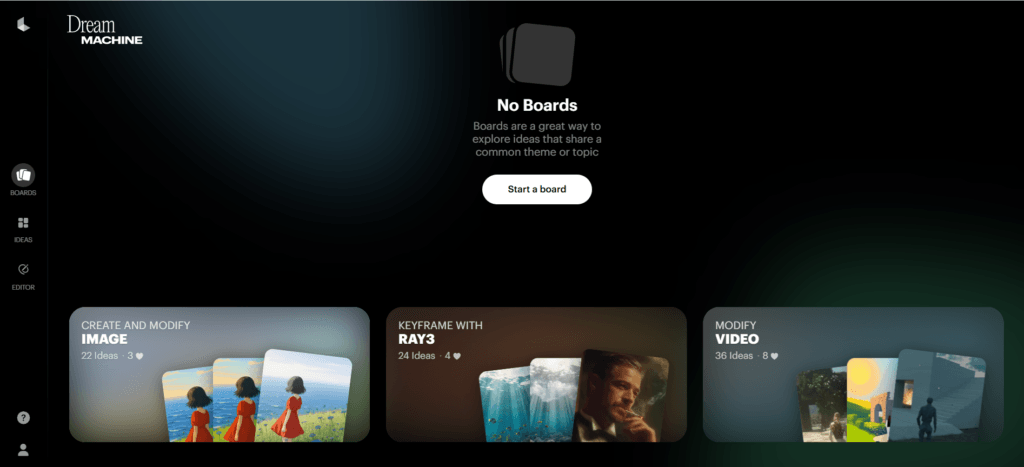
About This AI
Luma Ray 3 is Luma AI’s advanced reasoning video model, the first of its kind to think like a creative partner before generating cinematic videos.
Released September 18, 2025, and updated to Ray3.14 in January 2026, it excels in text-to-video, image-to-video, video-to-video modifications, character reference, keyframe control, and native HDR (16-bit EXR) output for production-grade fidelity.
Key strengths include multimodal reasoning for intent understanding and iteration, realistic physics/motion, temporal stability, improved prompt adherence, and features like Draft Mode (5x faster/cheaper for rapid exploration), annotation for precise layout/motion, Modify Video (wardrobe/environment swaps, relighting), and HiFi up-rendering to 4K HDR.
Ray3.14 adds native 1080p generation, 4x faster performance, 3x lower cost, better stability, and motion consistency, eliminating quality-speed-cost trade-offs.
Available via Dream Machine platform (web/iOS) with credit-based usage; free tier offers limited generations, while paid plans unlock unlimited relaxed mode, high priority, commercial rights, and higher limits.
Integrated as partner model in Adobe Firefly for early access and professional workflows.
Targeted at filmmakers, advertisers, game developers, and creators needing high-fidelity, controllable AI video for storytelling, pre-vis, ads, and animation.
Key Features
- Reasoning-driven generation: Model thinks, evaluates, iterates for better intent matching and quality
- Native HDR pipeline: First-to-market 16-bit HDR EXR output with tone mapping for professional color depth
- Draft Mode: 5x faster and 5x cheaper near-realtime ideation and exploration
- Video-to-video controls: Character reference, keyframe start/end, modify (wardrobe/environment swap, relighting)
- Annotation tools: Draw on images for precise layout, motion, and interaction guidance
- HiFi mastering: Upscale draft videos to production-grade 4K HDR
- Native 1080p in Ray3.14: Direct high-res generation without post-upscaling
- Improved physics and consistency: Realistic motion, anatomy, lighting, reflections, and temporal stability
- Per-second pricing: Scalable costs for production workflows in latest update
- Integration with Dream Machine: Text/image/video inputs, loop/extend/upscale features
Price Plans
- Free ($0): Limited daily credits/generations in Dream Machine, basic access to Ray3 features
- Starter/Lite (~$8/Month): Higher credits, relaxed mode, full Ray3 access, non-commercial
- Creator Pro (~$24-30/Month): 10,000+ credits/month, unlimited relaxed mode, 4K/HDR, high priority, commercial use
- Enterprise (Custom): Higher credits, highest priority, dedicated support for teams
Pros
- Production-grade quality: HDR, 1080p native, strong physics, and consistency for film/ad/gaming use
- Reasoning intelligence: Better prompt understanding and creative iteration than non-reasoning models
- Fast and cost-efficient: Draft Mode and Ray3.14 make it 4x faster and 3x cheaper
- Creative controls: Keyframes, character ref, annotations, modify video for precise output
- Professional pipelines: EXR export, high-fidelity suitable for broadcast/streaming
- Freemium access: Free credits to start, paid plans for heavy/commercial use
- Partner integrations: Available in Adobe Firefly for seamless pro workflows
Cons
- Credit-based limits: Free tier has daily/generation caps; heavy use requires paid credits
- Generation time: Complex high-res/HDR can still take time even with improvements
- Platform-dependent: Primarily web/iOS; no native Android/desktop app mentioned
- Cost for scale: Per-second pricing adds up for long or bulk campaigns
- Learning curve: Advanced controls (keyframes, annotations) require practice
- Occasional inconsistencies: Reasoning helps but complex scenes may have artifacts
- No offline mode: Requires internet for generation
Use Cases
- Film and short-form storytelling: Generate cinematic scenes with reasoning for narrative coherence
- Advertising campaigns: Create product demos, ads, regional variations quickly and scalably
- Game development pre-vis: Animate concepts, test motion, or visualize levels
- Animation and VFX: Use video-to-video for modifications, relighting, character consistency
- Creative ideation: Rapid drafting in Draft Mode for brainstorming visuals
- Professional editing workflows: Export HDR EXR to Premiere Pro or other tools
- Content creation: Text/image to high-fidelity video for social, YouTube, or marketing
Target Audience
- Filmmakers and directors: Needing cinematic, controllable video generation
- Advertisers and marketers: Producing high-volume, consistent creative assets
- Game developers: Prototyping animations and environments
- VFX artists: Modifying footage with AI for effects and consistency
- Content creators: YouTubers, social media pros wanting pro-grade clips
- Creative agencies: Scaling video production with reasoning AI
How To Use
- Sign up: Visit lumalabs.ai or Dream Machine, create free account for starter credits
- Choose input: Enter text prompt, upload image/video, or use existing clip
- Select mode: Draft for quick ideas, standard Ray3 for full quality, enable HDR if needed
- Customize controls: Add keyframes, character reference, annotations, or modify instructions
- Generate: Submit and wait; use Draft Mode for fast iterations
- Refine and export: Upscale with HiFi, extend/loop, download in HDR/SDR formats
- Integrate pro tools: Export EXR to Premiere Pro or use in Adobe Firefly partner access
How we rated Luma Ray 3
- Performance: 4.8/5
- Accuracy: 4.7/5
- Features: 4.9/5
- Cost-Efficiency: 4.6/5
- Ease of Use: 4.5/5
- Customization: 4.8/5
- Data Privacy: 4.4/5
- Support: 4.5/5
- Integration: 4.7/5
- Overall Score: 4.7/5
Luma Ray 3 integration with other tools
- Adobe Firefly: Partner integration for Ray3 access in Firefly app and Boards, seamless to Premiere Pro workflows
- Dream Machine Platform: Native web/iOS app for generation, editing, and export
- Professional Editing Software: HDR EXR output compatible with Premiere Pro, DaVinci Resolve, After Effects
- Creative Cloud Ecosystem: Works within Adobe tools for refinement and production pipelines
- API (Potential): Developer access for custom integrations in apps or automated video pipelines
Best prompts optimised for Luma Ray 3
- A lone astronaut floating in deep space, discovering an ancient alien monolith, slow cinematic dolly zoom, dramatic lighting, realistic physics, HDR, 10 seconds
- Busy Tokyo street at night during cherry blossom season, neon lights reflecting on wet pavement, crowds walking, dynamic camera pan, photorealistic, motion blur, high detail
- Fantasy elf warrior battling a dragon in misty mountains, epic sword fight, fire breath, dramatic camera angles, anime style with realistic physics, HDR cinematic
- Product shot of a luxury watch on wooden table, camera slowly rotating 360 degrees, soft studio lighting, reflections on metal, 4K quality, professional advertising look
- Surreal dream sequence: a person walking through a mirror portal into an upside-down city, smooth transition, floating objects, vibrant colors, artistic motion
FAQs
Newly Added Tools







About Author