



Zelili AI

Lummi AI

Curated AI-Generated Stock Images, Illustrations, and 3D Assets – Royalty-Free Visuals for Designers and Creatives
Tool Release Date

Mar 2024

Tool Users
N/A
0.0
๐Ÿ‘ 38

About This AI

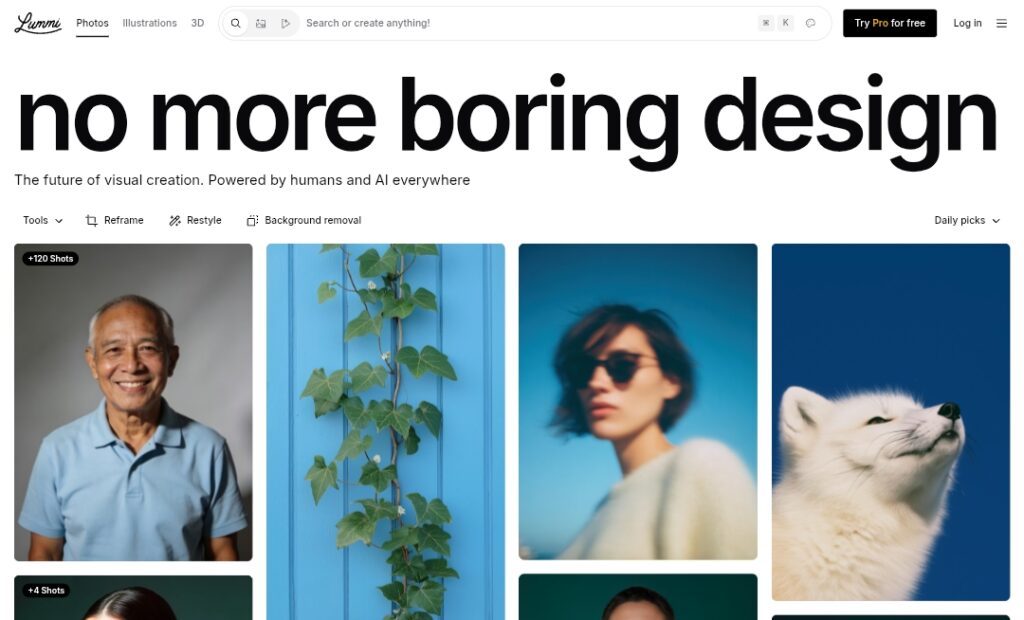
Lummi AI is a creative platform offering a curated library of high-quality, royalty-free AI-generated stock images, illustrations, and 3D renders.

Founded in 2020 by Pablo Stanley and team (known for tools like Blush), it focuses on tasteful, non-generic visuals created by top AI artists to avoid the ‘cringe’ factor of overused stock photos.

Users can browse thousands of free images (growing daily) across categories like editorial, art, 3D, and more, with tools including Text to Image generation, Reframe (aspect ratio adjustment), Restyle (effects like Duotone), Background Removal, Ultra Resolution upscaling, and Retouch for editing.

All images come without backgrounds by default, making them easy to composite.

The platform emphasizes human-curated quality and creative control, serving as an Unsplash alternative but powered by AI.

Acquired by Udemy in June 2025 to enhance instructor tools and course visuals, Lummi integrates with design apps like Figma, Canva, and Adobe Express.

Free access provides a vast library and basic generation, while Lummi Pro unlocks premium features like watermark-free downloads, unlimited generations, advanced editing, and higher resolution outputs.

Ideal for designers, marketers, bloggers, educators, and content creators needing professional, on-brand visuals quickly and affordably.

Key Features

  1. Curated AI Stock Library: Thousands of royalty-free images, illustrations, and 3D assets hand-picked for quality and taste
  2. Text to Image Generation: Create custom visuals from prompts with style consistency and on-brand results
  3. Reframe Tool: Effortlessly change aspect ratios or expand images while preserving composition
  4. Restyle and Effects: Apply styles like Duotone or other creative filters to any image
  5. Background Removal: Automatic precise subject extraction with transparent PNG output
  6. Ultra Resolution Upscaler: Enhance images to large sizes with detail recovery (Pro feature)
  7. Retouch and Editing: Make images your own with AI-powered adjustments and refinements
  8. Daily Picks and Explore: Discover trending images, collections, and top creators for inspiration
  9. No Background by Default: Every image ready for easy compositing in designs
  10. Shoots and Consistency: Generate series of images with matching style, vibe, and models

Price Plans

  1. Free ($0): Access to thousands of royalty-free AI stock images, basic generation, daily picks, and limited tool uses (e.g., refra me/restyle/background removal)
  2. Lummi Pro ($10/Month billed yearly or $15 monthly): Watermark-free library, unlimited generations, ultra resolution, advanced tools (Reframe any image, AI editing), 60+ AI credits monthly, commercial use support

Pros

  1. High taste and quality: Curated to avoid generic AI looks; visuals feel artistic and professional
  2. Generous free library: Thousands of usable images without cost or royalties
  3. Powerful editing tools: Reframe, restyle, upscaling, and background removal make it versatile
  4. Creative control: Prompt-based generation plus editing for on-brand results
  5. Integrations friendly: Works seamlessly with Figma, Canva, Adobe Express via plugins or exports
  6. Affordable Pro: Unlocks unlimited and advanced features at low monthly cost
  7. Community focus: Features top AI creators and daily inspiration feeds

Cons

  1. Limited free generation: Basic text-to-image and tools have usage caps or lower res
  2. Pro required for full power: Unlimited, watermark-free, ultra-res, and advanced editing behind paywall
  3. No video generation yet: Focuses on static images/3D; video added later in updates
  4. Library size vs competitors: Growing but smaller than massive traditional stock sites
  5. Web-primary: No dedicated desktop/mobile app; browser-based experience
  6. Occasional prompt variability: AI generation can need iteration for perfect matches
  7. Post-acquisition changes: Udemy ownership may shift focus toward education/tools

Use Cases

  1. Web and UI design: Source clean, background-free illustrations for apps and websites
  2. Blog and content marketing: High-quality visuals to enhance articles and social posts
  3. Course creation: Custom illustrations for Udemy or educational materials
  4. Marketing assets: On-brand images for ads, banners, and presentations
  5. Social media graphics: Quick generation and editing for posts/Reels
  6. Product mockups: Use 3D renders or restyled images for e-commerce
  7. Personal projects: Free stock for portfolios, invitations, or creative experiments

Target Audience

  1. Graphic designers and UI/UX pros: Needing tasteful, editable stock assets
  2. Content creators and bloggers: Enhancing posts with unique visuals
  3. Educators and Udemy instructors: Custom illustrations for courses
  4. Marketers and small businesses: Affordable on-brand imagery
  5. AI art enthusiasts: Exploring curated AI-generated libraries
  6. Web developers: Integrating clean images into sites via exports

How To Use

  1. Visit site: Go to lummi.ai and browse Explore or search categories
  2. Search or generate: Use search for existing images or enter prompt in generator
  3. Edit with tools: Apply Reframe, Restyle, Background Removal, or Upscale to any image
  4. Download: Free images downloadable (some watermarked); Pro for unlimited HD
  5. Refine prompt: Iterate text descriptions for better generation results
  6. Use integrations: Install Figma plugin or export to Canva/Adobe for workflow
  7. Go Pro: Upgrade for unlimited access, no watermarks, and advanced features

How we rated Lummi AI

  • Performance: 4.5/5
  • Accuracy: 4.6/5
  • Features: 4.7/5
  • Cost-Efficiency: 4.8/5
  • Ease of Use: 4.9/5
  • Customization: 4.6/5
  • Data Privacy: 4.5/5
  • Support: 4.4/5
  • Integration: 4.7/5
  • Overall Score: 4.7/5

Lummi AI integration with other tools

  1. Figma Plugin: Direct access to Lummi library and generation tools inside Figma for seamless design workflow
  2. Canva and Adobe Express: Easy import and use of Lummi images in popular design platforms
  3. Udemy Ecosystem: Integrated for instructors to add custom AI illustrations to courses
  4. Web Exports: PNG/JPG downloads compatible with WordPress, Squarespace, or any CMS
  5. API Potential: Developer access for embedding generation or library search in custom apps (via Udemy/Stability heritage)

Best prompts optimised for Lummi AI

  1. Minimalist flat illustration of a woman working on laptop in cozy cafe, soft pastel colors, clean lines, editorial style, high detail
  2. Futuristic 3D render of abstract geometric shapes floating in neon space, cyberpunk vibe, metallic textures, dramatic lighting
  3. Serene desert landscape at golden hour with lone cactus and distant mountains, cinematic wide shot, warm tones, ultra realistic
  4. Playful cartoon character of a fox explorer in forest adventure, vibrant colors, whimsical style, perfect for kids illustration
  5. Modern office scene with diverse team brainstorming on whiteboard, flat design, inclusive representation, professional yet fun
Lummi AI delivers curated, tasteful AI-generated stock images and illustrations that stand out from generic outputs. With a strong free library, powerful editing tools like Reframe and Restyle, and affordable Pro at $10/month, it’s excellent for designers and creators. Post-Udemy acquisition, it boosts educational and marketing visuals effectively.

FAQs

  • What is Lummi AI?

    Lummi AI is a platform offering a curated library of royalty-free AI-generated stock images, illustrations, and 3D assets, plus tools like text-to-image generation, Reframe, Restyle, and background removal.

  • Who founded Lummi AI?

    Lummi was founded by Pablo Stanley (known for Blush) in 2020; acquired by Udemy in June 2025 to enhance creative tools for instructors.

  • Is Lummi AI free to use?

    Yes, free access includes thousands of royalty-free images and basic tools; Lummi Pro ($10/month billed yearly) unlocks unlimited generations, watermark-free downloads, ultra resolution, and advanced editing.

  • What makes Lummi different from other AI image tools?

    Lummi focuses on curated, high-taste visuals by top AI artists to avoid generic looks, with editing tools like Reframe and Restyle, plus strong integration for designers (Figma, Canva).

  • When was Lummi launched?

    Lummi launched around March 2024 (Product Hunt ranking), with major growth before its Udemy acquisition in June 2025.

  • Can I use Lummi images commercially?

    Yes, all images are royalty-free for personal and commercial use; Pro plan enhances with watermark-free high-res and unlimited access.

  • Does Lummi support text-to-image generation?

    Yes, the built-in generator creates custom images, illustrations, or 3D from prompts, with style consistency and editing options.

  • What integrations does Lummi have?

    It includes a Figma plugin, easy exports for Canva/Adobe Express, Udemy course tools integration, and web-compatible downloads.


Newly Added Toolsโ€‹

Qwen-Image-2.0

$0/Month

Qodo AI

$0/Month

Codiga

$10/Month

Tabnine

$59/Month
Lummi AI Alternatives

Qwen-Image-2.0

$0/Month

GLM-OCR

$0/Month

Bing Image Creator

$0/Month

Lummi AI Reviews

0.0
0.0 out of 5 stars (based on 0 reviews)
Excellent0%
Very good0%
Average0%
Poor0%
Terrible0%

There are no reviews yet. Be the first one to write one.