
What is Nano Banana Pro?
Nano Banana Pro is Google’s advanced AI image generation and editing model based on Gemini 3 Pro, released November 2025, specializing in high-quality visuals with precise text rendering, reasoning, and professional design features.
How do I access Nano Banana Pro?
Use it free (with watermarks) in the Gemini app at gemini.google.com, or get watermark-free/full access via Gemini Advanced ($20/month), Vertex AI, Google Workspace, or API.
What makes Nano Banana Pro different from earlier models?
It builds on Gemini 3 Pro for better reasoning, text accuracy, infographics/diagrams, multi-reference support, real-world grounding, and professional consistency compared to Nano Banana (Gemini 2.5 Flash).
Is Nano Banana Pro free?
Free in Gemini app with visible watermarks and limits; watermark-free, higher limits, and advanced features require Gemini Advanced or enterprise plans.
Can Nano Banana Pro generate text in images?
Yes, it excels at clear, legible text rendering in multiple languages and styles, perfect for logos, posters, infographics, and product mockups.
What resolutions does Nano Banana Pro support?
Up to 4K in select interfaces (like third-party tools); standard outputs are high-res with options for enhanced quality in paid/enterprise modes.
Is Nano Banana Pro available for developers?
Yes, through Vertex AI and Gemini API with pay-per-use pricing, safety filters, and enterprise features for integration into custom apps.
When was Nano Banana Pro launched?
Google DeepMind announced and released Nano Banana Pro on November 20, 2025, as part of Gemini 3 Pro advancements.

Nano Banana Pro

About This AI
Nano Banana Pro is Google’s state-of-the-art image generation and editing model, built on Gemini 3 Pro and released in November 2025.
It excels in creating high-resolution, photorealistic or stylized images with exceptional prompt adherence, flawless text rendering in multiple languages, infographics, diagrams, and structured content.
Powered by advanced reasoning capabilities, it handles complex prompts involving real-world knowledge, multiple reference images, subject consistency across angles, grounding with Google Search data, and precise local edits like object removal/addition or style transfers.
Key strengths include crystal-clear legible text in images, improved visual design for professional assets, and thinking mode for better composition and accuracy.
Accessible via the Gemini app (free with watermarks), Google AI Studio, Vertex AI for developers, Google Workspace tools (Slides, Vids, NotebookLM), and third-party integrations like Adobe Firefly.
It supports 4K outputs in some interfaces, fast generation (often 10 seconds), and enterprise features like safety filters and provisioned throughput.
As the successor to earlier Nano Banana models, it targets professional creators, designers, marketers, and businesses needing reliable, high-fidelity AI visuals without heavy post-editing.
Key Features
- Studio-quality image generation: Creates high-fidelity visuals from text prompts with precise composition and detail
- Advanced text rendering: Generates legible, accurate text in multiple languages and styles within images
- Thinking/reasoning mode: Applies deep reasoning for better prompt understanding and logical image construction
- Precise editing controls: Local edits, object addition/removal, style transfer, and subject consistency across angles
- Multi-reference support: Uses multiple input images for grounded, consistent outputs
- Real-world knowledge grounding: Integrates Google Search data for factual accuracy in visuals
- Infographics and diagrams: Excels at structured content like charts, posters, and educational visuals
- High-resolution output: Supports up to 4K in select interfaces with enhanced quality
- Fast generation speeds: Often completes in 10 seconds with optimized performance
- Enterprise integrations: Available in Vertex AI, Google Workspace, and API for scaled use
Price Plans
- Free ($0): Access in Gemini app with watermarks, limited daily generations, basic Nano Banana Pro features
- Gemini Advanced/Plus ($20/Month): Watermark-free, higher limits, priority access, full reasoning mode in Gemini app
- Vertex AI / Enterprise (Pay-per-use or Custom): API access, provisioned throughput, advanced safety, integration in Workspace and other Google tools
Pros
- Superior text and structure handling: Best-in-class for images with readable text, logos, and infographics
- Strong reasoning integration: Produces more logical, coherent visuals than diffusion-only models
- Professional-grade consistency: Maintains subject/character across poses and edits reliably
- Accessible free tier: Available in Gemini app with watermarks for casual use
- Enterprise readiness: Safety filters, provisioned throughput, and API for business workflows
- Rapid improvements: Builds on Gemini 3 Pro's advancements for high prompt adherence
- Versatile applications: Ideal for design, marketing, education, and product mockups
Cons
- Watermarks on free use: Visible SynthID watermark in Gemini app free generations
- Paid for full access: Advanced features and no limits require Gemini Advanced/Plus or enterprise plans
- Generation speed varies: Thinking mode can be slower for complex reasoning tasks
- API costs: Vertex AI usage is pay-per-use; not free beyond limited trials
- Occasional inconsistencies: Rare artifacts in highly complex or edge-case prompts
- Platform-dependent: Best experience in Gemini/Workspace; third-party support varies
- No offline mode: Requires internet for generation and processing
Use Cases
- Graphic design and marketing: Create posters, infographics, product mockups, and ad visuals with text overlays
- Content creation: Generate illustrations, diagrams, or educational images with accurate details
- Professional editing: Precise photo edits, style transfers, object manipulation for photographers/designers
- Business presentations: Build custom slides, charts, and branded materials in Google Workspace
- Product development: Visualize prototypes, UI concepts, or packaging designs quickly
- Educational materials: Create diagrams, infographics, and visual explanations for teaching
- Social media assets: Produce engaging images, memes, or thumbnails with high fidelity
Target Audience
- Graphic designers and marketers: Needing precise, text-heavy visuals for campaigns
- Content creators and educators: Generating diagrams, illustrations, and educational graphics
- Business professionals: Using Workspace-integrated tools for presentations and reports
- Product managers and developers: Mocking up UI, prototypes, or concepts
- Enterprise teams: Scaling image generation via Vertex AI or API
- Casual users: Experimenting with free Gemini app generations
How To Use
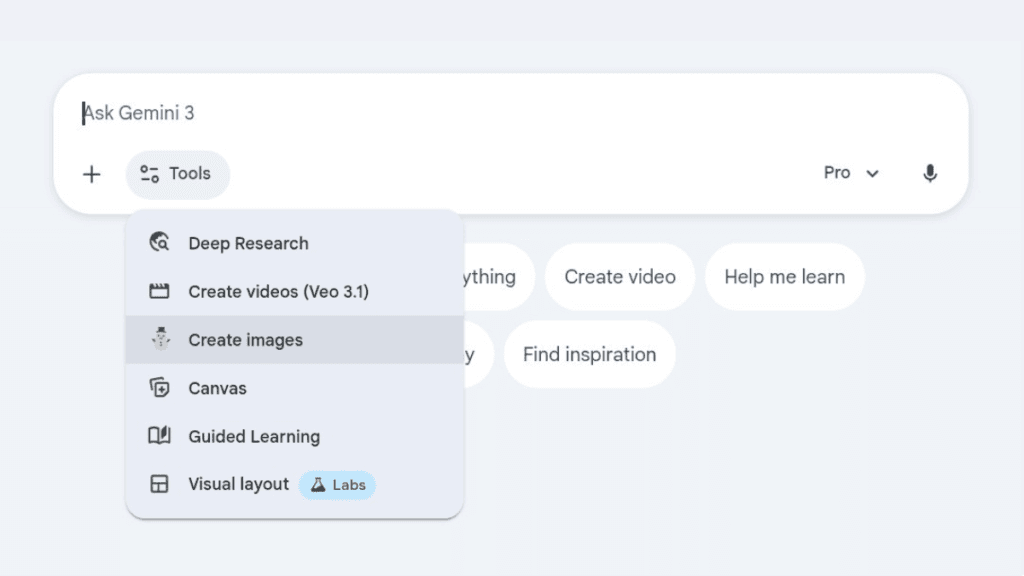
- Access in Gemini: Go to gemini.google.com, sign in, and select Nano Banana Pro from image tools or model options
- Enter prompt: Describe desired image or upload reference photo for editing
- Use thinking mode: Enable reasoning for complex or precise results
- Refine edits: Add follow-up prompts like 'add text' or 'change background'
- Generate and download: Create image; download (watermark-free in paid tiers)
- In Workspace: Use in Slides/Vids for direct insertion
- API for advanced: Integrate via Vertex AI or Gemini API for programmatic use
How we rated Nano Banana Pro
- Performance: 4.9/5
- Accuracy: 4.8/5
- Features: 4.9/5
- Cost-Efficiency: 4.5/5
- Ease of Use: 4.7/5
- Customization: 4.8/5
- Data Privacy: 4.6/5
- Support: 4.7/5
- Integration: 4.8/5
- Overall Score: 4.8/5
Nano Banana Pro integration with other tools
- Gemini App: Native access in web/mobile Gemini interface for chat-based generation and editing
- Google Workspace: Integrated into Slides, Vids, NotebookLM, and other apps for direct image insertion
- Vertex AI / Gemini API: Enterprise API access for developers to embed in custom applications and workflows
- Adobe Firefly: Partner integration allowing Nano Banana Pro in Firefly/Photoshop for professional editing
- Google AI Studio: Testing and prototyping environment with pay-per-use for advanced users
Best prompts optimised for Nano Banana Pro
- Create a professional infographic showing the solar system planets with accurate labels, sizes scaled realistically, and educational annotations in clear sans-serif text
- Generate a high-resolution product mockup of a smartphone on a minimalist white background with the brand name 'TechNova' in elegant metallic font across the screen
- Edit this uploaded photo: add a futuristic cyberpunk city skyline in the background while keeping the subject unchanged, dramatic neon lighting, cinematic style
- Illustrate a step-by-step flowchart for a machine learning pipeline including data collection, preprocessing, model training, evaluation, and deployment with icons and readable text labels
- Produce a vintage travel poster for Kyoto in spring with cherry blossoms, traditional architecture, and the title 'Discover Kyoto' in artistic Japanese-inspired typography
FAQs
Newly Added Tools






About Author