
What is NotebookLM?
NotebookLM is Google’s AI-powered notebook that turns your uploaded documents, PDFs, URLs, and notes into smart, queryable knowledge bases with summaries, FAQs, study guides, and podcast-style Audio Overviews.
Is NotebookLM free to use?
Yes, NotebookLM is completely free with a Google account; no paid tiers or credit limits (only source caps: 50 per notebook, 500K words total).
What makes Audio Overviews special in NotebookLM?
Audio Overviews generate natural, engaging podcast-style conversations between two AI hosts discussing your sources, helping with auditory learning or multitasking.
Does NotebookLM use my data for training?
No, your uploaded sources and chats remain private and are not used to train Google’s models unless you explicitly opt in.
How many sources can I add to a NotebookLM notebook?
Up to 50 sources per notebook (PDFs, Docs, URLs, text), with a total limit of around 500,000 words across all sources.
Can NotebookLM answer questions outside my uploaded sources?
No, it only uses your provided content for answers (grounded responses); it won’t pull general web knowledge unless you add relevant sources.
When was NotebookLM launched publicly?
NotebookLM became publicly available in July 2024 with major updates in 2025, including expanded Audio Overviews and mobile support.
Who is NotebookLM best suited for?
It’s ideal for students (study guides), researchers (paper synthesis), professionals (meeting notes/briefings), writers (research organization), and anyone managing lots of information.

NotebookLM

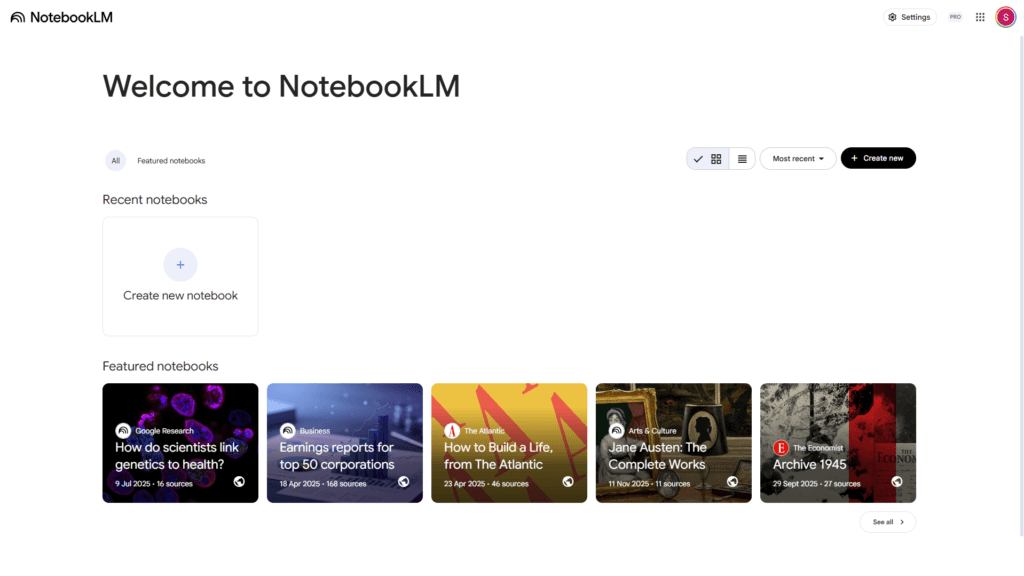
About This AI
NotebookLM is Google’s experimental AI-first notebook tool that helps users organize, synthesize, and interact with information from their own sources.
Users upload documents, PDFs, web URLs, Google Docs/Slides, text, or copied content (up to 50 sources per notebook, 500,000 words total), and the AI creates a personalized knowledge base.
It generates automatic summaries, FAQs, study guides, timelines, briefing docs, tables of contents, and more on demand.
The standout Audio Overview feature produces podcast-style conversations between two AI hosts discussing the sources in natural, engaging dialogue (with customizable tone, length, and focus).
Users can chat with the notebook for answers grounded in uploaded content, ask follow-ups, generate inline notes, or request new formats like outlines or glossaries.
It supports inline citations for traceability, version history, sharing notebooks (view-only or collaborative), and export to Google Docs.
Powered by Gemini 1.5 Pro (with Flash for faster responses), it emphasizes privacy: data stays private to the user, not used for training unless opted in.
Launched publicly in 2024 with major updates in 2025 (including Audio Overviews in more languages, mobile support, and source expansion), NotebookLM is widely used by students, researchers, professionals, and content creators for deep research, learning, meeting synthesis, and knowledge management.
Free to use with a Google account; no paid tiers or limits beyond source caps as of early 2026.
Key Features
- Source-based grounding: AI responses strictly cite and draw only from user-uploaded documents; no general web knowledge unless added
- Audio Overview podcasts: Generates 5-15 minute spoken discussions between two AI hosts summarizing key insights from sources
- Smart notebook generation: Auto-creates summaries, FAQs, study guides, timelines, briefing docs, tables, glossaries, and more
- Interactive chat: Ask questions, get explanations, request rewrites or new formats grounded in your content
- Inline citations: Every answer links back to exact source passages for verification and traceability
- Multi-format support: Handles PDFs, Google Docs/Slides, web URLs, text, copied content; up to 50 sources per notebook
- Sharing and collaboration: Share read-only or editable notebooks with others via link
- Export options: Download notebooks or generated content as Google Docs, Markdown, or text
- Privacy-focused: User data not used to train models (unless explicit opt-in); enterprise version available via Google Workspace
- Mobile and desktop access: Full web experience; responsive for phones and tablets
Price Plans
- Free ($0): Full access to all features including unlimited notebooks, Audio Overviews, chat, and generation with source limits (50 per notebook, 500K words total); no paid tiers for individuals
- Google Workspace / Enterprise (Custom): Business/education editions with admin controls, higher limits, compliance features, and integration with Workspace ecosystem
Pros
- Extremely accurate and grounded: Responses never hallucinate outside provided sources; ideal for research and fact-checking
- Audio Overviews are unique: Podcast-style summaries feel engaging and help with auditory learning or multitasking
- Completely free: No subscription, no credit limits, generous source caps for most users
- Boosts productivity: Turns hours of reading into minutes of insights, study aids, or briefings
- Strong privacy: Data stays private; no training on user content by default
- Versatile formats: One upload generates multiple useful outputs (FAQ, timeline, glossary, etc.)
- Continuous updates: Frequent new features from Google (e.g., mobile, more languages, longer audio)
Cons
- Limited to uploaded sources: Cannot answer general knowledge questions outside provided documents
- Source size caps: 50 sources / 500,000 words per notebook; large projects need multiple notebooks
- Audio Overview quality varies: Hosts can sound scripted or repeat points; accents/languages still improving
- No offline mode: Requires internet connection for AI processing and generation
- Export limitations: Audio cannot be downloaded natively (screen record workaround)
- Learning curve for best results: Optimal use requires good source selection and precise queries
- No native mobile app: Web-based only; works on mobile browsers but not optimized app
Use Cases
- Academic research and studying: Upload papers/articles, generate study guides, FAQs, timelines, and audio summaries
- Meeting and interview synthesis: Upload transcripts/notes, extract action items, key decisions, and briefing docs
- Content creation and writing: Feed research sources, get outlines, glossaries, or rewritten sections grounded in facts
- Personal knowledge management: Organize articles, books, notes into queryable notebooks with audio recaps
- Professional briefings: Turn reports/data into executive summaries, slide outlines, or podcast-style overviews
- Language learning: Upload foreign texts, generate explanations, translations, or audio discussions
- Project planning: Compile requirements/docs, auto-generate timelines, tasks, and FAQs
Target Audience
- Students and researchers: Synthesizing papers, creating study aids, and reviewing literature
- Professionals and knowledge workers: Processing meeting notes, reports, and client documents
- Content creators and writers: Researching topics and generating structured outlines/content
- Educators and trainers: Building lesson materials, summaries, and audio explanations
- Business analysts and consultants: Turning data/sources into briefings and insights
- Anyone managing information: Organizing personal notes, articles, or projects with AI help
How To Use
- Sign in: Go to notebooklm.google and sign in with Google account (free)
- Create notebook: Click New Notebook, name it, and start adding sources
- Upload sources: Drag/drop PDFs, paste URLs/text, import Google Docs/Slides
- Generate Audio Overview: Click Audio Overview button; customize length/tone if available
- Ask questions: Type queries in chat; get cited answers from sources
- Create guides: Use Generate menu for FAQs, study guide, timeline, briefing doc, etc.
- Share or export: Share link for collaboration or export to Google Docs
How we rated NotebookLM
- Performance: 4.8/5
- Accuracy: 4.9/5
- Features: 4.7/5
- Cost-Efficiency: 5.0/5
- Ease of Use: 4.6/5
- Customization: 4.4/5
- Data Privacy: 4.8/5
- Support: 4.5/5
- Integration: 4.7/5
- Overall Score: 4.8/5
NotebookLM integration with other tools
- Google Drive / Docs / Slides: Direct import from Google Workspace files for seamless source addition
- Google Account: Single sign-on and notebook storage tied to personal or Workspace account
- Export to Google Docs: One-click export of generated content (summaries, guides, etc.) to Docs
- Web URLs: Automatically fetches and processes content from pasted links
- Third-Party via Copy-Paste: Supports text copied from any source (PDFs, websites, emails) for quick addition
Best prompts optimised for NotebookLM
- N/A - NotebookLM is not a prompt-based generative tool like text-to-video or image generators. It processes uploaded sources automatically and responds to natural language questions about your content.
FAQs
Newly Added Tools







About Author