
What is OpenArt AI?
OpenArt AI is an all-in-one AI art generation and editing platform with text-to-image, upscaling, inpainting, LoRA training, and a large community library of models and prompts.
Is OpenArt AI free to use?
Yes, it has a free tier with daily credits for generations; Pro starts at $10/month for unlimited high-res, priority, advanced features, and commercial use.
What models does OpenArt AI support?
It includes SDXL, Flux, SD3, Playground v2.5, and many community fine-tunes, with easy switching and custom LoRA support.
Can I train custom models on OpenArt?
Yes, users can train personal LoRAs and fine-tune models on their own datasets directly in the platform.
Does OpenArt allow commercial use?
Free tier is for personal use; Pro and higher plans provide commercial licensing and watermark-free high-resolution outputs.
What editing tools are available in OpenArt?
Features include AI Upscaler (up to 16x), Inpainting/Outpainting, Image-to-Image remix, ControlNet (pose/depth/edge), and canvas editor.
How does the community feature work?
A large gallery lets users browse, remix, and download millions of prompts, artworks, and shared models for inspiration.
What are the main benefits of OpenArt Pro?
Unlimited generations, skip queue priority, higher resolution, faster processing, LoRA training, commercial rights, and advanced controls.
OpenArt AI

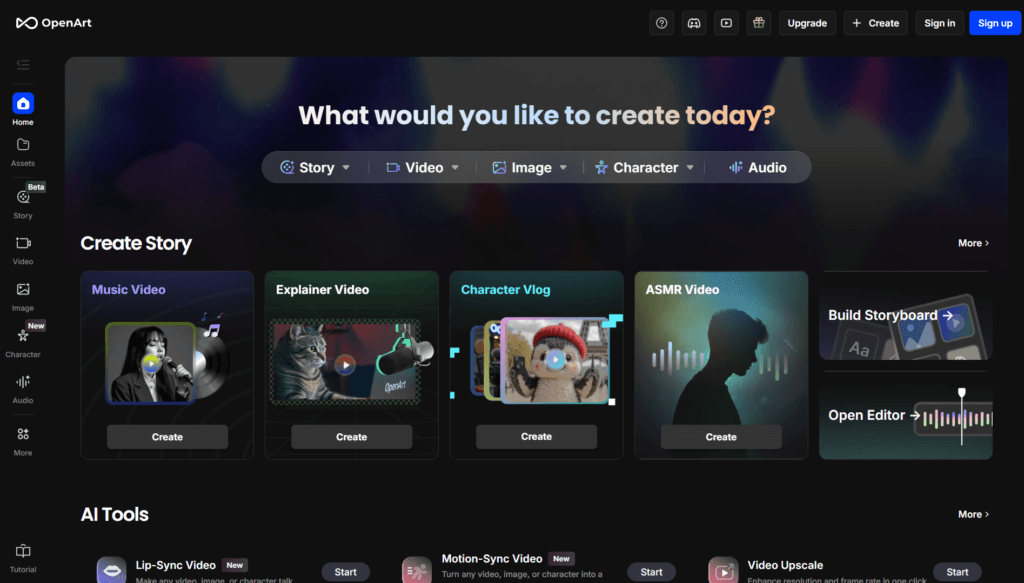
About This AI
OpenArt AI is a comprehensive AI-powered creative platform for generating, editing, and enhancing digital art and images.
It offers text-to-image generation using top open-source models like SDXL, Flux, SD3, Playground v2.5, and custom fine-tunes, with advanced controls for aspect ratio, style, quality, and negative prompts.
Key features include AI Upscaler (up to 16x with detail recovery), Inpainting/Outpainting for precise edits, Image-to-Image remix, Sketch to Image, ControlNet for pose/depth/edge guidance, LoRA training, model fine-tuning, and batch generation.
The platform includes a massive community library with millions of user-generated prompts, models, and artworks for inspiration, remixing, and sharing.
Users can create custom AI models (fine-tunes), train personal LoRAs, and use tools like Magic Prompt enhancer, image variation, and canvas editor.
Launched in 2022, OpenArt has grown rapidly with a freemium model: generous free daily credits for basic use, and paid plans for unlimited generations, priority queue, higher resolution, faster processing, and commercial rights.
It supports commercial use on paid tiers, making it popular among artists, designers, marketers, and hobbyists for concept art, illustrations, NFTs, social media visuals, and product mockups.
With strong integration of community features and continuous model updates, OpenArt stands as a leading accessible hub for AI art creation.
Key Features
- Text-to-Image Generation: Create art from detailed prompts using SDXL, Flux, SD3, and other leading models
- AI Upscaler: Enhance images up to 16x resolution with detail preservation and noise reduction
- Inpainting and Outpainting: Edit specific areas or extend canvas intelligently
- Image-to-Image and Remix: Transform existing images with style transfer or variations
- ControlNet Support: Use pose, depth, canny edges, scribble, or openpose for precise control
- LoRA and Fine-Tuning: Train custom LoRAs or fine-tune models on your own dataset
- Community Library: Browse millions of user prompts, artworks, and models for inspiration
- Magic Prompt Enhancer: Automatically improve prompts for better results
- Batch Generation: Create multiple variations at once for efficiency
- Canvas Editor: Intuitive in-browser editor for iterative creation and refinement
Price Plans
- Free ($0): Daily credits for generations (e.g., 50-100 depending on updates), basic access to models, community features, limited upscaling/inpainting
- Pro ($10/Month or $96/Year): Unlimited generations, priority queue, higher resolution, faster processing, advanced features like LoRA training, commercial use rights
- Ultra/Enterprise (Higher tiers ~$30+/Month): Even more credits, dedicated support, API access, team collaboration, and custom model hosting
Pros
- Extensive model selection: Access to latest open-source models like Flux and SD3 without local setup
- Powerful editing suite: Inpainting, outpainting, upscaling, and ControlNet rival professional tools
- Generous free tier: Daily credits allow meaningful experimentation without immediate payment
- Strong community ecosystem: Huge library of shared prompts and models accelerates creativity
- Custom model training: LoRA and fine-tuning make it personal and brand-consistent
- Fast and reliable: Cloud-based processing with priority in paid plans
- Commercial licensing: Paid tiers support professional and business use cases
Cons
- Credit limits on free: Daily caps push frequent users to paid plans quickly
- Pro pricing required for unlimited: Full high-res, priority, and commercial features need subscription
- Occasional queue times: Free users may wait during peak hours
- Learning curve for advanced controls: ControlNet, LoRA, and fine-tuning require experimentation
- Web-only platform: No native desktop/mobile app; browser-dependent
- Output variability: Complex prompts can still produce inconsistent results
- Privacy for custom models: Uploaded training data processed on servers
Use Cases
- Digital art and illustration: Generate concepts, characters, or scenes from text
- Graphic design: Create assets, backgrounds, or mockups with precise edits
- Marketing and social media: Produce branded visuals, ads, or posts quickly
- Game and concept art: Prototype characters, environments, or items
- Product visualization: Upscale, inpaint, or generate mockups for e-commerce
- Personal projects: Remix photos, create custom wallpapers, or experiment with styles
- Model training: Fine-tune LoRAs for consistent style or character generation
Target Audience
- Digital artists and illustrators: Seeking fast concept-to-art workflows
- Graphic designers and marketers: Needing quick, customizable visuals
- Game developers and concept artists: Prototyping assets and environments
- Social media creators: Generating eye-catching content efficiently
- AI art enthusiasts: Experimenting with models and community sharing
- Professional studios: Using paid tiers for commercial, high-volume output
How To Use
- Sign up: Visit openart.ai and create free account for daily credits
- Choose generator: Select Text-to-Image, Image-to-Image, Upscaler, or Inpaint from dashboard
- Input prompt: Write detailed description; add style, quality, negative prompts
- Customize settings: Set aspect ratio, model (SDXL/Flux/etc.), ControlNet if needed
- Generate and iterate: Create, then use remix, vary, or inpaint for refinements
- Use advanced tools: Train LoRA or fine-tune models in dedicated sections
- Download or share: Export high-res (Pro) or post to community gallery
How we rated OpenArt AI
- Performance: 4.7/5
- Accuracy: 4.6/5
- Features: 4.8/5
- Cost-Efficiency: 4.5/5
- Ease of Use: 4.7/5
- Customization: 4.9/5
- Data Privacy: 4.4/5
- Support: 4.3/5
- Integration: 4.5/5
- Overall Score: 4.6/5
OpenArt AI integration with other tools
- Community Gallery: Built-in sharing, remixing, and browsing of millions of user creations and prompts
- Model Hub: Direct access to community-uploaded LoRAs, fine-tunes, and checkpoints
- Third-Party Editors: Export images in standard formats (PNG/JPG) for use in Photoshop, Canva, Figma, or other tools
- API Access (Paid): Developer API for embedding generation into custom apps or workflows
- Browser-Based Workflow: Works seamlessly with design tools via web extensions or copy-paste
Best prompts optimised for OpenArt AI
- A cyberpunk samurai girl standing on a rainy neon-lit rooftop at night, detailed armor, katana glowing, dramatic lighting, cinematic composition, ultra realistic, 8k
- Fantasy elf archer in enchanted forest, flowing silver hair, intricate leather armor, magical bow, soft volumetric lighting, highly detailed, fantasy art style
- Minimalist product shot of wireless earbuds on white marble surface, modern tech aesthetic, clean composition, sharp focus, studio lighting, 4k
- Surreal dreamscape with floating islands, waterfalls pouring into sky, vibrant colors, ethereal atmosphere, in the style of Studio Ghibli and James Jean
- Portrait of a futuristic android with glowing blue eyes, cybernetic enhancements, dramatic side lighting, high fashion pose, photorealistic, 8k
FAQs
Newly Added Tools





About Author