




Zelili AI

PearAI

Open-Source AI-Powered Code Editor Fork of VSCode
Tool Release Date

1 Jan 2024

Tool Users
N/A
0.0
๐Ÿ‘ 15

About This AI

PearAI is an open-source AI code editor built as a fork of VSCode with integrated AI tools to accelerate development and help users build projects efficiently.

It combines familiar VSCode interface with powerful AI features like contextual chat (fork of Continue), autonomous coding agent (powered by Roo Code/Cline), automatic model routing to the best LLMs, and upcoming tools for project creation and deployment.

Key strengths include codebase-aware assistance (understands full context for accurate suggestions), multi-model access (routes to top performers like o1-preview, o1-mini, GPT-4o, Claude, Llama), AI debugging, code generation, bug fixing, and streamlined workflow without manual copy-paste to external chat tools.

Founded in 2024 by Nang Ang and Duke Pan (ex-Meta, Coinbase, Tesla, Two Sigma), PearAI emphasizes open-source transparency, community contributions (around 40 percent of code from community), and cost savings by replacing multiple subscriptions.

Released with rapid iterations (v1.8+ in 2025-2026), it offers free core access, paid hosted credits for premium models, and full local/self-hosted options.

With active GitHub presence (thousands of stars/forks), Discord community (1900+ members), and positive testimonials on productivity gains (users report senior-level output, $30+/month savings), PearAI targets developers of all levels seeking an all-in-one AI-enhanced coding environment.

Key Features

  1. VSCode fork base: Familiar interface with extensions, themes, and workflow continuity
  2. PearAI Chat: Contextual codebase-aware AI chat for questions, code generation, explanations (powered by Continue fork)
  3. PearAI Agent: Autonomous coding agent that writes code, fixes bugs, and implements features in your environment
  4. PearAI Router: Automatically selects and routes to the best-performing LLM for each task weekly
  5. Multi-model integration: Access to o1-preview, o1-mini, GPT-4o, Claude, Llama, and more via unified interface
  6. PearAI Model: Proprietary fine-tuned model outperforming major LLMs in coding benchmarks
  7. AI debugging and refactoring: Inline suggestions, bug detection, code improvements with context
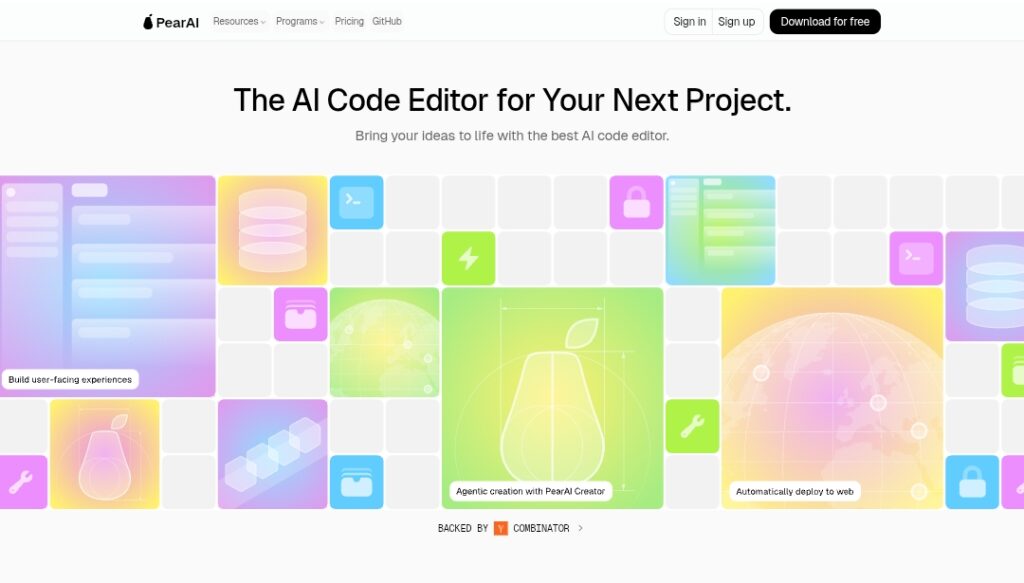
  8. Project creation tools: Upcoming PearAI Creator for starting new projects with best practices
  9. Launch and deployment: Upcoming PearAI Launch powered by Netlify for quick web project sharing
  10. Open-source extensibility: Full code on GitHub, community contributions, self-hosting options

Price Plans

  1. Free ($0): Full open-source core editor, local/self-hosted use, basic AI via free/open models, community support
  2. Hosted/Pro (Credits-based, ~$15+/month refill estimated): Monthly credits for market-leading hosted models, priority access, zero data retention, centralized billing, direct founder support; early bird discounts available
  3. Enterprise (Custom): Bulk purchase discounts, dedicated support, advanced team features (contact for details)

Pros

  1. Familiar and extensible: VSCode fork means zero learning curve for most developers
  2. Cost-effective: Replaces multiple AI subs (Copilot, Claude, ChatGPT) with potential savings
  3. Contextual power: Codebase understanding leads to more accurate and relevant AI help
  4. Open-source freedom: Full access to code, self-hosting, no vendor lock-in
  5. Rapid updates: Frequent releases with new agents, models, and features from community
  6. Strong community: Active Discord (1900+ members), GitHub contributions (40 percent community)
  7. Productivity boost: Users report senior-level output and faster project completion

Cons

  1. Early-stage maturity: Some features (Creator, Launch) still coming soon or in beta
  2. Requires setup: Download, install, and configure models/API keys for full power
  3. Hardware demands: Local heavy models need good GPU/CPU; hosted credits for premium
  4. Controversial origins: Past launch drama (fork ethics) noted in some reviews
  5. Limited user base metrics: No exact active users; GitHub stars/forks in thousands
  6. Dependency on backends: Relies on external LLMs (API keys needed for best models)
  7. No mobile/web version: Desktop-focused (though VSCode extensions possible)

Use Cases

  1. Personal side projects: Rapid prototyping and building with AI assistance
  2. Learning new languages/frameworks: Get contextual explanations and code examples
  3. Bug fixing and refactoring: Let agent debug and improve existing codebases
  4. Feature implementation: Describe what you want; agent writes and integrates code
  5. Professional development: Accelerate tasks in Swift, Python, JS, Hack/PHP, etc.
  6. Team collaboration: Share open-source setup for consistent AI tooling
  7. Cost optimization: Replace multiple AI subs with unified editor

Target Audience

  1. Individual developers: Makers building side projects or learning new tech
  2. Junior to senior engineers: Boosting productivity across languages and tasks
  3. Open-source enthusiasts: Wanting free, extensible, community-driven tools
  4. Content creators in tech: YouTubers/streamers using AI for coding demos
  5. Startups and small teams: Affordable alternative to paid IDEs like Cursor/Copilot
  6. AI tooling experimenters: Testing multi-model routing and agents locally

How To Use

  1. Download app: Visit trypear.ai and download desktop version (Windows/Mac/Linux)
  2. Install and launch: Run installer; it opens with familiar VSCode-like interface
  3. Set up AI: Add API keys for models (OpenAI, Anthropic, etc.) or use free/local ones
  4. Open project: Load codebase or start new file/folder
  5. Use chat/agent: Highlight code, right-click for AI actions, or open PearAI Chat sidebar
  6. Route models: Let PearAI Router select best LLM or choose manually
  7. Contribute/extend: Fork GitHub repo, add features, join Discord for community help

How we rated PearAI

  • Performance: 4.6/5
  • Accuracy: 4.5/5
  • Features: 4.7/5
  • Cost-Efficiency: 4.8/5
  • Ease of Use: 4.6/5
  • Customization: 4.9/5
  • Data Privacy: 4.7/5
  • Support: 4.4/5
  • Integration: 4.8/5
  • Overall Score: 4.7/5

PearAI integration with other tools

  1. VSCode Ecosystem: Full compatibility with VSCode extensions, themes, settings import
  2. Multiple LLM Providers: OpenAI, Anthropic (Claude), Google (Gemini), Meta (Llama), DeepSeek via API keys
  3. GitHub: Open-source repo for contributions, issues, and community-driven development
  4. Discord Community: Active server for support, feedback, hackathons, and collaboration
  5. Local/Remote Development: Supports self-hosting and integration with existing dev environments

Best prompts optimised for PearAI

  1. Implement a complete user authentication system with email/password and OAuth (Google) using best practices and latest libraries for this [project type/language]
  2. Debug and fix this bug in my Swift iOS code: [paste error/log/code snippet]; explain step-by-step
  3. Refactor this messy Python function into clean, efficient code with proper error handling and comments
  4. Generate a new React component for [feature description] with TypeScript, Tailwind CSS, and state management
  5. Explain this complex codebase section and suggest improvements for performance and readability: [paste code]
PearAI offers a compelling open-source alternative to proprietary AI code editors like Cursor, with strong contextual chat, autonomous agent, and model routing in a familiar VSCode shell. Fully free core and community-driven, it delivers impressive productivity for coding tasks while saving on multiple subscriptions. Ideal for developers wanting extensible AI tooling without lock-in.

FAQs

  • What is PearAI?

    PearAI is an open-source AI-powered code editor forked from VSCode, integrating contextual chat, autonomous coding agents, and multi-model routing to accelerate development.

  • Is PearAI free to use?

    Yes, the core editor is completely free and open-source; hosted premium model credits require paid refill (early bird discounts available), with self-hosting options.

  • Who founded PearAI?

    Founded in 2024 by Nang Ang and Duke Pan, experienced engineers from Meta, Coinbase, Tesla, Two Sigma, and IMC Trading.

  • What makes PearAI different from Cursor or Copilot?

    Open-source with no lock-in, community contributions, codebase-aware chat/agent, automatic best-model routing, and potential cost savings over multiple subs.

  • How many users does PearAI have?

    No exact active user count publicly reported; GitHub repo has thousands of stars/forks, Discord community over 1900 members, and positive testimonials.

  • What AI models does PearAI support?

    Routes to top models including o1-preview, o1-mini, GPT-4o, Claude, Llama, and proprietary PearAI Model via unified interface and API keys.

  • Can I run PearAI locally?

    Yes, fully open-source for self-hosting with local models or API connections; no cloud required for core features.

  • When was PearAI launched?

    Founded and initial launch in 2024, with major updates through 2025-2026 including agent improvements and v1.8+ releases.


Newly Added Toolsโ€‹

Qodo AI

$0/Month

Codiga

$10/Month

Tabnine

$59/Month

CodeRabbit

$0/Month
PearAI Alternatives

Qodo AI

$0/Month

Codiga

$10/Month

Tabnine

$59/Month

PearAI Reviews

0.0
0.0 out of 5 stars (based on 0 reviews)
Excellent0%
Very good0%
Average0%
Poor0%
Terrible0%

There are no reviews yet. Be the first one to write one.



