
What is Pictory AI?
Pictory AI is an AI platform that automatically converts text, blogs, scripts, URLs, audio, PPTs, or prompts into fully edited videos with visuals, voiceovers, captions, and music.
When was Pictory AI launched?
Pictory AI launched its first version in July 2020, following a 2019 hackathon prototype.
Is Pictory AI free to use?
It has a limited free tier with 15 video minutes and basic features; full access requires paid plans starting at $25/month after a 14-day trial.
What are Pictory AI’s main pricing plans?
Free (limited), Starter ($25/month), Professional ($49/month), Teams ($99+/month), and Enterprise (custom) with increasing video minutes, AI credits, voices, and features.
Does Pictory AI support AI voices and avatars?
Yes, it includes standard AI voices (unlimited in basic languages), hyper-realistic ElevenLabs voices in 29 languages, and upcoming AI avatars for realistic presenters.
Can Pictory AI be used for commercial purposes?
Yes, all assets are pre-licensed royalty-free for commercial use on paid plans; free tier may have restrictions or watermarks.
What integrations does Pictory AI offer?
It integrates with Zapier, Make for automation, Chrome extension for URLs, ChatGPT via Pictory GPT, and has API access for enterprise.
How many users does Pictory AI have?
Pictory serves thousands of paying customers and over 20,000 companies; exact total user numbers are not publicly specified beyond millions of site visitors.

Pictory AI

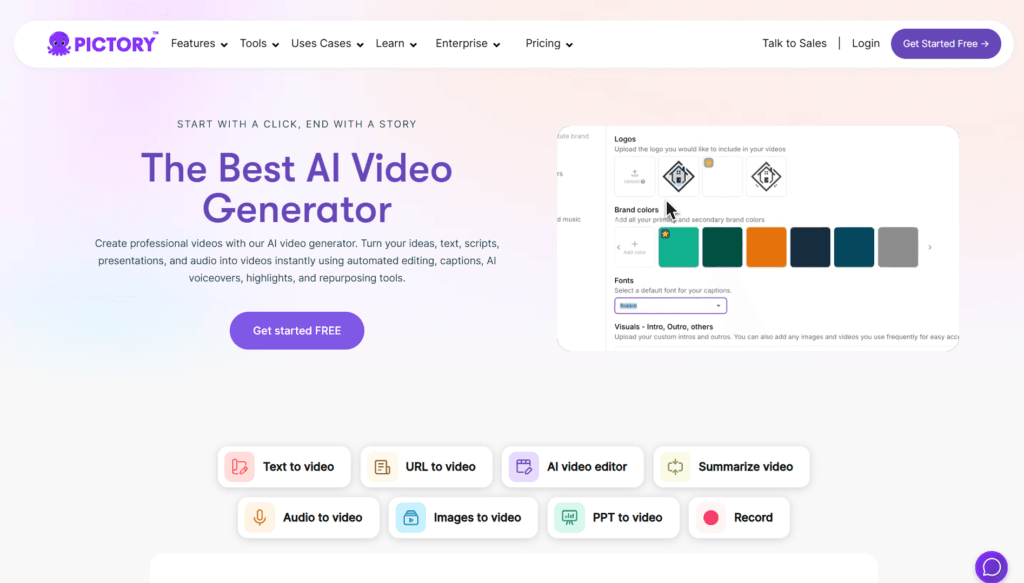
About This AI
Pictory AI is an intuitive AI video generation platform that transforms text-based content such as scripts, blog posts, articles, URLs, audio files, presentations, or prompts into engaging, fully edited videos in minutes.
It automates the entire process: extracting key points, selecting relevant stock visuals from premium libraries like Getty Images and Storyblocks, adding AI-generated voiceovers in multiple languages, auto-captioning/subtitling, background music, transitions, and branding.
Users can edit via a simple text-based storyboard interface without timelines or advanced skills, making it accessible for non-editors.
Advanced features include AI avatars (realistic presenters), hyper-realistic ElevenLabs voices in 29 languages, generative AI credits for images/videos/avatars, brand kits for consistent styling, Pictory GPT for script/video creation via ChatGPT integration, summarization of long videos into shorts, and repurposing content for social media or marketing.
Launched in July 2020 after a 2019 hackathon prototype, Pictory has grown to serve thousands of paying customers and millions of website visitors, trusted by over 20,000 companies for marketing, education, corporate training, social media, and explainer videos.
It offers a limited free tier for testing, a 14-day full-feature trial, and tiered paid subscriptions with increasing video minutes, resolutions (up to 1080p), AI credits, premium assets, and enterprise options including API access.
With strong integrations like Zapier, Make, Chrome extension, and partnerships with OpenAI, Getty, Storyblocks, and more, Pictory streamlines content creation for creators, marketers, educators, and businesses seeking fast, high-quality video output without production overhead.
Key Features
- Text to Video: Convert scripts, blogs, articles, or prompts into complete videos with auto visuals, voiceover, captions, and music
- URL to Video: Turn any webpage or article link into a polished video summary
- Audio to Video: Transform podcasts, narrations, or audio files into visual content
- PPT to Video: Animate PowerPoint presentations with AI enhancements
- Images to Video: Create animated videos from uploaded images or stock
- AI Video Editor: Text-based storyboard editing for scenes, text, visuals, transitions, and branding
- AI Voiceovers: Standard voices (unlimited in basic languages) and hyper-realistic ElevenLabs voices in 29 languages
- Auto Captions and Subtitles: Accurate transcription, styling, and positioning for accessibility
- Generative AI Tools: Create images, videos, avatars from prompts; Pictory GPT for script/video via ChatGPT
- Brand Kit: Custom logos, colors, fonts, and consistent styling across videos
- Video Summarization: Condense long videos into short clips or highlights
- Premium Asset Libraries: Access millions of Getty Images, Storyblocks videos/music
- API and Integrations: Connect with Zapier, Make, Chrome extension for workflows
Price Plans
- Free ($0): Limited 15 video minutes total, 5-minute videos, 720p, basic voices, 5 generative AI credits, watermarked previews/downloads restricted
- Starter ($25/Month or $19/Month annual): 200-600 video minutes/month (varies by source), 30-minute videos, 1080p, unlimited standard voices, 50-500 generative credits, Storyblocks assets, email support
- Professional/Pro ($49/Month or $29/Month annual): 600 video minutes, longer edits (180 min), ElevenLabs voices (240 min), Getty/Storyblocks, priority support, 5 brand kits
- Teams/Enterprise (Custom $99+/Month or quote): 1800+ minutes, team workspaces, unlimited/custom credits, dedicated manager, API, unlimited brand kits, expert consulting
Pros
- Extremely user-friendly: No editing skills required; text-based interface makes video creation fast and accessible
- High-quality automation: Smart visual matching, realistic voices, and professional outputs save hours of work
- Strong premium assets: Integration with Getty and Storyblocks provides vast, licensed stock without royalties
- Multilingual support: 29 languages for hyper-realistic voices and broad global usability
- Versatile input options: Handles text, URLs, audio, PPT, images for diverse content repurposing
- Commercial licensing: All assets pre-cleared for business use across plans
- Regular updates: Continuous additions like AI avatars, ElevenLabs voices, and GPT integration
- Enterprise-ready: API, custom plans, team workspaces, and dedicated support for scaling
Cons
- Limited free tier: Very restricted video minutes and features; full access requires paid subscription
- Credit/minute-based limits: Even paid plans cap monthly video minutes and generative credits
- No offline mode: Fully web-based; requires internet for all operations
- Occasional visual mismatches: AI may select less perfect stock footage for niche topics
- Export restrictions: Free/trial videos may have watermarks or download limits
- Learning curve for advanced features: Brand kits, API, or custom workflows need some setup
- No native mobile app: Best on desktop; mobile web experience limited
Use Cases
- Marketing videos: Explainer ads, product demos, social media campaigns from blog posts or scripts
- Educational content: Tutorials, online courses, training modules from PPTs or articles
- Corporate training: Onboarding, compliance videos, internal communications
- Social media repurposing: Turn long-form podcasts/blogs into short clips for TikTok/Reels/YouTube
- Content creators: Faceless videos, YouTube intros, or quick updates without filming
- Business presentations: Animate slides or reports into engaging narrated videos
- Webinar summaries: Condense recordings into highlight reels or promotional clips
Target Audience
- Content creators and YouTubers: Building faceless or quick videos from scripts/blogs
- Digital marketers: Producing ads, explainers, and social content at scale
- Educators and trainers: Creating tutorials, courses, or corporate learning materials
- Business owners and teams: Internal videos, product demos, marketing without production teams
- Bloggers and writers: Repurposing articles into visual content for better engagement
- Agencies and enterprises: Scaling video production with API and team features
How To Use
- Sign up: Visit pictory.ai and start with free trial or free tier (no card needed initially)
- Choose workflow: Select Text to Video, URL to Video, Audio to Video, PPT to Video, etc.
- Input content: Paste script/article/URL, upload audio/PPT/images, or use AI script generator
- Customize: Edit storyboard text, swap visuals/voice, add brand kit, adjust captions/music
- Generate: Preview AI-assembled video; refine scenes or regenerate sections
- Export: Download in 1080p (paid plans remove watermarks); share or integrate via API
- Advanced tips: Use Pictory GPT in ChatGPT for script ideas; apply brand kit for consistency
How we rated Pictory AI
- Performance: 4.6/5
- Accuracy: 4.5/5
- Features: 4.7/5
- Cost-Efficiency: 4.4/5
- Ease of Use: 4.8/5
- Customization: 4.5/5
- Data Privacy: 4.6/5
- Support: 4.4/5
- Integration: 4.5/5
- Overall Score: 4.6/5
Pictory AI integration with other tools
- Zapier and Make: Automate workflows like blog-to-video or social posting triggers
- Chrome Extension: Quick URL-to-video conversion directly from browser
- ChatGPT (Pictory GPT): Generate scripts/videos via custom GPT integration
- Stock Libraries: Seamless access to Getty Images and Storyblocks for premium assets
- API Access: Enterprise API for custom apps, automation, and bulk video generation
Best prompts optimised for Pictory AI
- Create a 60-second explainer video about sustainable living tips from this blog post: [paste blog URL or text], use engaging B-roll footage, upbeat music, female neutral AI voice in English, add captions, YouTube vertical format
- Turn this product description into a promotional short video: [insert product text], include AI-generated visuals of the item in use, enthusiastic male voiceover, energetic background track, Instagram Reels style 9:16
- Summarize this 30-minute webinar transcript into a 2-minute highlight reel: [paste transcript], focus on key takeaways, add professional transitions, captions, corporate narrator voice, LinkedIn-friendly landscape format
- Generate a tutorial video from this step-by-step guide: [paste guide text], use screen-like visuals or animations, clear instructional female voice, include on-screen text highlights, educational style
- Convert this news article URL into an engaging news update video: [paste URL], use dramatic visuals, neutral news anchor AI voice, add subtitles and subtle music, TikTok-ready square format
FAQs
Newly Added Tools







About Author