
What is Pixelcut AI?
Pixelcut is an AI-powered photo editor and creative suite for background removal, upscaling to 16x, generative fill/expand, product photo generation, and more, trusted by over 50 million users.
Is Pixelcut free to use?
Yes, free tier includes background removal, basic upscale, and exports without watermark; Pro at $10/month offers unlimited edits, 600 credits, commercial license, and advanced features.
What are Pixelcut’s standout features?
Key tools include ultra-high quality background removal, 16x upscaling, generative expand/uncrop, AI retouch/generative fill, shadow generation, batch editing, product photo generation, and Creative Agent for autonomous tasks.
Who is Pixelcut best for?
Ideal for e-commerce sellers (product photos), content creators, marketers (social ads/UGC), and businesses needing fast professional visuals.
Does Pixelcut have an API?
Yes, Pixelcut offers a developer API for integrating tools like background removal, upscaling, and generative features into apps with usage-based pricing.
When was Pixelcut founded?
Pixelcut was founded in 2021, with growth and funding reported through 2022 and ongoing development into 2026.
Can I use Pixelcut commercially?
Free tier for personal use; Pro/Business plans provide commercial license for professional, e-commerce, or brand content without restrictions.
What platforms does Pixelcut support?
Available on web, iOS app, Android app, and via API for custom integrations.

Pixelcut

About This AI
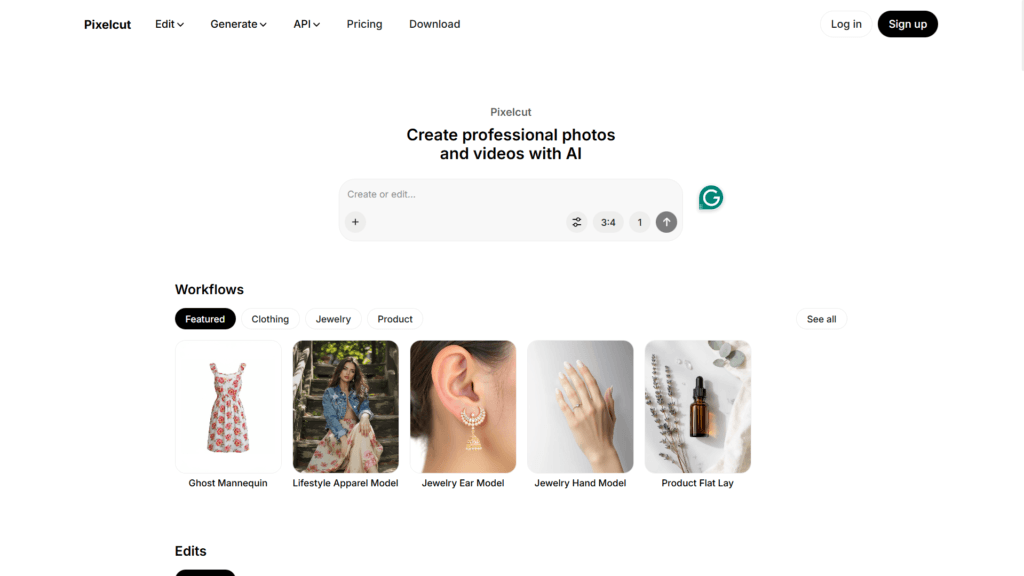
Pixelcut is an intelligent AI platform for creating, editing, and shipping production-ready visuals, often called the new operating system for creative work.
It offers a suite of tools including ultra-high quality background removal (for images and video), image upscaling up to 16x with models like Topaz for detail recovery, generative expand/uncrop to reframe and extend images, precise AI retouching with generative fill for erasing/editing objects, shadow generation, batch editing for hundreds of files, product photo generation from prompts, AI UGC ads with talking videos, and personas for consistent character across content.
The Creative Agent (Pixa) understands natural prompts, plans tasks, and executes using advanced models like Nano Banana Pro and Sora 2 without complex prompting.
Trusted by over 50 million creators, brands, and businesses, it excels in e-commerce product imagery, social media graphics, marketing visuals, and on-brand content creation.
Mobile apps for iOS/Android, web access, and API for developers make it versatile.
Freemium model with free basic tools (e.g., background removal, upscale) and Pro/Business plans unlocking unlimited edits, higher credits, batch processing, commercial license, and team features.
Founded in 2021 (with roots possibly earlier), it has millions of daily images processed and strong focus on speed, consistency, and professional results for e-commerce sellers, content creators, and marketers.
Key Features
- Background Removal: Ultra-high quality extraction for images and video with precise edges
- AI Image Upscaler: Boost resolution up to 16K/16x with detail recovery and noise reduction
- Generative Expand/Uncrop: Extend image borders intelligently to new aspect ratios
- Generative Fill/Retouch: Erase or edit objects with AI inpainting and precise cleanup
- Shadow Generation: Add realistic shadows to products or subjects
- Batch Editing: Process hundreds of images at once for efficiency
- Product Photo Generation: Create studio-grade product images from prompts
- AI UGC Ads: Generate talking videos for brand promotion
- Personas (AI Actors): Maintain consistent character across images/videos
- Creative Agent (Pixa): Autonomous task execution using best models from prompts
- API Access: Integrate tools like background removal or upscaling into apps
Price Plans
- Free ($0): Free background removal, upscale, exports without watermark (limits on advanced edits/credits)
- Pro ($10/Month): Unlimited AI edits, 600 credits monthly, add team members, commercial license, priority processing
- Business ($30/Month): 3,600 credits/month, unlimited edits, team collaboration, higher volume for enterprises
Pros
- High-quality results: Proprietary AI delivers professional-grade edits, especially background removal and upscaling
- Fast and intuitive: Beginner-friendly with quick processing and seamless mobile/web experience
- Versatile suite: All-in-one for editing, generation, batch work, and consistent branding
- Generous free tier: Core tools like background removal and basic upscale available free
- Strong for e-commerce: Excellent product visuals, mockups, and ad creation
- Batch and automation: Saves time for high-volume users like sellers and marketers
- Consistent characters: Personas feature ensures brand uniformity across content
Cons
- Credit limits free/Pro: Free has restrictions; Pro at $10/month for unlimited/higher credits
- Batch in paid: Advanced batch upscaling/editing often requires Pro/Business
- Occasional inconsistencies: Generative fill or expand may need tweaks in complex cases
- Mobile-first focus: Some advanced features better on desktop/web
- API separate: Developer integration has usage-based pricing
- No offline use: Cloud-based requiring internet
- Variable queue times: Free users may wait during peaks
Use Cases
- E-commerce product photos: Remove backgrounds, generate studio shots, add shadows
- Social media graphics: Quick edits, upscaling, generative fill for posts/stories
- Marketing and ads: Create UGC videos, consistent personas for campaigns
- Content creation: Batch process images, expand/uncrop for different formats
- Personal photo enhancement: Cleanup, retouch, upscale old/low-res photos
- Brand consistency: Use personas for uniform character in images/videos
- Developer integration: API for automated image processing in apps
Target Audience
- E-commerce sellers: Needing professional product visuals quickly and affordably
- Content creators and influencers: Editing photos for social media and ads
- Marketers and brands: Generating UGC, ads, and on-brand imagery
- Small businesses: Batch editing for listings, catalogs, promotions
- Photographers and designers: Enhancing, upscaling, and retouching work
- Developers: Using API for image tools in custom platforms
How To Use
- Visit site: Go to pixelcut.ai or download mobile app (iOS/Android)
- Upload image: Drag/drop photo or start from prompt for generation
- Select tool: Choose background removal, upscale, generative fill, etc.
- Apply edits: AI processes automatically; adjust with brushes if needed
- Preview and refine: View result, tweak (e.g., add shadows, expand canvas)
- Download/export: Save in high-res (free for basics, Pro for unlimited)
- Use Creative Agent: Enter natural prompt for autonomous task execution
How we rated Pixelcut
- Performance: 4.7/5
- Accuracy: 4.6/5
- Features: 4.8/5
- Cost-Efficiency: 4.5/5
- Ease of Use: 4.9/5
- Customization: 4.4/5
- Data Privacy: 4.5/5
- Support: 4.4/5
- Integration: 4.5/5
- Overall Score: 4.7/5
Pixelcut integration with other tools
- Mobile Apps: Native iOS and Android apps for on-the-go editing and generation
- Developer API: Usage-based API for embedding tools like background removal, upscaling, generative fill into custom apps or e-commerce platforms
- Third-Party Design Tools: Export formats (PNG/JPG) for easy import into Canva, Photoshop, Figma, or Shopify
- E-commerce Platforms: Optimized for Shopify, Poshmark, Instagram product listings with professional visuals
- Creative Workflows: Batch processing and Creative Agent for integration with marketing automation or content pipelines
Best prompts optimised for Pixelcut
- A clean white background product photo of a sleek black wireless earbuds case, studio lighting, high detail, professional e-commerce style, 4K resolution
- Expand this portrait photo to 16:9 landscape format, add a soft blurred city skyline background at sunset, keep subject perfectly consistent, cinematic look
- Remove the person in the background of this family photo at the beach, fill with natural sand and ocean seamlessly, high realism
- Upscale this low-res vintage photo to 8K, enhance details, reduce noise, restore colors naturally, sharp and clear
- Generate a talking head UGC ad: young woman smiling, saying 'Try our new skincare routine!' with natural lip-sync, casual indoor setting, brand colors
FAQs
Newly Added Tools






About Author