
What is RealVideo?
RealVideo is an open-source real-time streaming conversational video system from Z.ai that generates lip-synced high-fidelity video responses from text input using autoregressive diffusion.
When was RealVideo released?
It was released in December 2025, with initial GitHub commits on December 11 and last README update on December 15.
Is RealVideo free to use?
Yes, it is completely free and open-source under Apache-2.0 license with code and model weights available on GitHub and Hugging Face.
What are the key features of RealVideo?
Features include real-time WebSocket streaming, text-to-video dialogue, lip sync, voice cloning, audio-to-video generation, and modular architecture.
What hardware is required for RealVideo?
It needs at least 2 high-end GPUs (e.g., H100/H200 with 80GB each) for real-time performance; one for VAE, others for parallel DiT computation.
How does RealVideo work?
It uses GLM-4.5-AirX/GLM-TTS for audio, autoregressive diffusion for video frames, and WebSocket for live bidirectional communication.
Where can I download RealVideo models?
Model weights are available on Hugging Face (zai-org/RealVideo) and ModelScope (ZhipuAI/RealVideo).
What is RealVideo best suited for?
Ideal for building interactive AI avatars, virtual assistants, real-time video dialogue systems, and research in streaming video generation.

RealVideo

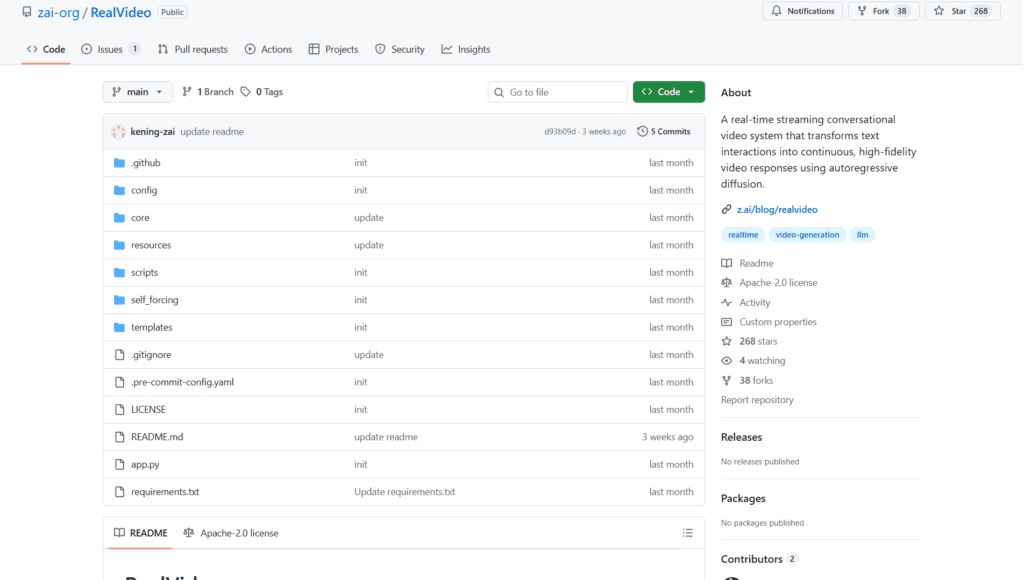
About This AI
RealVideo is an open-source real-time streaming conversational video system developed by Z.ai (Zhipu AI).
It transforms text interactions into continuous, high-fidelity video responses with realistic lip-sync, powered by autoregressive diffusion video generation.
The system uses WebSocket for bidirectional real-time communication, integrates GLM-4.5-AirX and GLM-TTS for audio/voice responses, and leverages models like Wan2.2-S2V-14B for video frame generation.
Key capabilities include text-to-video conversational output, audio-to-video lip sync (from uploaded audio more than 3s for voice cloning), image-to-video avatar setting, and modular architecture for easy extension.
It achieves low-latency performance (target less than 500ms per block) with multi-GPU support (requires at least 2x 80GB GPUs like H100/H200) for smooth streaming.
Released in December 2025 (initial commits December 11, last update December 15), under Apache-2.0 license with code, model weights, and blog available.
Designed for developers and researchers building interactive AI avatars, virtual assistants, or real-time video dialogue systems.
No hosted demo; local deployment required via GitHub repo with pip dependencies and model downloads from Hugging Face/ModelScope.
Strong focus on clean code, real-time performance, and integration of LLM audio with diffusion-based video.
Key Features
- Real-time streaming video: WebSocket-based bidirectional communication for live text-to-video dialogue
- Autoregressive diffusion generation: Continuous high-fidelity video frame synthesis from audio/text
- Lip sync and voice cloning: Realistic mouth movements synced to generated or uploaded audio (more then 3s for cloning)
- Text-to-video conversational: Input text messages to produce animated avatar responses
- Audio-to-video support: Generate video from audio input with lip sync
- Image avatar setting: Use uploaded image as base for consistent character in video output
- Modular clean architecture: Easy to maintain, extend, and integrate components
- Multi-GPU acceleration: Parallel DiT computation for low-latency real-time performance
- Voice response integration: GLM-4.5-AirX and GLM-TTS for natural AI audio replies
- Open-source deployment: Full code and model weights available for local running
Price Plans
- Free ($0): Fully open-source under Apache-2.0 with code, weights, and deployment guide available on GitHub and Hugging Face; no usage fees
- Cloud/Hosted (Custom): Potential future Z.ai platform hosting or API (not available yet in repo)
Pros
- Real-time capability: Achieves streaming video dialogue with sub-second block latency target
- High-fidelity lip sync: Strong synchronization using autoregressive diffusion
- Fully open-source: Apache-2.0 license with accessible code and weights on Hugging Face
- Voice cloning support: Quick cloning from short audio samples
- Modular design: Clean structure facilitates customization and research
- Multi-modal input: Handles text, audio, and image inputs effectively
- Performance optimization: Multi-GPU support for smoother inference
Cons
- High hardware requirements: Needs at least 2x 80GB GPUs (H100/H200) for real-time use
- Local deployment only: No hosted web interface or easy cloud demo
- Setup complexity: Requires model downloads, API keys, multi-GPU config, and dependencies
- Early-stage project: Released December 2025 with limited community adoption
- No mobile/web client: Primarily server-side; browser client for testing
- Latency not fully real-time yet: Some blocks exceed 500ms target without optimizations
- Potential artifacts: Diffusion-based video may show inconsistencies in long sessions
Use Cases
- Interactive AI avatars: Build real-time conversational video agents for virtual assistants
- Voice cloning demos: Create personalized talking avatars from short audio samples
- Research in video generation: Experiment with autoregressive diffusion for lip-sync and streaming
- Virtual customer support: Text-based queries to animated video responses
- Language learning tools: Visual pronunciation and conversation practice
- Content creation prototyping: Test AI-driven video dialogue concepts
- Accessibility applications: Text-to-video for sign language or visual communication aids
Target Audience
- AI developers and researchers: Building or studying real-time video dialogue systems
- LLM and diffusion model enthusiasts: Integrating audio/video generation pipelines
- Virtual agent creators: Developing interactive avatars or chatbots with video output
- Open-source contributors: Extending modular code for new features
- Tech companies: Prototyping conversational video AI products
- Education/content creators: Exploring AI talking heads for tutorials
How To Use
- Clone repo: git clone https://github.com/zai-org/RealVideo
- Install dependencies: pip install -r requirements.txt
- Download models: huggingface-cli download Wan-AI/Wan2.2-S2V-14B --local-dir wan_models/Wan2.2-S2V-14B
- Set API key: export ZAI_API_KEY=your_key (for GLM models)
- Configure model path: Edit config/config.py with your model.pt path
- Launch service: CUDA_VISIBLE_DEVICES=0,1 bash ./scripts/run_app.sh (needs 2 GPUs)
- Access interface: Open http://localhost:8003 in browser for WebSocket video chat
How we rated RealVideo
- Performance: 4.2/5
- Accuracy: 4.3/5
- Features: 4.5/5
- Cost-Efficiency: 5.0/5
- Ease of Use: 3.8/5
- Customization: 4.6/5
- Data Privacy: 4.8/5
- Support: 4.0/5
- Integration: 4.2/5
- Overall Score: 4.4/5
RealVideo integration with other tools
- Hugging Face: Model weights and checkpoints hosted for easy download
- WebSocket Clients: Browser-based interface for real-time interaction
- GLM Models (Z.ai): Native integration with GLM-4.5-AirX and GLM-TTS for audio
- Diffusion Frameworks: Built on autoregressive diffusion pipelines (compatible with diffusers library)
- Local GPU Setup: Multi-GPU support via CUDA for high-throughput inference
Best prompts optimised for RealVideo
- N/A - RealVideo is a real-time streaming system for text/audio-to-video conversation, not a traditional prompt-based generator like text-to-video tools. It responds dynamically to live text input rather than single static prompts.
- N/A - Core usage is through live text messages in the WebSocket interface, generating continuous video responses automatically.
FAQs
Newly Added Tools







About Author