




Zelili AI

RealVideo

Real-Time Streaming Conversational Video AI – Lip-Synced High-Fidelity Video Responses from Text Using Autoregressive Diffusion
Tool Release Date

11 Dec 2025

Tool Users
N/A
0.0
πŸ‘ 63

About This AI

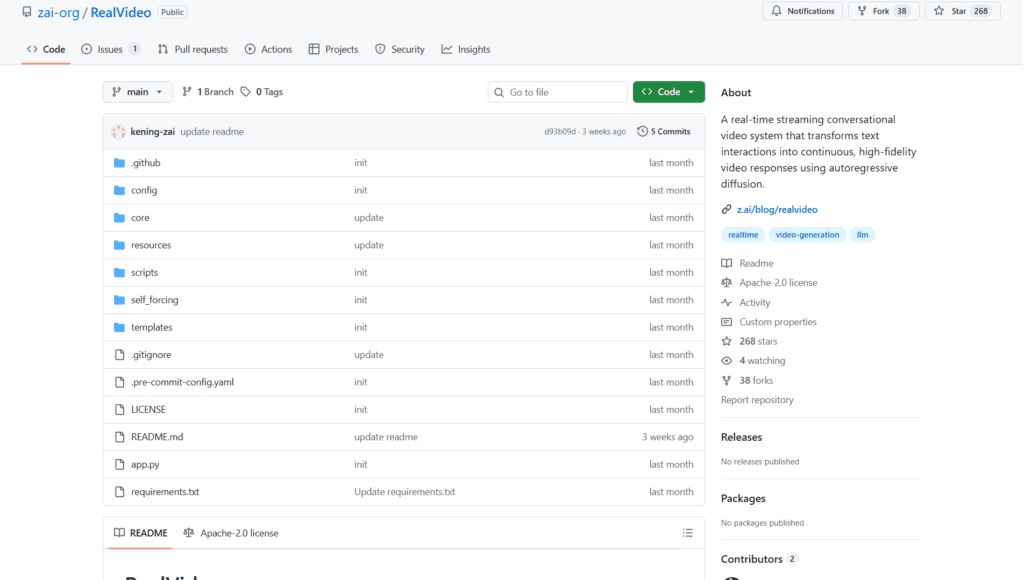
RealVideo is an open-source real-time streaming conversational video system developed by Z.ai (Zhipu AI).

It transforms text interactions into continuous, high-fidelity video responses with realistic lip-sync, powered by autoregressive diffusion video generation.

The system uses WebSocket for bidirectional real-time communication, integrates GLM-4.5-AirX and GLM-TTS for audio/voice responses, and leverages models like Wan2.2-S2V-14B for video frame generation.

Key capabilities include text-to-video conversational output, audio-to-video lip sync (from uploaded audio more than 3s for voice cloning), image-to-video avatar setting, and modular architecture for easy extension.

It achieves low-latency performance (target less than 500ms per block) with multi-GPU support (requires at least 2x 80GB GPUs like H100/H200) for smooth streaming.

Released in December 2025 (initial commits December 11, last update December 15), under Apache-2.0 license with code, model weights, and blog available.

Designed for developers and researchers building interactive AI avatars, virtual assistants, or real-time video dialogue systems.

No hosted demo; local deployment required via GitHub repo with pip dependencies and model downloads from Hugging Face/ModelScope.

Strong focus on clean code, real-time performance, and integration of LLM audio with diffusion-based video.

Key Features

  1. Real-time streaming video: WebSocket-based bidirectional communication for live text-to-video dialogue
  2. Autoregressive diffusion generation: Continuous high-fidelity video frame synthesis from audio/text
  3. Lip sync and voice cloning: Realistic mouth movements synced to generated or uploaded audio (more then 3s for cloning)
  4. Text-to-video conversational: Input text messages to produce animated avatar responses
  5. Audio-to-video support: Generate video from audio input with lip sync
  6. Image avatar setting: Use uploaded image as base for consistent character in video output
  7. Modular clean architecture: Easy to maintain, extend, and integrate components
  8. Multi-GPU acceleration: Parallel DiT computation for low-latency real-time performance
  9. Voice response integration: GLM-4.5-AirX and GLM-TTS for natural AI audio replies
  10. Open-source deployment: Full code and model weights available for local running

Price Plans

  1. Free ($0): Fully open-source under Apache-2.0 with code, weights, and deployment guide available on GitHub and Hugging Face; no usage fees
  2. Cloud/Hosted (Custom): Potential future Z.ai platform hosting or API (not available yet in repo)

Pros

  1. Real-time capability: Achieves streaming video dialogue with sub-second block latency target
  2. High-fidelity lip sync: Strong synchronization using autoregressive diffusion
  3. Fully open-source: Apache-2.0 license with accessible code and weights on Hugging Face
  4. Voice cloning support: Quick cloning from short audio samples
  5. Modular design: Clean structure facilitates customization and research
  6. Multi-modal input: Handles text, audio, and image inputs effectively
  7. Performance optimization: Multi-GPU support for smoother inference

Cons

  1. High hardware requirements: Needs at least 2x 80GB GPUs (H100/H200) for real-time use
  2. Local deployment only: No hosted web interface or easy cloud demo
  3. Setup complexity: Requires model downloads, API keys, multi-GPU config, and dependencies
  4. Early-stage project: Released December 2025 with limited community adoption
  5. No mobile/web client: Primarily server-side; browser client for testing
  6. Latency not fully real-time yet: Some blocks exceed 500ms target without optimizations
  7. Potential artifacts: Diffusion-based video may show inconsistencies in long sessions

Use Cases

  1. Interactive AI avatars: Build real-time conversational video agents for virtual assistants
  2. Voice cloning demos: Create personalized talking avatars from short audio samples
  3. Research in video generation: Experiment with autoregressive diffusion for lip-sync and streaming
  4. Virtual customer support: Text-based queries to animated video responses
  5. Language learning tools: Visual pronunciation and conversation practice
  6. Content creation prototyping: Test AI-driven video dialogue concepts
  7. Accessibility applications: Text-to-video for sign language or visual communication aids

Target Audience

  1. AI developers and researchers: Building or studying real-time video dialogue systems
  2. LLM and diffusion model enthusiasts: Integrating audio/video generation pipelines
  3. Virtual agent creators: Developing interactive avatars or chatbots with video output
  4. Open-source contributors: Extending modular code for new features
  5. Tech companies: Prototyping conversational video AI products
  6. Education/content creators: Exploring AI talking heads for tutorials

How To Use

  1. Clone repo: git clone https://github.com/zai-org/RealVideo
  2. Install dependencies: pip install -r requirements.txt
  3. Download models: huggingface-cli download Wan-AI/Wan2.2-S2V-14B --local-dir wan_models/Wan2.2-S2V-14B
  4. Set API key: export ZAI_API_KEY=your_key (for GLM models)
  5. Configure model path: Edit config/config.py with your model.pt path
  6. Launch service: CUDA_VISIBLE_DEVICES=0,1 bash ./scripts/run_app.sh (needs 2 GPUs)
  7. Access interface: Open http://localhost:8003 in browser for WebSocket video chat

How we rated RealVideo

  • Performance: 4.2/5
  • Accuracy: 4.3/5
  • Features: 4.5/5
  • Cost-Efficiency: 5.0/5
  • Ease of Use: 3.8/5
  • Customization: 4.6/5
  • Data Privacy: 4.8/5
  • Support: 4.0/5
  • Integration: 4.2/5
  • Overall Score: 4.4/5

RealVideo integration with other tools

  1. Hugging Face: Model weights and checkpoints hosted for easy download
  2. WebSocket Clients: Browser-based interface for real-time interaction
  3. GLM Models (Z.ai): Native integration with GLM-4.5-AirX and GLM-TTS for audio
  4. Diffusion Frameworks: Built on autoregressive diffusion pipelines (compatible with diffusers library)
  5. Local GPU Setup: Multi-GPU support via CUDA for high-throughput inference

Best prompts optimised for RealVideo

  1. N/A - RealVideo is a real-time streaming system for text/audio-to-video conversation, not a traditional prompt-based generator like text-to-video tools. It responds dynamically to live text input rather than single static prompts.
  2. N/A - Core usage is through live text messages in the WebSocket interface, generating continuous video responses automatically.
RealVideo delivers impressive real-time conversational video generation with solid lip-sync and streaming via autoregressive diffusion. Fully open-source and free, it’s ideal for developers building interactive AI avatars. High hardware needs and setup complexity limit casual use, but its modular design and performance make it a promising choice for research and prototyping.

FAQs

  • What is RealVideo?

    RealVideo is an open-source real-time streaming conversational video system from Z.ai that generates lip-synced high-fidelity video responses from text input using autoregressive diffusion.

  • When was RealVideo released?

    It was released in December 2025, with initial GitHub commits on December 11 and last README update on December 15.

  • Is RealVideo free to use?

    Yes, it is completely free and open-source under Apache-2.0 license with code and model weights available on GitHub and Hugging Face.

  • What are the key features of RealVideo?

    Features include real-time WebSocket streaming, text-to-video dialogue, lip sync, voice cloning, audio-to-video generation, and modular architecture.

  • What hardware is required for RealVideo?

    It needs at least 2 high-end GPUs (e.g., H100/H200 with 80GB each) for real-time performance; one for VAE, others for parallel DiT computation.

  • How does RealVideo work?

    It uses GLM-4.5-AirX/GLM-TTS for audio, autoregressive diffusion for video frames, and WebSocket for live bidirectional communication.

  • Where can I download RealVideo models?

    Model weights are available on Hugging Face (zai-org/RealVideo) and ModelScope (ZhipuAI/RealVideo).

  • What is RealVideo best suited for?

    Ideal for building interactive AI avatars, virtual assistants, real-time video dialogue systems, and research in streaming video generation.


Newly Added Tools​

CodeRabbit

$0/Month

Code Genius

$0/Month

AskCodi

$20/Month

PearAI

$0/Month
RealVideo Alternatives

Seedance 2.0

$0/Month

VideoGen

$12/Month

WUI.AI

$10/Month

RealVideo Reviews

0.0
0.0 out of 5 stars (based on 0 reviews)
Excellent0%
Very good0%
Average0%
Poor0%
Terrible0%

There are no reviews yet. Be the first one to write one.







