
What is Remaker AI?
Remaker AI is an all-in-one AI platform for image editing, generation, face swapping, upscaling, background removal, and video creation with a credit-based system.
Is Remaker AI free to use?
Yes, many tools are free with daily credits; advanced or high-volume use requires purchasing one-time credit packs starting from around $5.99 for 200 credits.
How does Remaker AI pricing work?
No subscriptions; buy credits one-time (never expire) in packs from $5.99 (200 credits) to higher tiers; credits used across all tools.
What are Remaker AI’s main features?
Key tools include Face Swap (photo/video), AI Upscaler (up to 16K), Background Remover, Magic Eraser, Text to Image, AI Photo Editor, Image to Video, and more.
Can I use Remaker AI commercially?
Yes, purchased credits enable commercial use with high-res, watermark-free outputs; suitable for e-commerce, marketing, and professional projects.
Does Remaker AI support video generation?
Yes, it includes AI Video Generator (text/image to video) and video face swap, plus templates for social media shorts.
How many users does Remaker AI have?
It claims to serve millions of creators worldwide and ranks among top AI web products globally, though exact figures are not publicly detailed.
Is Remaker AI safe and private?
Yes, it uses Stripe bank-level encryption for payments, does not store card info, and follows security protocols for data privacy.

Remaker AI

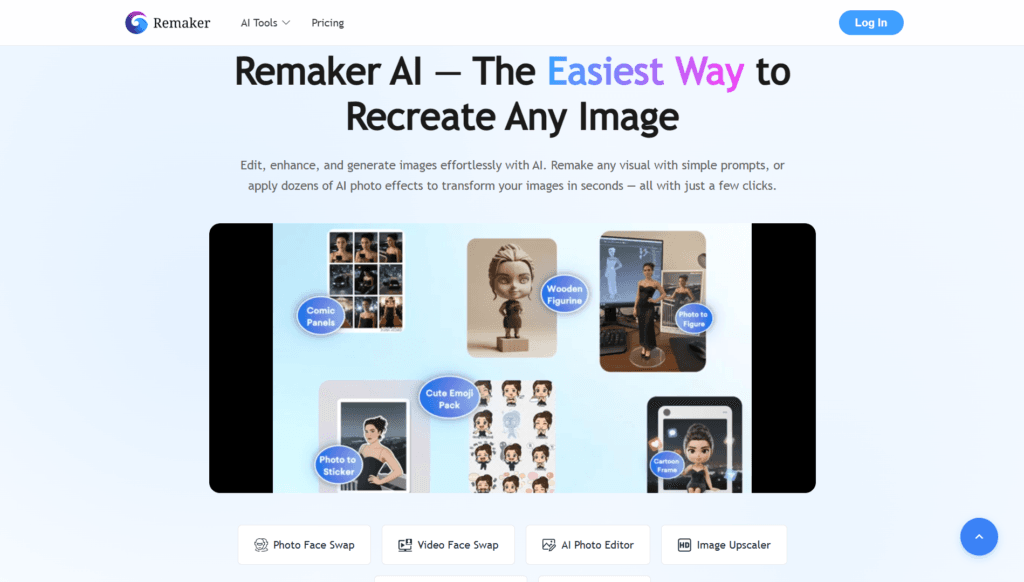
About This AI
Remaker AI is a comprehensive AI-powered creative platform specializing in image editing, generation, and video tools.
It offers a wide suite including Face Swap (single, multi, video, batch), AI Image Upscaler (up to 16K with detail recovery), Background Remover (free HD transparent outputs), Cleanup/Magic Eraser (object removal), AI Photo Editor (prompt-based drawing/editing), Text to Image generation, AI Portrait/Headshot Generator, AI Tattoo Generator, Photo Effect filters, Style Transfer, Photo Restoration, and AI Video Generator (text/image to video).
Additional capabilities cover Image to Video conversion, video templates for social media (Reels, TikToks), and multilingual support for prompts in English, Chinese, Japanese, German, etc.
The platform emphasizes ease of use with no downloads needed (web-based), fast processing, professional results, and privacy-focused security (Stripe encryption, no stored cards).
It uses a credit-based system with no subscriptions—credits never expire and are purchased one-time in flexible packs starting low.
Basic features like Background Remover and Upscaler are free with daily credits, while advanced tasks consume more.
Popular for e-commerce product photos, social content, photography enhancement, creative fun (face swaps, tattoos), and marketing visuals, Remaker AI is recognized as a top AI web product globally and serves millions of creators with high user satisfaction.
Key Features
- Face Swap Tools: Single photo, multi-face, video face swap, batch processing for images/videos
- AI Image Upscaler: Enlarge images up to 16K resolution with detail enhancement and noise reduction
- Background Remover: Instant removal with HD transparent PNG downloads, free basic use
- Magic Eraser/Cleanup: Remove unwanted objects, people, text, or defects seamlessly
- AI Photo Editor: Prompt-based editing to draw, repaint, or modify specific parts of photos
- Text to Image Generation: Create art from text prompts instantly
- AI Portrait/Headshot Generator: Turn selfies or ideas into professional portraits
- AI Tattoo Generator: Design custom tattoos from prompts
- Image to Video: Animate static photos into dynamic videos
- Photo Effects and Style Transfer: Apply filters, artistic styles, or restore old photos
- Multilingual Prompt Support: Works with English, Chinese, Japanese, German, and more
Price Plans
- Free ($0): Daily free credits for basic tasks (e.g., background removal, simple upscaling, limited face swaps); no signup for some tools
- Credit Packs (One-time purchase): Starting from $5.99 for 200 credits up to $299 for 20,000 credits; credits never expire and work across all tools
- VIP/Permanent Access (One-time): Higher packs grant permanent VIP status with potential priority or extras
Pros
- Extremely versatile suite: Combines dozens of image/video tools in one platform
- No subscription model: Flexible one-time credit buys with no recurring charges
- Generous free access: Many core tools free with daily credits (e.g., background removal)
- High-quality results: Professional-grade outputs praised for realism and detail
- User-friendly interface: Beginner-friendly with fast processing and no downloads
- Privacy and security: Bank-level encryption, no stored payment info
- Global recognition: Listed in top AI tools by a16z and strong creator adoption
Cons
- Credit consumption varies: Advanced features like video or batch use credits quickly
- No unlimited free tier: Heavy users need to purchase credits for sustained use
- Occasional artifacts: Complex face swaps or edits may show flaws in challenging scenes
- Web-only: No native desktop/mobile apps beyond browser access
- Limited user stats visibility: Claims millions but no precise verified numbers
- Resolution/quality caps: Free outputs may have lower res or limits on some tools
- Learning curve for pro use: Best results require good prompts despite ease
Use Cases
- E-commerce product photos: Remove backgrounds, cleanup, enhance for listings
- Social media content: Face swaps, effects, video from images for Reels/TikToks
- Photography enhancement: Upscale low-res shots, restore old photos, relight
- Creative fun: Tattoo designs, portrait generation, artistic style transfers
- Marketing visuals: Generate or edit images/videos for ads/campaigns
- Personal projects: Edit family photos, create memes, or custom avatars
- Batch processing: Handle multiple images/videos for efficiency
Target Audience
- E-commerce sellers: Needing clean product images quickly
- Content creators/influencers: For social media visuals, face swaps, videos
- Photographers and designers: Enhancing, upscaling, or restoring images
- Marketers and businesses: Generating professional graphics/videos
- Casual users: Fun edits like tattoos, portraits, or memes
- Developers/teams: Potential API use for automated workflows
How To Use
- Visit site: Go to remaker.ai and select a tool (e.g., Face Swap, Upscaler)
- Upload input: Drag/drop image/video or paste URL for processing
- Apply tool: Use prompt for generation/editing or let AI auto-process (e.g., remove bg)
- Customize: Adjust settings like resolution, strength, or add prompts for edits
- Generate and preview: Wait for AI result; preview and regenerate if needed
- Download: Export HD (free for basics, credits for advanced/high-res)
- Buy credits: Purchase pack if needed for more usage or premium features
How we rated Remaker AI
- Performance: 4.6/5
- Accuracy: 4.5/5
- Features: 4.8/5
- Cost-Efficiency: 4.7/5
- Ease of Use: 4.9/5
- Customization: 4.4/5
- Data Privacy: 4.6/5
- Support: 4.3/5
- Integration: 4.2/5
- Overall Score: 4.6/5
Remaker AI integration with other tools
- Web Browser Access: Full suite available directly in Chrome, Safari, Edge, or any modern browser
- Payment Gateways: Seamless credit purchases via Stripe, Google Pay, Apple Pay
- Social Media Export: Optimized output formats for direct upload to Instagram, TikTok, YouTube
- Design Tools Compatibility: Export PNG/JPG for import into Canva, Photoshop, Figma
- Cross-Device Sync: Account login enables seamless use across Windows, Mac, iOS, Android
Best prompts optimised for Remaker AI
- A highly detailed cyberpunk cityscape at night with neon lights reflecting on wet streets, flying cars, holographic ads, dramatic atmosphere, cinematic lighting, 8k resolution
- Swap my face onto this celebrity in a movie poster style, realistic skin texture, matching lighting and expression, high detail portrait
- Remove the background from this product photo of a red sneaker on white table, make it transparent PNG for e-commerce, clean edges
- Upscale this old family photo to 4K, enhance details, reduce noise, restore colors naturally, sharp focus on faces
- Generate an AI portrait of a confident young woman with long wavy hair, fantasy style, glowing eyes, intricate clothing, soft lighting
FAQs
Newly Added Tools






About Author