
What is Spoken AAC?
Spoken is a tap-to-talk augmentative communication app for teens/adults with nonverbal autism, aphasia, stroke, or speech disorders, using AI prediction and natural voices to build and speak sentences quickly.
Is Spoken free to use?
Yes, the app is free to download with core tap-to-talk and basic voices; premium upgrade unlocks unlimited use, advanced voices (ElevenLabs cloning, Personal Voice), and extras.
How many users does Spoken have?
Spoken has helped over 300,000 users find their voice, according to official site and app descriptions.
When was Spoken launched?
Spoken officially launched in 2019, with development starting in 2015 by Michael Bond to modernize AAC tools.
What platforms does Spoken support?
Available on iOS (iPhone/iPad/Mac with Apple Silicon), Android phones/tablets, with seamless cross-device use.
Does Spoken support voice cloning?
Yes, it integrates ElevenLabs for voice cloning and prompt-based design, plus Apple Personal Voice for personalized synthetic speech.
Who is Spoken best for?
Teens and adults with communication difficulties from autism, aphasia, stroke, ALS, Parkinson’s, cerebral palsy, or similar conditions needing quick, natural expression.
How does Spoken help with communication?
AI predicts next words from user patterns, enabling fast sentence building by tapping; speaks with lifelike voices to reduce isolation and support independence.

Spoken

About This AI
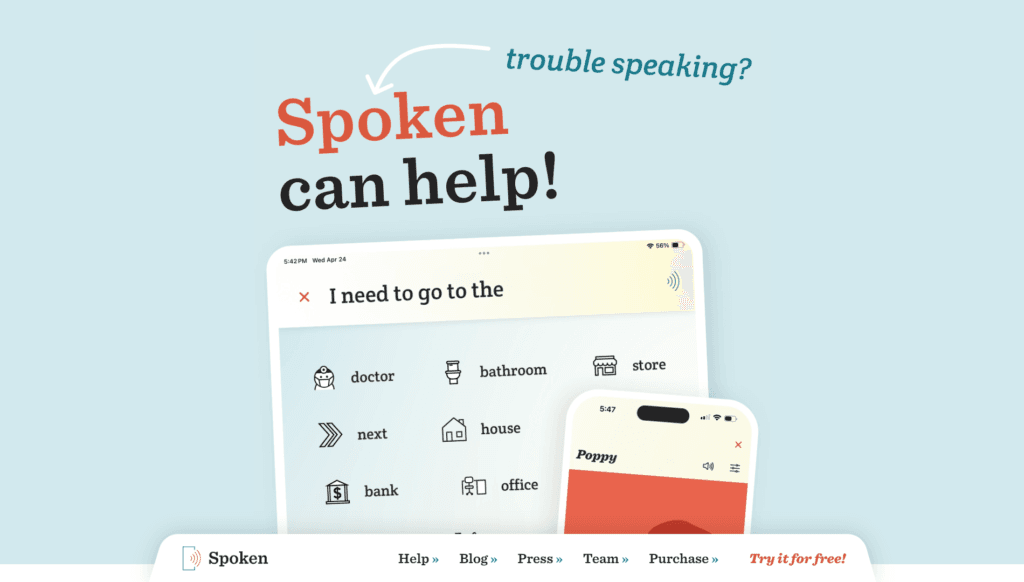
Spoken is a mobile augmentative and alternative communication (AAC) app designed for teens and adults who have difficulty speaking due to conditions like nonverbal autism, aphasia, stroke, ALS, cerebral palsy, Parkinson’s, or other speech/language disorders.
It allows users to build sentences quickly by tapping on the screen, with the app automatically speaking them using a wide variety of natural-sounding voices (including customizable pitch, speed, gender, and now ElevenLabs voice cloning/Personal Voice support).
The core innovation is AI-powered word prediction that learns from how the user talks, anticipating next words to enable faster, more fluid expression of complex thoughts and emotions.
Users can personalize vocabulary, add custom words/symbols, share audio to other apps, use one-button Alert & Speak for emergencies, and access thousands of symbol-supported words.
The app supports iOS (iPhone/iPad/Mac with Apple Silicon), Android, and is actively updated based on user feedback, with recent additions like new voices, accessibility improvements, and personalization features.
Launched in 2019 by Michael Bond (Spoken, Inc.), it has helped over 300,000 users find their voice and is available free with premium upgrades for unlimited features.
It emphasizes independence, natural communication, and reliability without requiring complex setups, making it a powerful tool for daily interactions, social connection, and overcoming isolation caused by speech challenges.
Key Features
- AI Word Prediction: Learns from user patterns to suggest next words for rapid sentence building
- Tap-to-Talk Interface: Simple screen taps to construct and auto-speak sentences quickly
- Natural Voices: Wide selection of lifelike text-to-speech voices with pitch/speed/gender customization
- Voice Cloning and Personal Voice: Integration with ElevenLabs and Apple Personal Voice for personalized synthetic speech
- Vocabulary Customization: Add words, symbols to thousands of pre-loaded items for personal expression
- Alert & Speak: One-button emergency or quick alert feature to speak pre-set messages
- Audio Sharing: Export spoken sentences as audio to other apps or messages
- Symbol Support: Visual icons added to many words for easier understanding and use
- Multi-Platform Access: Works on phones, tablets, and Macs for consistent communication
- Regular Updates: Frequent improvements based on user feedback and accessibility needs
Price Plans
- Free ($0): Basic app download with core tap-to-talk, word prediction, and standard voices; suitable for trial and light use
- Premium (One-time or Subscription, pricing varies ~$50-100 one-time or monthly): Unlimited access, advanced voice options (ElevenLabs cloning, Personal Voice), custom vocab/symbols, priority updates, and full features
Pros
- Fast and intuitive communication: Tap-based input with smart prediction speeds up expression significantly
- Highly natural voices: Advanced TTS options including cloning and Personal Voice make speech feel personal
- Free core access: Download and basic use free; premium adds unlimited features without high barriers
- Positive user impact: Helped over 300,000 people with speech challenges regain independence
- Cross-device support: iOS, Android, Mac compatibility for seamless daily use
- Active development: Regular updates add voices, symbols, and accessibility enhancements
- Focus on empowerment: Designed for teens/adults to express complex ideas and emotions naturally
Cons
- Premium for full features: Unlimited use, advanced voices, and extras require paid upgrade
- Mobile-focused: Primarily app-based; no dedicated desktop/web version beyond Mac
- Learning curve for setup: Customizing vocab/voices may take initial effort for some users
- Voice quality variability: Depends on selected TTS engine; some accents may not be perfect
- No offline mention: Likely requires internet for some advanced voice features
- Limited enterprise tools: Geared toward individuals rather than large-scale team deployment
- Potential subscription cost: Premium pricing not always transparent upfront
Use Cases
- Daily communication: Express needs, emotions, and ideas in conversations when speech is difficult
- Social interactions: Connect with friends/family and reduce isolation through voiced messages
- Emergency alerts: Use Alert & Speak for quick help in critical situations
- Education and work: Participate in classes, meetings, or therapy sessions with clear expression
- Personal storytelling: Share thoughts, stories, or journal entries audibly
- Medical recovery: Support during aphasia/stroke recovery or conditions like ALS/Parkinson's
Target Audience
- Nonverbal or limited-speech individuals: Teens/adults with autism, aphasia, stroke, ALS, cerebral palsy
- Speech therapy users: People in rehabilitation needing reliable communication aids
- Caregivers and families: Supporting loved ones with speech/language disorders
- Educators and therapists: Using AAC tools in sessions for students/clients
- Accessibility advocates: Promoting inclusive tech for communication challenges
How To Use
- Download app: Search 'Spoken - Tap to Talk AAC' in App Store (iOS/Mac) or Google Play (Android)
- Sign up/open: Launch app; no complex account needed for basic use (optional for premium)
- Tap to build sentences: Select words/symbols from grid; AI predicts next options
- Customize voice: Choose from natural voices or connect ElevenLabs/Apple Personal Voice
- Speak: Tap play button; app speaks sentence aloud automatically
- Add custom words: Go to vocab settings to personalize dictionary/symbols
- Share audio: Export spoken message as audio file to other apps
- Alert feature: Set up one-tap emergency phrases for quick access
How we rated Spoken
- Performance: 4.6/5
- Accuracy: 4.7/5
- Features: 4.5/5
- Cost-Efficiency: 4.6/5
- Ease of Use: 4.8/5
- Customization: 4.7/5
- Data Privacy: 4.5/5
- Support: 4.4/5
- Integration: 4.3/5
- Overall Score: 4.6/5
Spoken integration with other tools
- ElevenLabs: Connect account for advanced voice cloning and prompt-based voice design features
- Apple Personal Voice: Support for creating/using personalized synthetic voices on iOS/Mac
- Other Apps: Share spoken audio directly to messaging, social, or recording apps
- Device Ecosystem: Native support across iOS (iPhone/iPad), Android phones/tablets, and Apple Silicon Macs
- Accessibility Settings: Works with device-wide features like screen readers or switch control
Best prompts optimised for Spoken
- Not applicable - Spoken is an AAC tap-to-talk app with AI prediction, not a prompt-based generative tool like text-to-image/video. It works via user taps and voice selection rather than manual text prompts for content creation.
FAQs
Newly Added Tools






About Author