
What is Trellis 2?
Trellis 2 is Microsoft’s open-source 4B-parameter image-to-3D generative model that creates high-fidelity textured 3D assets with PBR materials from single images.
When was Trellis 2 released?
Trellis 2 was released on December 16, 2025, with code, weights, and paper made public for research use.
Is Trellis 2 free to use?
Yes, it is completely open-source under MIT license for academic and research purposes, with full access to model weights and code on GitHub/Hugging Face.
What are the key innovations in Trellis 2?
It introduces O-Voxel sparse voxel structure for field-free geometry and appearance encoding, plus Sparse Compression VAE with 16x downsampling for efficient high-res generation.
What resolutions does Trellis 2 support?
It generates assets up to 1536 cubed voxels, with fast times like 3s for 512 cubed and 60s for max res on H100 GPUs.
Can Trellis 2 be used commercially?
No, it is explicitly for research and academic use only; commercial applications are not permitted under the release terms.
How does Trellis 2 handle complex shapes?
The O-Voxel representation supports arbitrary topologies including open surfaces, interiors, and non-manifold geometry without traditional field limitations.
Where can I try Trellis 2?
Try the demo on Hugging Face Spaces (microsoft/TRELLIS.2) or run locally via the GitHub repo after setup.

Trellis 2

About This AI
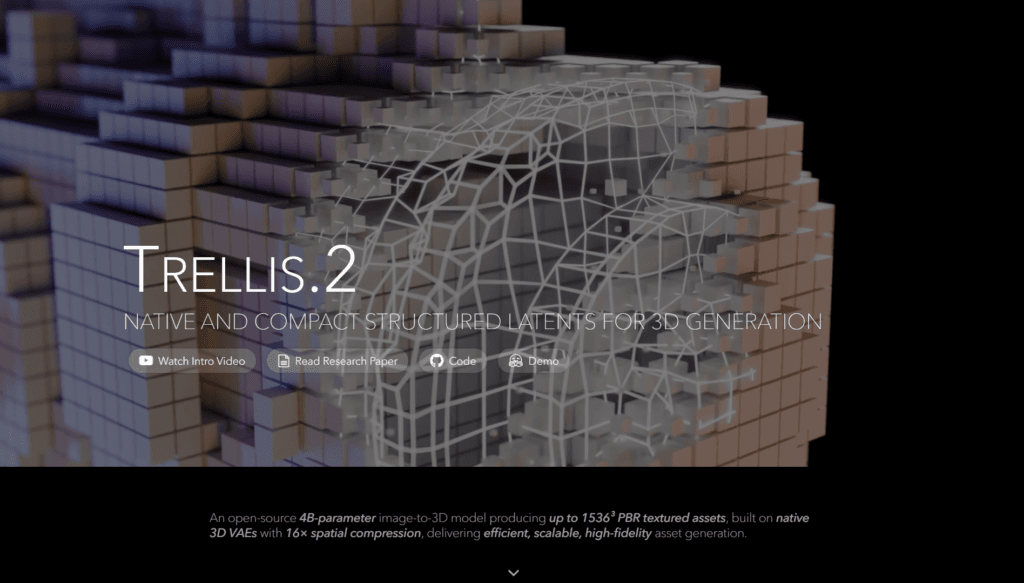
Trellis 2 is Microsoft’s open-source large 3D generative model with 4 billion parameters, specializing in high-fidelity image-to-3D generation.
It transforms a single 2D image into fully textured 3D assets with complex topologies, sharp features, and complete PBR (Physically Based Rendering) materials including base color, roughness, metallic, and opacity.
The model introduces a novel ‘field-free’ sparse voxel structure called O-Voxel that encodes both geometry and appearance natively, avoiding limitations of traditional signed distance fields.
Powered by a Sparse Compression VAE with 16x spatial downsampling and flow-matching transformers, it achieves exceptional efficiency and quality, producing assets up to 1536 cubed resolution.
Generation times are fast on high-end GPUs (e.g., 3 seconds for 512 cubed, 17 seconds for 1024 cubed, 60 seconds for 1536 cubed on H100).
Key strengths include handling arbitrary topologies (open surfaces, non-manifold geometry, interiors), rich texturing, and minimalist processing pipelines for fast mesh-to-latent and latent-to-mesh conversions.
Released in December 2025 under MIT license with full code, weights on Hugging Face, and GitHub repo, it supports academic and research use only.
Demos available on Hugging Face Spaces allow testing image-to-3D conversion, showcasing diverse assets like characters, objects, and scenes with production-ready detail.
Ideal for 3D artists, game developers, VFX professionals, researchers, and creators seeking efficient, high-quality 3D asset generation without proprietary tools.
Key Features
- High-fidelity image-to-3D generation: Converts single 2D images into detailed textured 3D models with PBR materials
- O-Voxel structured latents: Novel field-free sparse voxel representation for geometry and appearance encoding
- Sparse Compression VAE: 16x spatial downsampling for compact latent space and efficient processing
- Arbitrary topology support: Handles complex shapes, open surfaces, interiors, and non-manifold geometry
- Full PBR texturing: Generates base color, roughness, metallic, and opacity for realistic relighting
- Fast mesh-latent conversion: Rendering-free bidirectional processing (mesh to O-Voxel smaller than 10s CPU, O-Voxel to mesh less than 100ms CUDA)
- High-resolution output: Supports up to 1536 cubed voxel resolution for detailed assets
- Efficient generation pipeline: Flow-matching transformers for scalable, high-quality results
- Open-source accessibility: MIT license with code, weights, and demos on GitHub/Hugging Face
- Robust to diverse inputs: Works on real photos, renders, and varied object categories
Price Plans
- Free ($0): Fully open-source under MIT license with model weights, code, and demos available on GitHub and Hugging Face for research/academic use; no fees or subscriptions
- Commercial (Not Available): Explicitly restricted to non-commercial research; no paid tiers or enterprise options
Pros
- Exceptional quality and detail: Produces production-ready textured 3D assets with sharp features and complex structures
- High efficiency: Fast generation times and compact latents make it practical on high-end hardware
- Topology flexibility: Breaks traditional limitations by handling arbitrary shapes and open geometry
- Rich PBR materials: Full physically based rendering attributes for realistic lighting and appearance
- Fully open-source: MIT license enables research, reproduction, and community extensions
- Minimalist pipeline: No rendering or heavy optimization needed for conversions
- Strong benchmark performance: Outperforms many prior open and some proprietary image-to-3D models
Cons
- Research-only license: Explicitly for academic/research use; no commercial deployment allowed
- High hardware requirements: Needs powerful GPUs (e.g., H100 for optimal speeds) for high-res generation
- Generation time scales with resolution: 60 seconds for max 1536 cubed on top hardware
- Setup and inference complexity: Requires technical expertise for local running via GitHub code
- No hosted easy interface: Demos on Hugging Face but full power needs custom setup
- Potential inconsistencies: May require prompt tuning for perfect results on challenging inputs
- Limited adoption metrics: Recent release with growing but unquantified community use
Use Cases
- 3D asset creation for games/VFX: Generate detailed models from concept images quickly
- Research in 3D generation: Experiment with structured latents and topology handling
- Product visualization: Convert product photos to rotatable 3D models with textures
- Digital prototyping: Rapidly create 3D versions of sketches or renders
- AR/VR content development: Produce textured assets for immersive environments
- Dataset augmentation: Generate synthetic 3D variations from real images
- Educational tools: Demonstrate advanced 3D AI techniques in courses
Target Audience
- 3D artists and VFX professionals: Seeking fast high-quality asset generation
- Game developers: Prototyping models without manual sculpting
- AI/3D researchers: Studying or extending state-of-the-art generation models
- Digital creators and designers: Converting 2D concepts to 3D quickly
- Academic institutions: Using for computer vision/graphics research
- Tech enthusiasts: Experimenting with open-source 3D AI locally
How To Use
- Visit GitHub: Go to github.com/microsoft/TRELLIS.2 for code, docs, and setup instructions
- Download model: Get weights from Hugging Face (microsoft/TRELLIS.2-4B)
- Install environment: Set up Python with required dependencies (PyTorch, etc.) per repo guide
- Run inference: Use provided scripts or example.py to load model and generate from image input
- Provide input: Upload a single image or use prompt for generation
- Process output: Receive textured 3D mesh in formats like .obj/.glb with PBR maps
- Try demo: Use Hugging Face Space for quick no-setup testing
How we rated Trellis 2
- Performance: 4.8/5
- Accuracy: 4.7/5
- Features: 4.6/5
- Cost-Efficiency: 5.0/5
- Ease of Use: 4.3/5
- Customization: 4.5/5
- Data Privacy: 5.0/5
- Support: 4.2/5
- Integration: 4.4/5
- Overall Score: 4.7/5
Trellis 2 integration with other tools
- Hugging Face: Model weights and demo spaces for easy testing and inference
- GitHub Repository: Full code, training/inference scripts, and community issues/discussions
- 3D Software (Potential): Outputs compatible with Blender, Unity, Unreal Engine via standard mesh formats
- ComfyUI / Automatic1111: Community workflows for integration into popular AI image/3D pipelines
- Local GPU Setup: Runs natively on CUDA-enabled hardware; no cloud required for core use
Best prompts optimised for Trellis 2
- A highly detailed futuristic robot with metallic surfaces and glowing accents, front view photo on white background, generate full PBR textured 3D model
- Ancient stone statue of a warrior in dynamic pose, dramatic lighting, archaeological photo style, produce high-resolution 3D asset with realistic materials
- Cute cartoon fox character standing alert, vibrant fur colors, game-ready style reference image, convert to textured 3D model with sharp details
- Realistic sports car in red, side profile studio shot with reflections, automotive photography, create production-quality 3D model with PBR textures
- Fantasy dragon perched on rock, scales and wings detailed, epic lighting, concept art photo, generate complex topology 3D asset with full materials
FAQs
Newly Added Tools






About Author