
What is UniVideo?
UniVideo is an open-source unified multimodal video foundation model that handles understanding, text/image-to-video generation, and free-form editing in a single framework.
Who developed UniVideo?
It was developed by the Kling Team at KwaiVGI (Kuaishou Technology), with key contributors including Wenhu Chen and others.
Is UniVideo free to use?
Yes, it is completely free and open-source under Apache 2.0 license, with code and model weights available on GitHub and Hugging Face for personal, research, or commercial use.
When was UniVideo released?
The arXiv preprint was published on October 9, 2025, with code and model weights released on January 7, 2026.
What hardware is needed for UniVideo?
It requires a powerful GPU for efficient inference due to its large-scale architecture; suitable for local deployment on high-end consumer or server hardware.
How does UniVideo differ from other video models?
It unifies understanding, generation, and editing in one model with strong consistency and generalization, unlike task-specific models.
Can UniVideo be used commercially?
Yes, the Apache 2.0 license allows free commercial use, modification, and distribution without restrictions.
Where can I download UniVideo?
Model weights are on Hugging Face (KlingTeam/UniVideo) and full code/repository on GitHub (KlingTeam/UniVideo).

UniVideo

About This AI
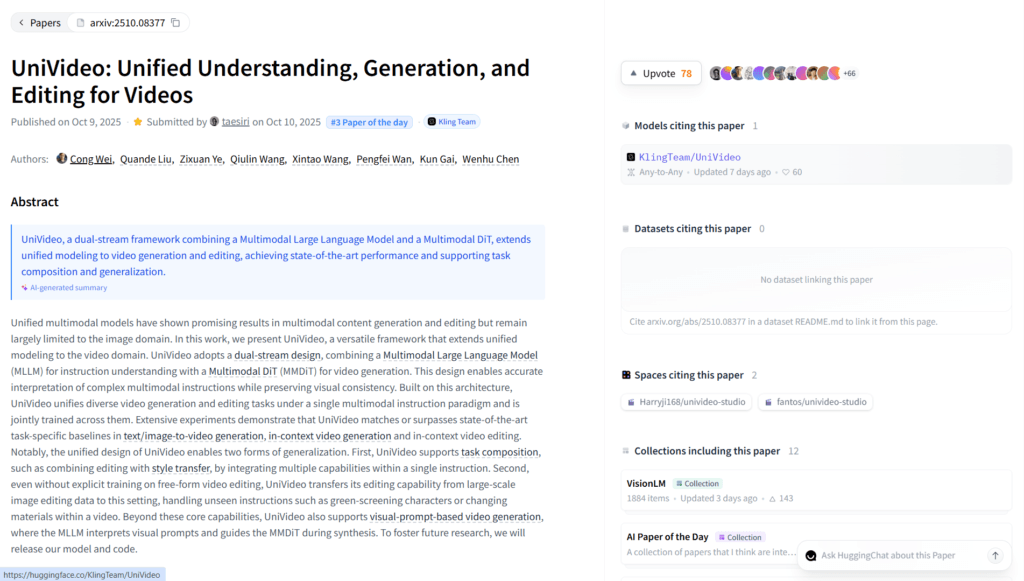
UniVideo is an open-source unified multimodal video foundation model developed by the Kling Team at KwaiVGI (Kuaishou Technology), released in October 2025 with code and weights in January 2026.
It combines a Multimodal Large Language Model (MLLM) for instruction understanding with a Multimodal DiT (MMDiT) for video generation, enabling seamless handling of video/image understanding, text/image-to-image/video generation, free-form editing, in-context creation, and task composition.
The dual-stream architecture preserves visual consistency, supports complex multimodal instructions, and achieves state-of-the-art performance across diverse tasks without switching models.
Key strengths include high-fidelity generation, precise editing (e.g., object replacement, style transfer), generalization to unseen tasks, and support for reference-driven outputs from images or prompts.
Trained jointly on understanding and generation tasks, it excels in maintaining temporal coherence, character/object identity, and realistic motion.
Fully open-source under Apache 2.0 license with code on GitHub and weights on Hugging Face, it serves as a powerful alternative for researchers, developers, and creators building video AI applications.
No hosted web app; requires local setup with GPU for inference, making it ideal for custom pipelines, research extensions, or integration into tools like ComfyUI.
As an academic/research-focused release, it pushes boundaries in unified video intelligence with potential for commercial and creative adaptations.
Key Features
- Unified multimodal framework: Single model handles understanding, generation, and editing for images/videos
- Dual-stream architecture: MLLM for instruction parsing + MMDiT for high-fidelity video synthesis
- Text/image-to-video generation: Create videos from prompts or reference images with consistency
- In-context video generation: Generate conditioned on previous frames or references
- Free-form video editing: Precise modifications like object replacement, style transfer, composition
- Visual prompt understanding: Interprets complex multimodal instructions for accurate outputs
- Temporal and identity consistency: Maintains character/object appearance and motion coherence
- Task composition: Combine multiple editing/generation tasks in one inference
- High generalization: Performs well on unseen combinations and domains
- Open-source full access: Apache 2.0 code, weights, and inference scripts on GitHub/Hugging Face
Price Plans
- Free ($0): Full open-source access to code, model weights, and inference under Apache 2.0; no costs for personal, research, or commercial use (local run only)
- Cloud/Hosting (Custom): Potential future paid options for managed inference or enterprise support (not available at launch)
Pros
- Versatile all-in-one model: Eliminates need for separate tools for understanding/generation/editing
- Strong consistency: Excels at identity preservation and temporal coherence in videos
- Fully open-source: Free to use, modify, and deploy commercially under Apache 2.0
- Research-grade performance: Matches or beats task-specific baselines in benchmarks
- Flexible for developers: Easy to integrate, fine-tune, or extend for custom applications
- Community potential: Quick adoption in tools like ComfyUI expected post-release
- No vendor lock-in: Run locally without API costs or limits
Cons
- Requires powerful GPU: Heavy model (likely large parameters) demands high-end hardware for inference
- Local-only deployment: No hosted web interface; setup involves code and dependencies
- Technical expertise needed: Best for developers/researchers; not plug-and-play for beginners
- No real-time web demo: Must install and run locally to test
- Early-stage release: Limited community integrations/examples initially
- Potential artifacts: Complex edits or long videos may show inconsistencies
- No built-in UI: Command-line or script-based usage unless wrapped in tools
Use Cases
- Video generation research: Experiment with unified multimodal models for new tasks
- AI content creation: Generate/edit videos from text or images with consistency
- Free-form editing pipelines: Build custom workflows for object replacement or style transfer
- Game cinematic prototyping: Create consistent character animations or scenes
- Autonomous agent simulation: Use in-context understanding for dynamic video scenarios
- Academic benchmarks: Test and extend on video understanding/generation datasets
- Integration in tools: Wrap in ComfyUI or other frameworks for user-friendly access
Target Audience
- AI researchers and academics: Studying unified video models and multimodal intelligence
- Developers and engineers: Building custom video AI applications or pipelines
- Open-source enthusiasts: Forking/extending the model for new features
- Content creators (advanced): Using local setups for high-control video generation
- Game and VFX studios: Prototyping consistent animations without proprietary tools
- Computer vision teams: Experimenting with generation + editing in one framework
How To Use
- Visit GitHub: Go to github.com/KlingTeam/UniVideo for code, docs, and setup guide
- Download model: Get weights from Hugging Face (KlingTeam/UniVideo)
- Install dependencies: Set up environment with PyTorch and required libs per README
- Run inference: Use provided scripts for text-to-video, image-to-video, or editing tasks
- Input prompts: Provide text description, reference image, or edit instruction
- Generate/edit: Run model to produce consistent video output
- Integrate/extend: Customize for specific tasks or wrap in UI like ComfyUI
How we rated UniVideo
- Performance: 4.6/5
- Accuracy: 4.7/5
- Features: 4.8/5
- Cost-Efficiency: 5.0/5
- Ease of Use: 4.0/5
- Customization: 4.9/5
- Data Privacy: 5.0/5
- Support: 4.2/5
- Integration: 4.5/5
- Overall Score: 4.7/5
UniVideo integration with other tools
- Hugging Face: Model weights and inference pipelines for easy download and testing
- GitHub Repository: Full open-source code, scripts, and community extensions
- ComfyUI (Community): Rapid integration support for node-based workflows
- Local Development Tools: Compatible with PyTorch, Diffusers, and custom scripts
- Research Frameworks: Usable in video AI experiments or multimodal benchmarks
Best prompts optimised for UniVideo
- A majestic dragon soaring over misty ancient mountains at sunrise, cinematic aerial tracking shot, golden hour lighting, volumetric fog, ultra realistic, high detail
- Cyberpunk city street at night with neon reflections on wet pavement, slow dolly zoom on a lone figure walking, dramatic blue and pink lighting, moody atmosphere
- Close-up of a chef slicing fresh vegetables in a modern kitchen, dynamic camera movement, warm lighting, hyper realistic food details, ASMR style
- Fantasy warrior battling a giant monster in an enchanted forest, epic wide shot with particle effects, dramatic lighting, anime style with high motion
- Futuristic robot assembly line in a high-tech factory, smooth panning camera, metallic reflections, sci-fi aesthetic, realistic physics
FAQs
Newly Added Tools







About Author