
What is Veo 3.1?
Veo 3.1 is Google’s advanced AI video generation model (December 2025 release) that creates high-quality videos up to 4K from text, images, or video inputs, with native audio, realistic physics, and precise camera controls.
Where can I access Veo 3.1?
Available in Google AI Studio (aistudio.google.com) for testing and Vertex AI for enterprise/API use; requires Google account.
Is Veo 3.1 free to use?
Limited free credits in AI Studio for small tests; full access and higher volume require Google AI Pro ($20/month) or Vertex AI paid credits.
Does Veo 3.1 generate audio in videos?
Yes, Veo 3.1 supports native generation of synchronized audio including dialogue, sound effects, and ambient sounds in the same output.
What resolutions and durations does Veo 3.1 support?
Up to 4K resolution and 60 seconds standard duration (extendable); high detail and cinematic quality.
How does Veo 3.1 compare to Kling or Sora?
Veo 3.1 excels in realism, physics, native audio, and prompt control; often competitive or leading in quality benchmarks against Kling 2.6 and OpenAI Sora.
Are there safety features in Veo 3.1?
Yes, includes SynthID invisible watermarking, content moderation filters, and restrictions on harmful or sensitive content generation.
Can I use Veo 3.1 commercially?
Yes, outputs can be used commercially under Google AI Studio/Vertex AI terms (review licensing); paid plans support professional/business use.

Veo 3.1

About This AI
Veo 3.1 is Google’s latest state-of-the-art video generation model, released in December 2025 as an upgrade to Veo 3, available exclusively through Google AI Studio and Vertex AI.
It generates high-fidelity videos up to 4K resolution from text prompts, reference images, or video inputs, with dramatically improved realism, physics, human motion, lip-sync, and natural camera work.
Key advancements include native audio generation (voiceovers, sound effects, ambient noise), precise prompt adherence, better temporal consistency over longer durations (up to 60 seconds standard, extendable), and advanced controls like camera motion (pan, zoom, dolly), style references, and negative prompts.
The model excels in complex scenes with multiple characters, dynamic lighting, realistic physics (gravity, fluid dynamics, cloth simulation), and creative styles ranging from photorealistic to animated or cinematic.
Veo 3.1 powers tools like Google AI Studio’s video generator, Whisk Animate, and Vertex AI for enterprise use, with features like safety filters, watermarking (SynthID), and content moderation.
Access is tiered: limited free credits in AI Studio for testing, higher limits via paid credits or Vertex AI subscriptions for developers and businesses.
It represents Google’s push to lead in generative video, competing directly with models like Sora, Kling, and Runway Gen-3, with strengths in quality, controllability, and integration within the Google ecosystem.
Ideal for filmmakers, marketers, educators, content creators, and developers needing professional-grade AI video without traditional production resources.
Key Features
- Text-to-Video Generation: Create videos from detailed natural language prompts with high prompt adherence
- Image-to-Video: Animate static images into dynamic clips with consistent character/object motion
- Native Audio Generation: Simultaneous video and audio output including dialogue, effects, and ambiance
- 4K Resolution Support: Generate and upscale to 4K with sharp details and cinematic quality
- Advanced Camera Controls: Specify precise movements (pan, tilt, zoom, dolly, orbit) in prompts
- Style and Reference Control: Match artistic styles or reference images for consistent aesthetics
- Longer Duration: Up to 60 seconds standard, with extension capabilities in advanced modes
- Improved Physics and Motion: Realistic human actions, object interactions, lighting, and environment dynamics
- Safety and Watermarking: Built-in SynthID watermark and content filters for responsible use
- Vertex AI Integration: Enterprise-scale API access for batch generation and custom workflows
Price Plans
- Free Trial ($0): Limited credits in Google AI Studio for testing Veo 3.1 (small number of generations)
- Google AI Pro ($20/Month): Higher monthly credits, access to advanced features and priority generation
- Vertex AI (Pay-as-you-go or Enterprise): Token/credit-based pricing for API access, batch jobs, and custom deployments; costs vary by usage volume
Pros
- Exceptional visual quality: Leads in realism, detail, and cinematic feel among current models
- Native audio support: Eliminates need for separate dubbing with synced sound and lip movements
- Strong prompt control: High adherence to complex instructions including camera and style
- Integrated ecosystem: Seamless use in Google AI Studio and Vertex AI for developers
- Responsible AI features: Robust safety filters and invisible watermarking
- Rapid improvements: Frequent updates building on Veo series strengths
- Professional applications: Suitable for film pre-vis, marketing, education, and content production
Cons
- Limited free access: Only small credit allowances in AI Studio; heavy use requires payment
- Generation time: Complex or high-res prompts can take minutes even in paid tiers
- Web/AI Studio dependent: No standalone desktop app; requires Google account and internet
- Content restrictions: Strict safety policies may block certain creative prompts
- Cost for scale: Vertex AI pricing can add up for high-volume or enterprise use
- No offline mode: Fully cloud-based processing
- Occasional inconsistencies: Rare artifacts in very complex multi-subject scenes
Use Cases
- Film and animation pre-production: Storyboard scenes, test shots, and camera movements
- Marketing and advertising: Create product demos, social media videos, and branded content
- Educational content: Animate explanations, historical recreations, or scientific visualizations
- Social media creators: Generate short-form videos with audio for platforms like YouTube Shorts
- Game development: Prototype cinematics, character animations, and environmental sequences
- Corporate training: Produce professional explainer videos with voiceover and visuals
- Enterprise media: Scale video asset creation through Vertex AI integrations
Target Audience
- Filmmakers and animators: Needing quick high-quality video prototypes
- Marketers and advertisers: Producing promotional and social content efficiently
- Content creators: YouTubers, TikTokers, and social media professionals
- Educators and trainers: Creating engaging visual learning materials
- Game studios: For cinematic sequences and asset generation
- Enterprises and developers: Using Vertex AI for scalable production
How To Use
- Access AI Studio: Go to aistudio.google.com and sign in with Google account
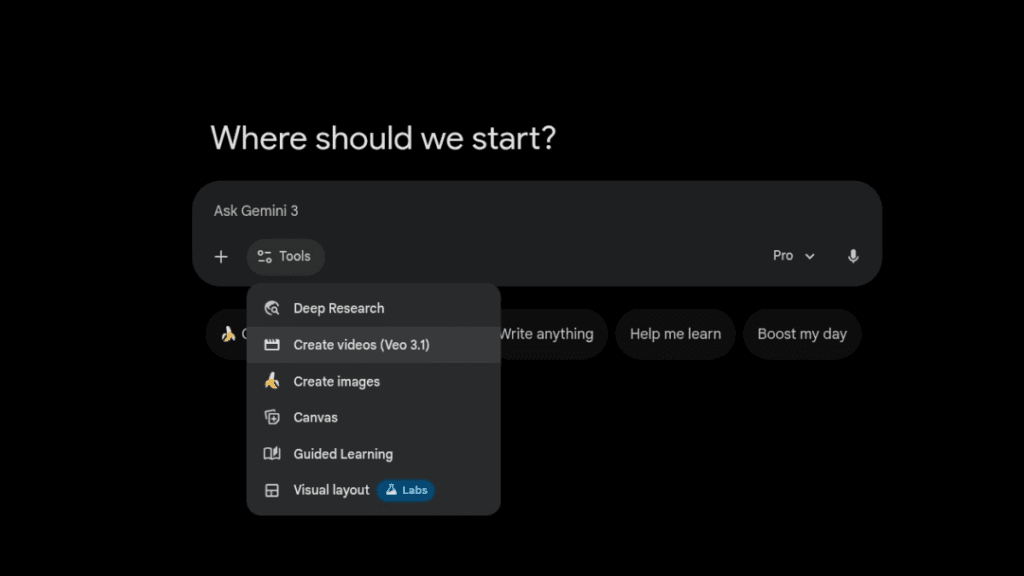
- Select Veo 3.1: Choose the Veo 3.1 model from the available generators
- Enter prompt: Write detailed text description; add style, camera, or reference image if desired
- Customize settings: Set duration, aspect ratio, resolution, motion intensity, and audio options
- Generate: Submit and wait for processing (minutes depending on complexity)
- Review and iterate: Preview result; refine prompt or extend clip as needed
- Export: Download video with embedded SynthID watermark
How we rated Veo 3.1
- Performance: 4.9/5
- Accuracy: 4.8/5
- Features: 4.9/5
- Cost-Efficiency: 4.3/5
- Ease of Use: 4.7/5
- Customization: 4.8/5
- Data Privacy: 4.6/5
- Support: 4.5/5
- Integration: 4.7/5
- Overall Score: 4.8/5
Veo 3.1 integration with other tools
- Google AI Studio: Primary web interface for prompt-based generation and testing
- Vertex AI: Enterprise API for batch processing, custom apps, and scalable workflows
- Google Workspace: Potential export to Google Drive, Slides, or Docs for marketing/education use
- Video Editing Tools: Output MP4 files compatible with Premiere Pro, DaVinci Resolve, Final Cut Pro
- Third-Party Platforms: Via Vertex AI API integration with Zapier, Make, or custom scripts
Best prompts optimised for Veo 3.1
- Cinematic slow-motion shot of a futuristic city at dusk, flying cars weaving between skyscrapers, neon lights reflecting on wet streets, dramatic orchestral music, camera slowly panning upward, 4K, photorealistic
- A majestic lion walking through savanna at golden hour, dust particles in air, realistic fur movement and muscle definition, gentle wind blowing grass, national geographic style, 60 seconds
- Animated fantasy scene: young wizard casting spell in ancient library, glowing runes floating, books flying off shelves, dynamic camera circling the character, epic music, vibrant colors
- Close-up product reveal of a sleek smartphone on black background, smooth rotation, soft lighting highlighting edges, subtle particle effects, professional commercial style, with voiceover narration
- Time-lapse of cherry blossoms blooming in Japanese garden during spring, gentle breeze, petals falling slowly, serene piano music, cinematic color grading, 4K ultra detailed
FAQs
Newly Added Tools







About Author