
What is Vizard AI?
Vizard AI is an AI-powered video editing tool that automatically turns long-form videos into short, engaging clips optimized for TikTok, YouTube Shorts, Instagram Reels, and more.
Is Vizard AI free to use?
Yes, it has a free plan with 60 credits/month (60 upload minutes), 720p exports, watermarks, and basic features; paid plans start at around $15/month for no watermarks, 4K, and higher limits.
How many users does Vizard AI have?
Vizard AI is trusted by over 5 million creators and businesses, with strong community growth and adoption in content creation.
What are the main features of Vizard AI?
Key features include AI clipping for highlights, text-based editing, auto captions/translation in 100+ languages, speaker detection, auto-reframe, B-rolls, hashtags, and social scheduling.
What does Vizard AI pricing look like?
Free: 60 mins/month; Creator: ~$15/month (600+ mins, 4K, no watermark); Business: ~$20/month (higher mins, team features, brand kit). Yearly discounts apply.
Who is Vizard AI best for?
Ideal for content creators, podcasters, marketers, coaches, agencies, and teams repurposing webinars, interviews, or podcasts into social media clips.
Does Vizard AI support team collaboration?
Yes, Business plan offers shared workspaces, team invites, external viewers, brand kits, and collaborative project management.
What languages does Vizard AI support for captions?
Captions and translations available in over 100 languages, making it suitable for global content creators.

Vizard AI

About This AI
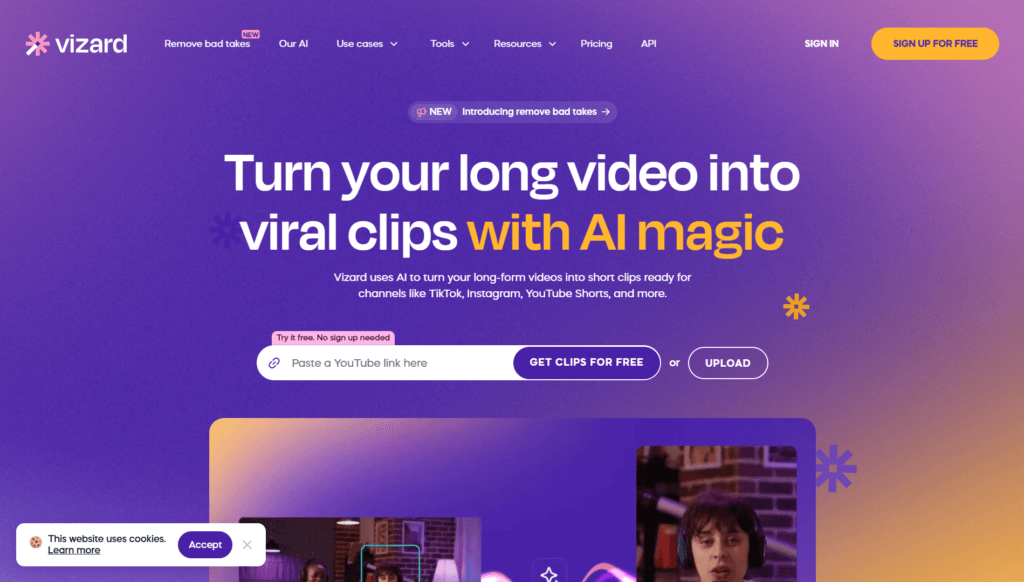
Vizard AI is an intuitive AI video editing and clipping platform that transforms long-form videos into engaging short clips optimized for social media platforms like TikTok, YouTube Shorts, Instagram Reels, and more.
It uses advanced AI to automatically detect highlights, transcribe audio, generate dynamic captions in multiple languages, track speakers, reframe for vertical formats, add emojis/B-rolls, and suggest hashtags/post ideas.
Users upload videos (podcasts, webinars, interviews, client calls), and AI creates multiple ready-to-post clips in minutes with text-based editing (delete from transcript to trim), auto-subtitling, translation, and brand templates.
Key strengths include one-click repurposing, 10x faster editing than manual, no watermark on paid plans, 4K exports, social scheduling, team collaboration, and permanent storage.
Founded in the USA (Delaware) as Vizard Corp, it targets creators, podcasters, coaches, marketers, agencies, and teams to repurpose content efficiently and boost views/engagement.
With a freemium model, it offers a free tier for testing (limited minutes/exports) and paid plans starting at around 15/Month (with yearly discounts) for unlimited or high-volume use.
Trusted by millions of creators and businesses, Vizard simplifies video content creation, making it accessible without advanced editing skills or expensive software.
Key Features
- AI Clipping: Automatically finds engaging moments and generates multiple short clips with one click
- Text-Based Editing: Edit video by deleting or modifying the transcript to trim content instantly
- Auto Captions and Translation: Generates dynamic subtitles in over 100 languages with emojis and keyword highlights
- Speaker Detection and Reframe: Tracks speakers, centers active ones, and auto-reframes for vertical social formats
- AI B-Roll and Post Suggestions: Adds relevant visuals and suggests captions/hashtags for better reach
- Social Media Optimization: Exports in platform-specific formats, schedules posts, and manages multiple accounts
- Team Workspace: Shared projects, invite team members, external viewers, and brand kits/templates
- High-Quality Exports: 4K resolution, no watermarks on paid plans, unlimited exports in higher tiers
- Fast Processing: Priority and faster AI speeds in paid plans for quick turnaround
- Video Storage and Management: Permanent storage in paid plans vs 3-day limit in free
Price Plans
- Free ($0): 60 credits/month (60 upload minutes), 720p exports, watermarked videos, 3-day storage, basic features and 1 social account
- Creator ($15/Month approx, $29 monthly or $14.5 with yearly 50% off): 600+ credits/month, no watermarks, 4K exports, unlimited storage, auto subtitling/translation, custom templates, faster processing, scheduling, 6 social accounts
- Business ($20/Month approx, $39 monthly or $19.5 with yearly discount): Higher credits (1000+ mins), team collaboration, shared workspace, brand kit, priority support, invite members, external viewers
Pros
- Extremely fast repurposing: Turns hours of video into dozens of clips in minutes with minimal effort
- High-quality AI outputs: Accurate clipping, natural captions, speaker tracking, and platform-ready formatting
- Freemium accessibility: Solid free tier with 60 minutes/month for testing before committing
- Time and cost savings: Users report 10x faster editing and significant reduction in manual work
- Team collaboration features: Shared workspaces and brand tools ideal for agencies/marketers
- Multi-language support: Captions/translations in 100+ languages expand global reach
- Strong community: Trusted by millions with positive testimonials on views/engagement boosts
Cons
- Limited free credits: 60 minutes/month caps heavy use; watermarks and short storage in free
- Credit-based system: 1 credit per minute uploaded can add up quickly for long videos
- Web-only focus: No dedicated desktop/mobile apps; browser-dependent experience
- Occasional AI misses: May require manual tweaks for perfect clips in complex content
- Paid for advanced features: Full 4K, unlimited storage, team tools require Pro/Business
- Processing time: Free tier slower; peak times may queue even in paid
- No offline mode: Requires internet for AI processing and uploads
Use Cases
- Content creators/podcasters: Turn long episodes into viral shorts for TikTok/Reels/Shorts to grow views
- Marketers and agencies: Repurpose webinars, client calls, or interviews into monthly social content
- Coaches/business owners: Clip sessions for personal branding and lead generation
- Teams and freelancers: Collaborate on video projects with shared workspaces and brand consistency
- Educators/trainers: Create bite-sized clips from lectures or tutorials for social sharing
- Social media managers: Schedule and optimize posts with AI suggestions and multi-account support
Target Audience
- Content creators and podcasters: Needing quick clips to boost engagement and views
- Digital marketers and agencies: Repurposing long content for social campaigns
- Coaches and business owners: Building personal brands with client/interview clips
- Teams and collaborators: Using shared workspaces for joint video editing
- Freelancers and solopreneurs: Fast editing without hiring or complex software
- Social media professionals: Managing multiple accounts and scheduling
How To Use
- Sign up: Visit vizard.ai and create free account (no card for trial)
- Upload video: Drag/drop or upload long-form content (podcasts, webinars, etc.)
- AI processing: Click 'Get AI clips' for automatic highlight detection and clipping
- Edit clips: Use text-based editor to trim by deleting transcript parts, adjust captions
- Customize: Add translations, emojis, B-rolls, reframe, apply brand templates
- Export and share: Download in 720p/4K or schedule direct to social platforms
- Team features: Invite members or share projects in paid plans
How we rated Vizard AI
- Performance: 4.7/5
- Accuracy: 4.6/5
- Features: 4.8/5
- Cost-Efficiency: 4.5/5
- Ease of Use: 4.9/5
- Customization: 4.6/5
- Data Privacy: 4.5/5
- Support: 4.4/5
- Integration: 4.5/5
- Overall Score: 4.7/5
Vizard AI integration with other tools
- Social Media Platforms: Direct publishing/scheduling to TikTok, Instagram Reels, YouTube Shorts, and other channels
- Google Drive: Save/export videos and assets for easy access in cloud workflows
- Team Collaboration: Shared workspaces for inviting members and external viewers/clients
- Video Export Formats: Compatible with editors like Premiere Pro, CapCut, or DaVinci Resolve via MP4 downloads
- Brand Tools: Custom fonts/templates integrated for consistent marketing outputs
Best prompts optimised for Vizard AI
- Not applicable - Vizard AI is an automatic AI video clipping and editing tool that processes uploaded videos without manual text prompts for content generation. It analyzes existing footage to create clips, captions, and suggestions automatically.
- N/A - Core functionality relies on video uploads rather than generative prompts; best results come from high-quality long-form source videos with clear speech.
- N/A - No text-to-video prompting; focus is repurposing existing content via AI detection and editing.
FAQs
Newly Added Tools







About Author