
What is Websites.ly?
Websites.ly is an AI-powered no-code website builder that creates fully functional, responsive sites from natural language descriptions via chat, with templates, code editing, and custom domains.
Is Websites.ly free to use?
Yes, Basic plan is free with limited chat messages and tokens; paid plans start at $20/month for unlimited generations, advanced editing, and full features.
How fast can I build a website with Websites.ly?
You can go from idea to published site in minutes using the AI chat builder, with real-time previews and one-click deployment.
Do I need coding skills for Websites.ly?
No coding required for core use; AI generates everything, but an optional code editor allows advanced HTML/CSS/JS customization.
What types of websites can I build?
Best for landing pages, portfolios, business sites, blogs, event pages, and simple promo sites; supports responsive design and SEO basics.
Does Websites.ly support custom domains?
Yes, connect your own domain easily (available in paid plans) for professional branding instead of using their subdomain.
How does the AI chat work?
Describe your site idea, business, style, pages, and features in chat; AI asks clarifying questions and builds the full site accordingly.
Is Websites.ly good for beginners?
Yes, very beginner-friendly with AI handling design/content, templates for quick starts, and visual editing; no technical skills needed.

Websites.ly

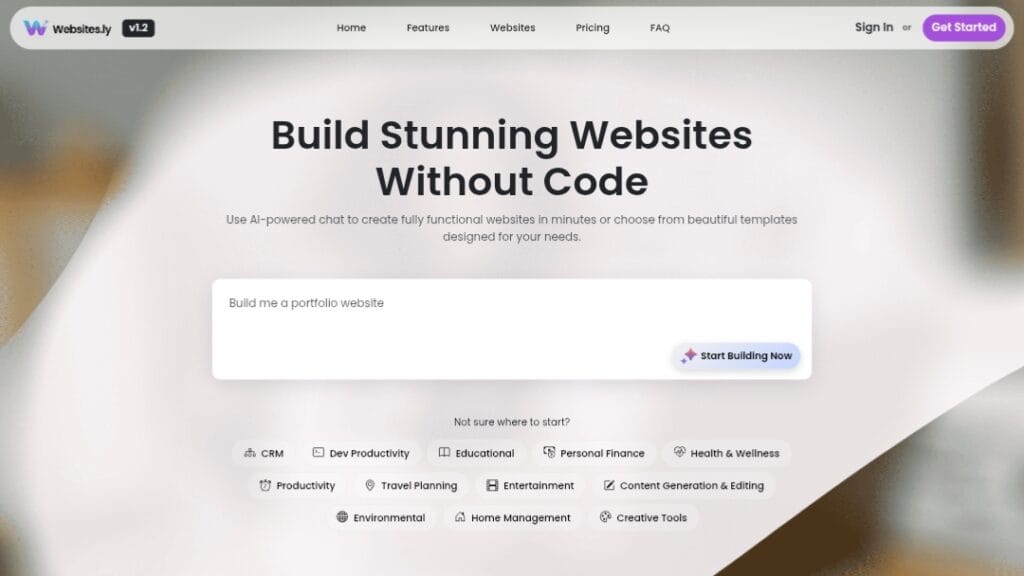
About This AI
Websites.ly is an intuitive AI-driven platform that enables anyone to build and launch custom, responsive websites without coding.
Users describe their vision through an AI chat interface, and the tool generates complete sites including design, text content, layout, and functionality in seconds.
It offers pre-made professional templates for quick starts, an in-app code editor for HTML/CSS/JS customization, file manager for media uploads, custom domain connection, and SEO-friendly outputs.
The builder supports real-time editing, responsive designs across devices, and easy publishing with hosting included.
Launched around late 2025, it emphasizes speed and accessibility for entrepreneurs, small businesses, creators, and non-technical users to go from idea to live site rapidly.
Freemium model includes a Basic free plan with limited messages/tokens/templates, while paid upgrades unlock unlimited generations, advanced features, higher priority, and commercial usage rights.
Ideal for landing pages, portfolios, business sites, blogs, or simple e-commerce setups, Websites.ly combines AI generation with manual tweaks for professional results without traditional web dev skills.
Key Features
- AI Chat Builder: Describe your site in natural language; AI generates full design, content, and code instantly
- Pre-made Templates: Choose from modern, industry-specific starting points for faster creation
- Real-Time Editing: Modify layout, text, colors, and elements live after generation
- Code Editor: Built-in editor for advanced HTML, CSS, JavaScript tweaks
- File Manager: Upload and manage images, media, and assets directly
- Custom Domain: Connect your own domain for professional branding
- Responsive Design: All sites auto-adapt to mobile, tablet, and desktop
- SEO Optimization: Built-in friendly structure and meta tools
- One-Click Publish: Deploy live with included hosting in minutes
- Unlimited Revisions: Regenerate or edit as many times as needed (paid)
Price Plans
- Basic ($0): AI builder access, basic templates, up to 5 chat messages, 100 free tokens, limited generations
- Paid Plans (from $20/Month): Unlimited generations, full code editor, custom domains, priority support, advanced features, no limits
Pros
- Extremely fast creation: From idea to live site in minutes via chat
- No coding required: Perfect for beginners and non-technical users
- Flexible customization: Combine AI generation with manual code edits
- Responsive and SEO-ready: Professional outputs out of the box
- Free starting plan: Basic features and tokens available without payment
- Modern templates: Attractive designs for various industries
- Easy domain integration: Quick professional setup
Cons
- Limited free tier: Caps on messages, tokens, and generations
- Basic customization in free: Advanced editing and unlimited require paid
- Potential generic outputs: AI-generated sites may need tweaks for uniqueness
- No advanced e-commerce: Better for simple sites than full stores
- New platform: Limited user base and long-term reliability data
- Hosting dependency: Tied to their platform for publishing
- Learning curve for code editor: Optional but useful for pros
Use Cases
- Personal portfolios: Showcase work or resume quickly
- Business landing pages: Create lead-gen or info sites fast
- Small business websites: Professional online presence without devs
- Event or product pages: Temporary promo sites with custom domains
- Blog starters: Simple content sites with AI-written copy
- Side project MVPs: Validate ideas with functional web presence
- Client mockups: Rapid prototypes for design pitches
Target Audience
- Entrepreneurs and startups: Quick MVPs without hiring devs
- Small business owners: Affordable online presence
- Content creators: Portfolios or promo sites
- Freelancers: Personal branding pages
- Non-technical users: Anyone avoiding code
- Marketers: Fast campaign landing pages
How To Use
- Visit site: Go to websites.ly and start free (no card needed for basic)
- Chat with AI: Describe your website idea in detail (business type, pages, style, features)
- Generate site: AI builds full site; preview instantly
- Customize: Edit text/images via visual editor or code view
- Add domain: Connect custom domain (paid plans)
- Publish: One-click deploy live with hosting
- Upgrade if needed: For unlimited use or advanced options
How we rated Websites.ly
- Performance: 4.5/5
- Accuracy: 4.4/5
- Features: 4.6/5
- Cost-Efficiency: 4.5/5
- Ease of Use: 4.8/5
- Customization: 4.3/5
- Data Privacy: 4.4/5
- Support: 4.2/5
- Integration: 4.3/5
- Overall Score: 4.5/5
Websites.ly integration with other tools
- Custom Domain Providers: Easy connection to GoDaddy, Namecheap, Google Domains, etc. for professional URLs
- Payment Gateways (Potential): Future support for Stripe/PayPal integration in e-commerce features
- File Storage: Built-in file manager for media; compatible with external uploads from Google Drive/Dropbox
- Analytics Tools: Embed Google Analytics or similar scripts via code editor for traffic tracking
- Social Media: Easy sharing buttons and meta tags for better social previews
Best prompts optimised for Websites.ly
- Create a modern one-page portfolio website for a freelance graphic designer named Alex, with sections for about, services, recent work gallery, testimonials, and contact form, dark mode theme, minimalist design
- Build a professional landing page for a local coffee shop called Brew Haven, include hero image with tagline 'Best Artisan Coffee in Town', menu highlights, location map, hours, online ordering button, warm earthy colors
- Generate a simple blog site for a travel influencer, homepage with latest posts grid, about page with bio and photo, categories for Europe/Asia, contact and newsletter signup, clean white layout with accent teal
- Make an event page for a tech conference 'AI Summit 2026', with countdown timer, speaker list, agenda schedule, ticket purchase button, sponsors logos, futuristic blue gradient design
- Design a personal resume site for a software engineer, sections: hero with name/photo/title, experience timeline, skills icons, projects showcase with links, education, contact form, professional navy theme
FAQs
Newly Added Tools




About Author