



Anthropic has expanded its Cowork platform by introducing plugins, a feature that empowers users to customize the Claude AI assistant for specialized professional tasks.
This update targets paid subscribers and aims to streamline workflows in areas like sales, marketing, legal, and finance without requiring advanced coding skills.
Cowork, which debuted earlier in mid-January as an extension of Claude Code, transforms Claude into a hands-on desktop agent.
It allows the AI to interact with local files, organize documents, draft reports, and execute multi-step processes directly on users’ computers.
The new plugins build on this foundation, enabling seamless integration of custom tools and data sources.
Key Features of Cowork Plugins
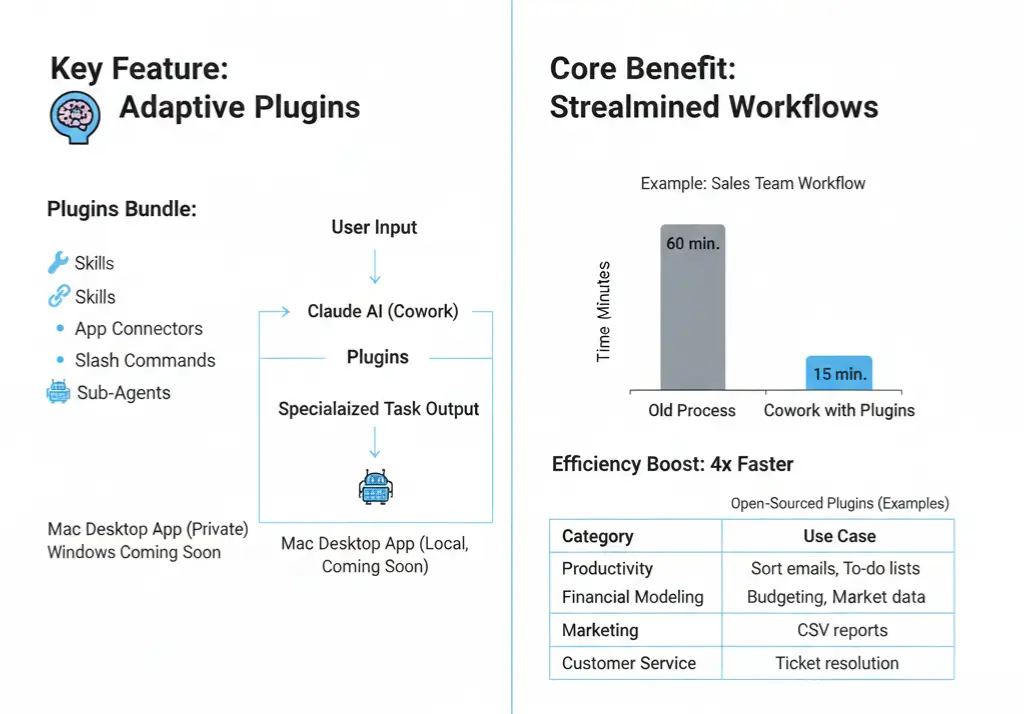
Plugins bundle several elements to create role-specific assistants:
- Skills: Pre-defined actions like data analysis or content generation.
- App Connectors: Links to external tools such as CRMs, databases, or productivity apps.
- Slash Commands: Quick-access prompts for common tasks, like /research or /summarize.
- Sub-Agents: Specialized mini-agents that handle subtasks autonomously.
These components install locally on Mac devices, ensuring data privacy and offline capabilities. Windows support is slated for an upcoming release, along with organization-wide sharing to facilitate team collaboration.
Open-Sourced Plugins and Customization Options
To kickstart adoption, Anthropic open-sourced 11 plugins available on their website and GitHub. Here’s a breakdown of select examples in a table for quick reference:
| Plugin Category | Description | Example Use Case |
|---|---|---|
| Productivity | Automates task management and document organization. | Sorting emails and creating to-do lists. |
| Biology Research | Integrates with scientific databases for quick queries and analysis. | Reviewing genetic data or literature. |
| Financial Modeling | Builds spreadsheets, forecasts trends, and pulls market data. | Budget planning or investment analysis. |
| Data Analysis | Processes datasets with statistical tools and visualizations. | Generating reports from CSV files. |
| Marketing | Crafts campaigns, analyzes customer data, and suggests content strategies. | Social media planning or A/B testing. |
| Customer Service | Handles inquiries, tracks tickets, and generates responses. | Support ticket resolution. |
Users can easily build, edit, or share custom plugins, making it accessible for non-technical teams. This modular approach reduces context-switching by keeping all tools within the Claude interface.
Benefits for Enterprise Users
The update positions Cowork as a versatile AI agent for knowledge workers, potentially boosting efficiency by automating repetitive tasks.
For instance, a sales team could use a plugin to pull CRM data, research leads, and draft follow-up emails in one workflow. Early feedback highlights its role as a “modular operating system for work,” minimizing the need to juggle multiple apps.
Privacy remains a priority, with plugins running locally and user-controlled permissions. As Cowork evolves from research preview to full release, it could compete more aggressively in the enterprise AI market against tools from OpenAI and Google.
For paid Claude users on Pro, Max, Team, or Enterprise plans, plugins are available now via the desktop app. This launch underscores Anthropic’s commitment to safe, practical AI that adapts to real-world business needs, paving the way for more intuitive digital assistants.





