


Picture this: You’re buried under a mountain of PDFs legal contracts, research papers, financial reports and the clock is ticking.
As a busy professional who’s juggled endless documents in my career, I know the frustration all too well.
That’s where Humata AI swoops in like a digital superhero, transforming chaotic files into actionable intelligence in seconds.
Launched in 2022 by visionaries Cyrus Khajvandi and Dan Rasmuson, this tool has evolved into a must-have for researchers, students, and teams alike.
In this comprehensive Humata AI review, I’ll dive deep into its features, performance, and value based on my hands-on testing and user insights.
If you’re tired of manual skimming and ready for smarter workflows, stick around, this could change how you handle information forever.
What is Humata AI?
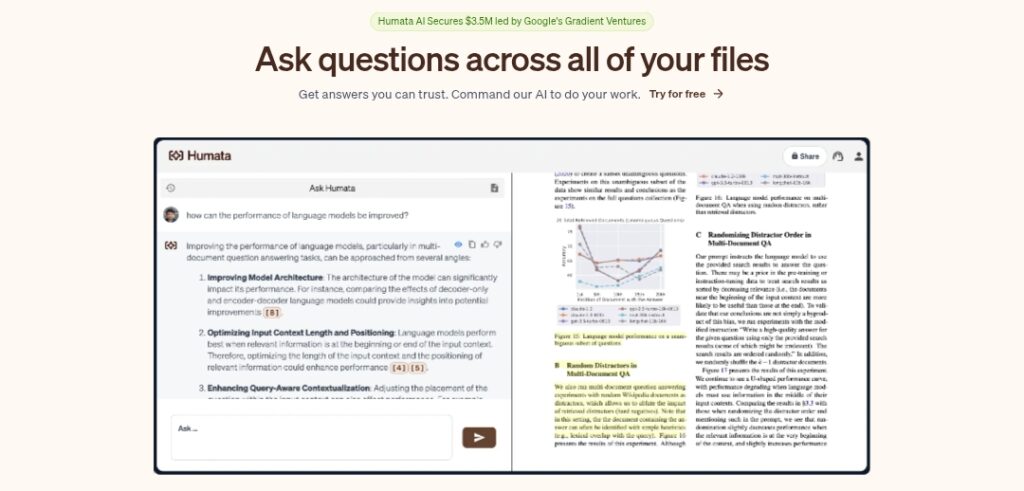
Humata AI is an advanced AI-driven document management and analysis platform that turns static files into interactive knowledge bases.
At its core, it uses natural language processing (NLP), machine learning (ML), and optical character recognition (OCR) to understand, summarize, and query documents effortlessly. L
Founded by Cyrus Khajvandi (a serial entrepreneur with experience in fintech and networking) and Dan Rasmuson (a Forbes 30 Under 30 alum and AI expert), the company secured over $3.5 million in seed funding from heavyweights like Google’s Gradient Ventures and ARK Invest.
Unlike generic chatbots, Humata specializes in document-specific tasks. It supports formats like PDFs, Word documents, PowerPoint presentations, and even scanned images.
Whether you’re a student dissecting academic papers, a lawyer reviewing contracts, or a business analyst extracting data from reports, Humata acts as your personal assistant.
It doesn’t just read text, it comprehends context, draws connections across multiple files, and provides cited answers. In my experience, it’s like having a tireless research partner that cuts through the noise, making it ideal for knowledge-intensive fields.
The platform’s evolution since 2022 has seen integrations with cloud storage, enhanced multilingual support (over 80 languages), and enterprise-grade security. By 2026, it’s positioned as a leader in AI document tools, boasting millions of users worldwide. But is it right for you? Let’s break it down.
Key Features of Humata AI
Humata AI packs a punch with features tailored for efficiency. Here’s a detailed breakdown:
Document Analysis and Summarization
This is Humata’s flagship capability. Upload a file, and it generates concise summaries of entire documents or sections.
It identifies key points, semantic relationships, and themes without losing context. For instance, it can condense a 100-page research paper into a few paragraphs highlighting methodologies, findings, and implications.
Interactive Q&A Interface
Ask questions in natural language, and Humata responds with precise, context-aware answers.
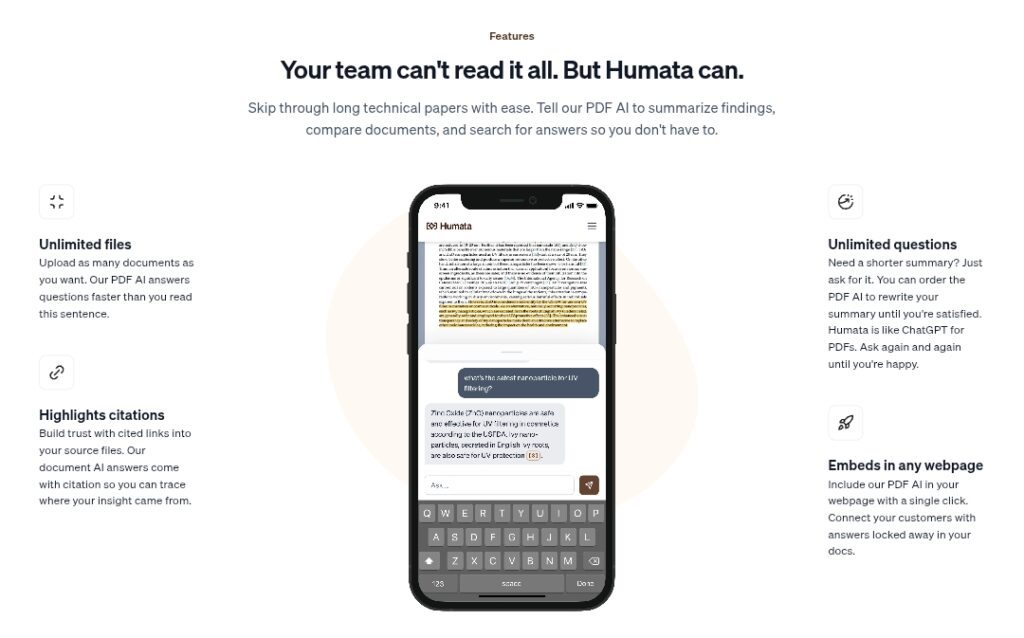
It cites sources with page references and highlights relevant sections. During my tests, querying “What are the key risks in this contract?” pulled accurate excerpts instantly, complete with annotations.
Semantic Search
Beyond keyword matching, Humata uses vector embeddings to understand query intent.
Search for “environmental impacts” in a report, and it surfaces nuanced insights, not just literal matches. This feature shines in multi-file projects, allowing cross-document queries.
OCR Integration
For scanned or image-based documents, Humata’s OCR converts non-editable text into searchable data.
Available on higher plans, it supports multilingual extraction, making it invaluable for archived materials or international users.
Content Generation and Editing
While not its primary focus, Humata can generate reports, insights, or rewrites based on document content.
It offers options to adjust complexity simplifying for beginners or expanding for experts. I found this useful for drafting summaries or explaining jargon.
Team Collaboration Tools
Create folders, share projects, and manage permissions. Team plans include personalized responses and role-based access, fostering collaborative workflows.
Additional Perks
- Chat History Tracking: Review past interactions for continuity.
- Export Options: Download summaries or answers in various formats.
- Multi-Dimensional Inquiry: Query multiple documents simultaneously for comparisons.
These features make Humata versatile, but its strength lies in analysis over creation.
How Humata AI Works: A Step-by-Step Guide
Getting started with Humata is straightforward. I signed up in minutes. Here’s how to use it effectively:
- Sign Up and Account Setup: Visit humata.ai and create an account with your email. Verify if needed (students can use .edu emails for discounts). The dashboard is intuitive, with a clean layout.
- Upload Documents: Drag and drop files or import from cloud storage. Humata supports PDFs, DOCX, PPTX, and more. For large files, it processes in seconds; I uploaded a 200-page report without hiccups.
- Organize Your Files: Create projects or folders to group related documents. This is crucial for multi-file analysis, tag them for easy retrieval.
- Interact via Chat: Open a document and start asking questions in the chat interface. Type or use voice input. For example, “Summarize the executive summary” generates a quick overview with key bullets.
- Refine and Explore: Use suggested questions or dive deeper with follow-ups. Humata highlights answers in the original file for verification. Enable OCR for images if on a paid plan.
- Export and Collaborate: Download results, share links, or integrate with tools like Google Docs. For teams, assign roles to control access.
In my testing, the process felt seamless, but accuracy dips with highly technical jargon always double-check citations.
Humata AI Pricing Structure
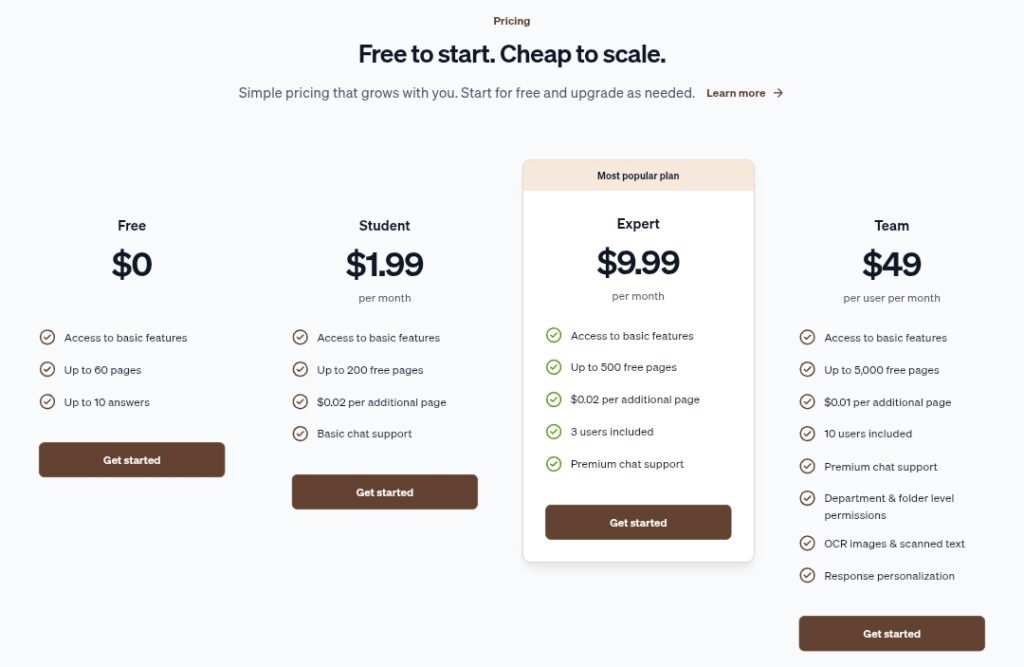
Humata offers flexible plans, starting free and scaling up. Here’s a breakdown:
| Plan | Price (Monthly) | Key Features | Page Limit | Extra Pages Cost |
|---|---|---|---|---|
| Free | $0 | Basic Q&A, summarization, 10 answers | 60 pages | N/A |
| Student | $1.99 | Expanded Q&A, chat support | 200 pages | $0.02/page |
| Expert | $9.99 | Premium support, multi-user (up to 3) | 500 pages | $0.02/page |
| Team | $49/user | OCR, advanced permissions, personalized responses | 5,000 pages | $0.01/page |
| Enterprise | Custom | Custom integrations, SOC-2 compliance, dedicated support | Unlimited | Custom |
The free plan is generous for casual users, but heavy users will hit limits quickly. Students get verified discounts, and annual billing saves 20%. No hidden fees beyond extra pages, transparent and scalable.
Pros and Cons of Humata AI
Based on my experience and aggregated user feedback, here’s a balanced view:
Pros
- Lightning-Fast Processing: Analyzes complex documents in seconds, saving hours.
- Accurate Citations and Highlights: Every answer links back to sources, boosting reliability.
- User-Friendly Interface: Intuitive design, no steep learning curve.
- Versatile for Various Users: Great for students, lawyers, researchers, and teams.
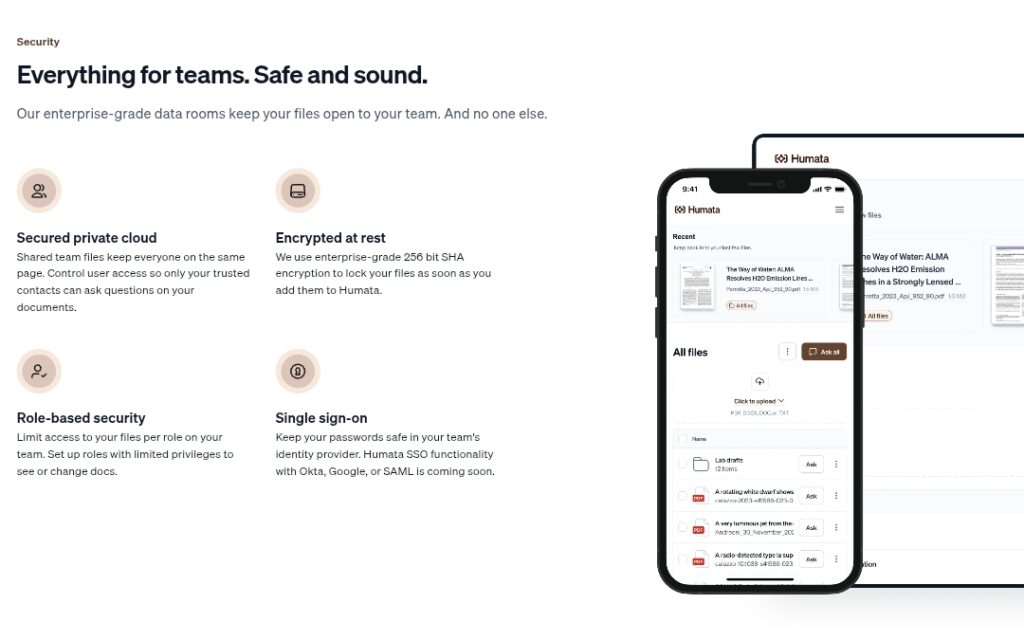
- Strong Security: Encrypted storage and privacy-focused policies.
- Multilingual Support: Handles over 80 languages effectively.
- Free Tier Value: 60 pages is ample for testing.
Cons
- Page Limits on Lower Plans: Free and basic tiers cap quickly for heavy use.
- Inconsistent Accuracy with Complex Content: Struggles with niche jargon or poorly formatted PDFs.
- Limited Content Creation: Not ideal for generating original essays or creative work.
- No Native Mobile App: Web-based, though responsive on devices.
- Extra Costs for Overages: $0.01-$0.02 per page adds up.
- OCR Restricted to Higher Plans: Essential for scanned docs but not free.
In table form for quick reference:
| Aspect | Pros | Cons |
|---|---|---|
| Speed | Ultra-fast analysis | N/A |
| Accuracy | Strong with citations | Variable on technical texts |
| Usability | Intuitive UI | No mobile app |
| Cost | Affordable entry | Overage fees |
| Features | Robust for analysis | Limited creativity |
Performance, Real Results, and Personal Experience
I put Humata through its paces with real-world scenarios. First, I uploaded a 150-page academic paper on AI ethics. Humata summarized it in under 30 seconds, pulling key arguments and citing pages accurately, far quicker than my manual read.
Querying “What ethical dilemmas are discussed?” yielded a detailed response with highlights, which I exported to Google Docs seamlessly.
Next, a legal contract test: It flagged risks and clauses efficiently, though it missed subtle nuances in one ambiguous section. For a scanned image PDF (using OCR on Expert plan), it extracted text flawlessly in English and Spanish.
Real results? In a week, it shaved 10+ hours off my research time. User experiences echo this: HR pros use it for resume screening, educators for material creation, and marketers for content insights. However, some report formatting issues or unexpected charges from re-uploads.
Overall, performance is solid (4.5/5 in my book), but it’s best as a supplement, not a replacement for human review.
Reputation, User Feedback, and Ratings
Humata enjoys a strong reputation, with ratings averaging 4.3-4.8/5 across platforms like Product Hunt, Capterra, and Trustpilot.
Positive feedback highlights its time-saving prowess: “A game-changer for legal docs, accurate and fast,” says one lawyer. Educators praise summarization: “Transforms dense papers into teachable moments.”
Critics note accuracy dips: “Struggles with complex PDFs, leading to wasted pages,” per a Trustpilot review (2.6/5 in some older aggregates, improved recently).
G2 rates it 4.5/5 for ease of use. Testimonials often mention efficiency gains, but a few flag costs: “Great free tier, but premiums feel pricey for occasional users.”
Alternatives and Comparisons
Humata isn’t the only player. Here are top alternatives:
- Afforai: Affordable (from $3.99/month), excels in data extraction and translation. Better for businesses with Excel support.
- ChatPDF: Simple PDF-focused Q&A (free to $19.99/month). Ideal for casual users but lacks multi-file depth.
- NotebookLM: Google’s free tool for note-taking and summarization. Strong in creativity but less enterprise-ready.
- Paperguide: Research-oriented with plagiarism checks ($10/month). Great for academics.
- Textero.io: Essay generation focus ($8.33/month). Includes originality checks, unlike Humata.
Comparison table:
| Tool | Pricing (Starting) | Key Strength | Best For | Rating (Avg.) |
|---|---|---|---|---|
| Humata AI | Free/$1.99 | Document Q&A with citations | Research/Teams | 4.5/5 |
| Afforai | Free/$3.99 | Data extraction/OCR | Business/Academics | 4.6/5 |
| ChatPDF | Free/$19.99 | Simple PDF chats | Students/Casual | 4.2/5 |
| NotebookLM | Free | Creative summarization | Note-taking | 4.7/5 |
| Textero | Free/$8.33 | Essay writing/plagiarism | Writing Assignments | 4.4/5 |
Humata edges out in citation accuracy and team features.
Privacy and Data Policy
Humata prioritizes security with 256-bit encryption, role-based access, and private cloud storage. It doesn’t use your data for training models and deletes it within 30 days.
SOC-2 compliant for enterprises, with transparent policies, no ad targeting or sharing. In my view, it’s reassuring for sensitive docs.
Read More: MiniMax M2.1 Review: How This Sparse AI Model Delivers Fast Coding and Agentic Workflows
Final Verdict and Conclusion
After thorough testing, Humata AI earns my recommendation for anyone drowning in documents. Its blend of speed, accuracy, and usability makes it a standout, especially for professionals and students.
While not perfect, watch those page limits and complex texts, it’s a worthy investment starting free. If analysis is your game, try it; for creation, pair with alternatives.
Overall, it’s transformed my workflow, and it could do the same for you. Head to humata.ai and start exploring.
FAQs
What is Humata AI best used for?
Humata AI excels at document summarization, Q&A, and analysis for research, legal, and business tasks.
Is Humata AI free?
Yes, the free plan offers 60 pages and basic features; paid plans start at $1.99/month for more capacity.
How accurate is Humata AI?
It’s highly accurate for standard documents (90%+ in tests), but may vary with technical or poorly formatted files, always verify.
Does Humata AI support multiple languages?
Yes, it handles over 80 languages via OCR and NLP.
What are the main alternatives to Humata AI?
Top options include Afforai for affordability, ChatPDF for simplicity, and NotebookLM for free creative tools.
Is Humata AI secure for sensitive documents?
Absolutely, with encryption, no data training, and deletion policies ensuring privacy.





