
What is Adobe Podcast?
Adobe Podcast is a web-based AI tool for audio recording, editing, and enhancement, focusing on making voice recordings sound professional with features like Enhance Speech, Mic Check, and Studio beta.
Is Adobe Podcast free to use?
Yes, basic Enhance Speech and Mic Check are free with limits (1 hour/day processing, 30-min files); Premium via Adobe Express ($9.99–$10/month) unlocks video support, bulk, longer files, and unlimited Studio.
When was Adobe Podcast launched?
It launched as Project Shasta beta in 2022, rebranded to Adobe Podcast with public access in November 2022, and continues with updates through 2025.
What are the main features of Adobe Podcast?
Enhance Speech for noise/echo removal, Mic Check for setup analysis, Studio for browser recording/editing/transcription, audiogram creation, and video processing in Premium.
Does Adobe Podcast require a subscription?
Free tier available; full features (higher limits, video, bulk) require Adobe Express Premium subscription at $9.99/month or equivalent.
Can Adobe Podcast edit video audio?
Yes, Premium plan supports MP4/MOV video files for enhancement and processing; free is audio-only.
How does Adobe Podcast compare to other tools?
It excels in one-click voice enhancement and browser simplicity, competing with Descript or Audition but with easier entry for beginners.
Is Adobe Podcast still available in 2026?
Yes, active with recent updates (e.g., August 2025 guide), no discontinuation reported.

Adobe Podcast

About This AI
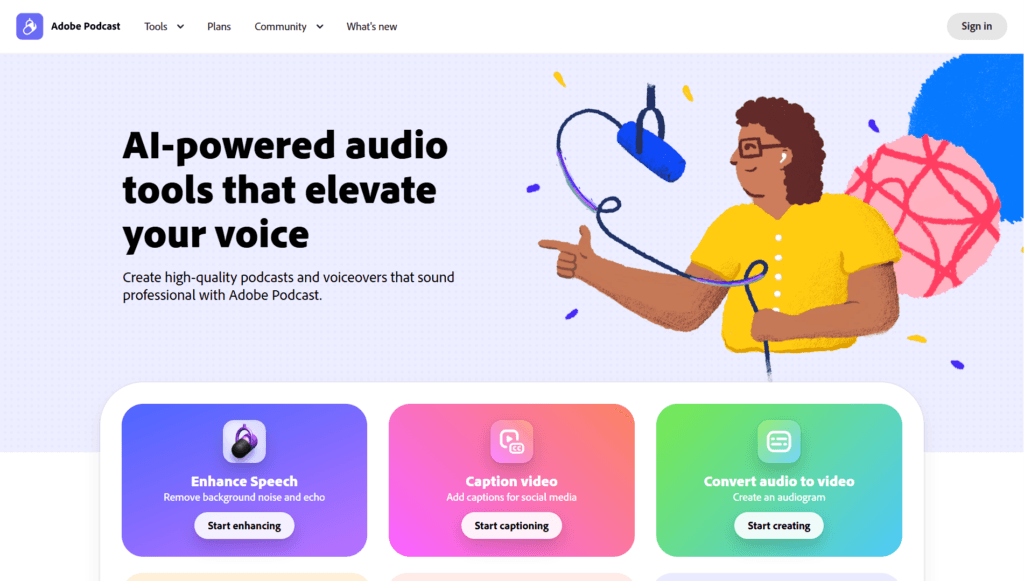
Adobe Podcast is a browser-based AI tool suite from Adobe for creating and enhancing high-quality audio content like podcasts and voiceovers.
Core features include Enhance Speech (removes noise, echo, and background distractions to make voice sound studio-professional), Mic Check (AI analyzes setup for optimal recording conditions), and Studio (beta) for recording, editing, transcribing, and sharing directly in the browser.
Enhance Speech uses advanced AI to clean up spoken audio, supporting audio and video files with options for strength adjustment in Premium.
Studio allows high-quality remote recording (solo or guests), transcription-based editing (cut/copy/paste text to edit audio), audiogram/caption customization, and export of clean tracks.
It requires no software download, works on any browser, and focuses on elevating voice without professional equipment.
Launched initially as Project Shasta in late 2022 (public beta November 2022), it evolved with updates like Enhance Speech v2 in 2024 and ongoing improvements through 2025.
As of early 2026, it remains active with Premium features unlocked via Adobe Express Premium subscription, offering free basic access and paid upgrades for higher limits, video support, bulk processing, and extended durations.
Ideal for podcasters, voiceover artists, educators, and creators seeking easy, AI-assisted professional sound without complex DAWs.
Key Features
- Enhance Speech AI: Removes noise, echo, and artifacts to make spoken audio sound studio-quality
- Mic Check: Analyzes microphone setup and provides AI recommendations for optimal recording
- Studio Beta: Browser-based recording, editing, transcription, and sharing for podcasts/voiceovers
- Transcription Editing: Edit audio by cutting/copying/pasting text transcript like a document
- High-Quality Remote Recording: Supports solo or guest sessions with low-latency even on imperfect internet
- Audiogram and Caption Customization: Create visual clips with themes, custom backgrounds, and captions
- Bulk Upload and Processing: Premium allows multiple files at once for efficient workflows
- Video Support: Enhance and process MP4/MOV files in Premium plan
- Strength Adjustment: Control enhancement intensity for natural-sounding results
- No Download Required: Fully web-based with 16-bit 48k WAV export options
Price Plans
- Free ($0): Basic Enhance Speech (1 hour/day, 30-min/500MB files, audio only), full Mic Check, limited Studio (invitation needed, 30-min projects, 2 downloads/day)
- Premium/Express Premium ($9.99–$10/Month or $99.99/Year): 4 hours/day enhancement, video support, bulk upload, strength adjustment, 1GB/2-hour files, unlimited Studio downloads/projects, custom audiograms/captions, priority features; 30-day free trial available
Pros
- Easy professional sound: One-click AI enhancement delivers broadcast-quality voice without expertise
- Browser-only access: No software install needed; works on any device with internet
- Free basic tier: Enhance Speech and Mic Check available free with daily/hour limits
- Transcription workflow: Edit audio via text for fast, intuitive changes
- Remote recording strength: Reliable for guests with varying connections
- Adobe ecosystem tie-in: Benefits from Adobe's AI advancements and potential integrations
- Regular updates: Features like v2 Enhance Speech improve quality over time
Cons
- Limited free usage: Enhance Speech capped at 1 hour/day (30-min files) in free; Premium needed for more
- Premium required for advanced: Bulk, video, longer files, and unlimited Studio downloads need paid plan
- Still partly beta: Studio remains in beta with potential feature instability
- File size/duration caps: Free limits to 500MB/30 min; Premium to 1GB/2 hours
- No offline mode: Fully cloud-dependent for processing
- Variable accuracy: AI enhancement may need tweaks for complex/noisy audio
- Subscription model: Tied to Adobe Express Premium ($9.99–$10/month) for full access
Use Cases
- Podcast production: Record/edit/enhance episodes with clean voice and easy transcription edits
- Voiceover creation: Clean up recordings for ads, audiobooks, or narration
- Educational content: Produce lectures, tutorials, or audio lessons with professional sound
- Remote interviews: Host guest discussions with reliable quality despite varying setups
- Content repurposing: Enhance existing audio clips or create audiograms for social sharing
- Quick fixes: Remove noise/echo from calls, meetings, or field recordings
- Beginner creators: Achieve pro audio without expensive gear or learning complex software
Target Audience
- Podcasters and creators: Independent hosts seeking easy professional audio
- Voice actors/narrators: Needing clean, enhanced voice recordings
- Educators and trainers: Producing audio lessons or lectures
- Remote workers: Enhancing meeting recordings or interviews
- Content marketers: Creating voiceovers or repurposed audio clips
- Beginners: Users wanting AI help without technical expertise
How To Use
- Access site: Visit podcast.adobe.com and sign in with Adobe ID (free account works)
- Select tool: Choose Enhance Speech, Mic Check, or Studio from dashboard
- Upload/record: For Enhance: upload audio/video file; for Studio: start new project and record
- Process AI: Click Enhance to clean up; use Mic Check pre-recording for setup tips
- Edit transcript: In Studio, transcribe and edit text to modify audio timeline
- Customize output: Adjust strength (Premium), add audiograms/captions
- Download/share: Export enhanced WAV/MP3; unlimited in Premium
How we rated Adobe Podcast
- Performance: 4.6/5
- Accuracy: 4.7/5
- Features: 4.5/5
- Cost-Efficiency: 4.4/5
- Ease of Use: 4.8/5
- Customization: 4.3/5
- Data Privacy: 4.6/5
- Support: 4.5/5
- Integration: 4.4/5
- Overall Score: 4.6/5
Adobe Podcast integration with other tools
- Adobe Ecosystem: Ties into Adobe Express and Creative Cloud for broader creative workflows
- Browser-Based: Works directly in Chrome/Edge/Firefox without additional plugins
- File Export: Outputs WAV/MP3 for import into Audition, Premiere Pro, or other editors
- Cloud Storage: Saves projects in Adobe cloud for cross-device access
- Sharing Tools: Export audiograms/captions for social media or web embedding
Best prompts optimised for Adobe Podcast
- Not applicable - Adobe Podcast is an AI audio enhancement and recording tool, not a prompt-based generative model like text-to-video or chat. It processes uploaded audio files automatically with one-click Enhance Speech or Studio recording; no manual prompts needed for core features.
- N/A - Focus is on file upload and AI processing rather than text prompting; best 'use' is uploading clean audio for enhancement or recording directly in Studio.
- N/A - This tool automates noise removal, transcription, and editing; no generative prompting interface exists.
FAQs
Newly Added Tools






About Author