
What is Noty AI?
Noty AI is a workplace AI assistant that transcribes meetings in real-time, generates summaries, and creates prioritized to-do lists to make communication actionable and boost productivity.
Is Noty AI free to use?
Yes, it offers a free plan with basic features and limits (e.g., 10 conversations/month); Pro starts at $10/user/month with 100 hours/month, unlimited storage, custom summaries, and priority support.
How many users does Noty AI have?
Noty AI is loved by over 100,000 happy users, according to their official site and marketing materials.
What integrations does Noty AI support?
It integrates with Google Meet/Calendar, Slack, Gmail, Zapier (for 5000+ apps), and other workspaces to push summaries and tasks directly.
When was Noty AI founded?
Noty AI was founded in 2021, with early funding and growth reported in late 2021.
How does Noty AI save time?
It automates 95% of post-meeting admin by transcribing, summarizing, and creating/following up on tasks, saving users up to 2 extra hours daily or 4 hours weekly.
Does Noty AI support multiple languages?
Yes, it supports various languages for transcription and processing (exact count not specified in sources but implied for global teams).
Who is Noty AI best for?
It’s ideal for professionals and teams in sales, engineering, product management, HR, recruitment, UX/UI research, and any meeting-heavy roles needing task tracking.
Noty AI

About This AI
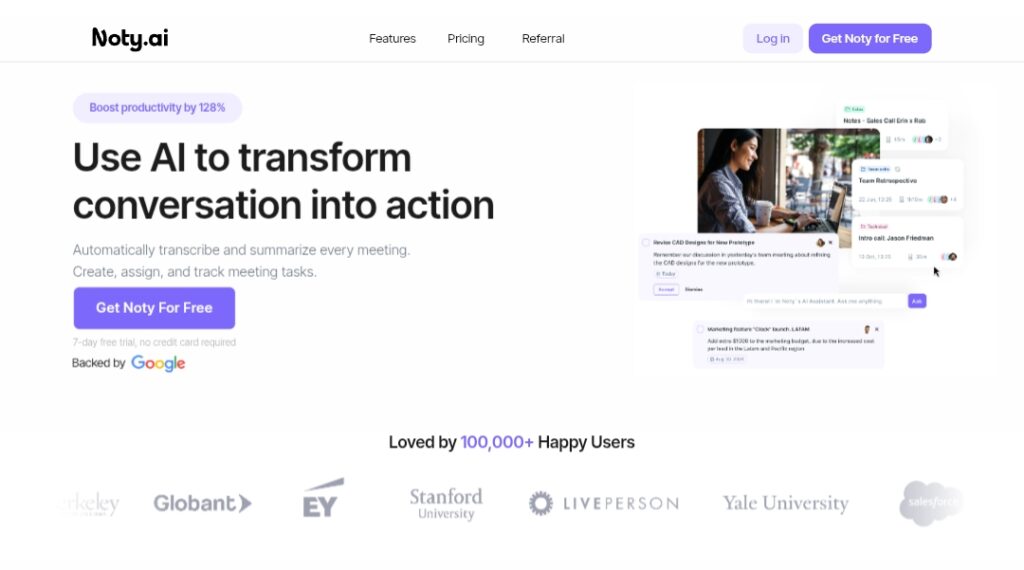
Noty AI is a workplace AI assistant designed to boost productivity by transforming meetings into actionable outcomes.
It provides real-time transcription of video calls and meetings, generates intelligent summaries with key highlights, and automatically creates prioritized to-do lists, action items, tasks, and events from discussions.
The tool tracks tasks, assigns follow-ups, and organizes meetings for easy retrieval, connecting related discussions across sessions to maintain context and accelerate workflows.
Users can review, edit, and comment on transcripts, chat with the AI to search or extract information, and send summaries/to-dos directly to integrated workspaces.
It handles post-meeting admin tasks (claimed to automate 95% of them), saving users significant time (up to 2 extra hours daily or 4 hours weekly on average) and increasing productivity by 128% through better organization and communication.
Noty AI integrates seamlessly with popular tools to push outputs into existing workflows, closing communication gaps and making every meeting a catalyst for progress.
Founded in 2021, it is trusted by over 100,000 happy users and supports professionals in sales, engineering, product management, HR, recruitment, UX/UI research, and more.
With a freemium model including a free tier for basic use, 7-day Pro trial, and paid plans starting at $10/user/month, Noty AI focuses on making communication 100% actionable without disrupting natural conversations.
Key Features
- Real-time transcription: Captures meeting conversations accurately with live highlighting and commenting
- AI-generated summaries: Creates concise overviews with key details, insights, and highlights for quick review
- Automatic to-do lists: Extracts and prioritizes action items, tasks, deadlines, and events from discussions
- Task tracking and follow-ups: Monitors progress, assigns responsibilities, and sends reminders automatically
- Meeting organization: Stores and connects related conversations across sessions for contextual search
- AI chat for queries: Ask questions about past meetings to retrieve specific info or insights instantly
- Workspace integrations: Pushes summaries, to-dos, and transcripts directly to tools like Slack, Gmail, etc.
- Editing and collaboration: Review, edit transcripts, add comments, and collaborate on action items
- Performance tracking: Monitors team and personal productivity based on meeting outcomes
- Multi-language support: Handles various languages for global teams (specific count not detailed)
Price Plans
- Free ($0): Basic transcription, summaries, to-do lists, and integrations with limits (e.g., 10 conversations/month recently); suitable for light individual use
- Pro ($10/user/Month or $40/user/Year discounted): 100 hours/month transcription, 3 AI credits/meeting, unlimited storage/access, custom summaries, global search, Kanban board, priority support, commercial/team features
- Impact (Custom for non-profits/education): All Pro features at discounted rate (e.g., 90% off for schools/universities); eligibility required
- Pay-as-you-go ($1/hour): No commitment, volume-based for occasional heavy use; includes all Pro features
Pros
- Significant time savings: Automates post-meeting admin, freeing up hours weekly for core work
- Actionable outputs: Turns passive meetings into productive to-do lists and follow-ups
- Seamless workflow integration: Sends results directly to preferred tools without manual effort
- High user satisfaction: Loved by 100,000+ users with strong testimonials on productivity gains
- Generous free access: Basic features available free with limits; 7-day Pro trial no card required
- Boosts team alignment: Keeps everyone on the same page with organized, searchable meeting data
- Focus on real productivity: Emphasizes task creation and tracking over just notes/transcripts
Cons
- Limited free tier: Caps on conversations (e.g., 10/month recently) and features push toward Pro
- Pro required for full power: Advanced summaries, unlimited storage, priority support need paid plan
- Integration depth varies: While strong with common tools, may not cover every niche platform
- Transcription accuracy: Depends on audio quality; complex accents or noisy calls may vary
- No offline mode: Requires internet for real-time processing and integrations
- Storage/email limits: Free/Pro may have caps (not fully detailed in sources)
- Relatively niche focus: Best for meeting-heavy roles; less utility for non-call workflows
Use Cases
- Team meetings and standups: Auto-capture notes, action items, and follow-ups to keep projects moving
- Sales calls and discovery: Summarize client needs, create tasks for proposals or next steps
- Engineering/product reviews: Track decisions, bugs, and priorities from technical discussions
- HR/recruitment interviews: Document key points, generate follow-up tasks for candidates
- UX/UI research sessions: Organize feedback, create to-dos for design iterations
- Remote team collaboration: Ensure alignment with searchable, shared meeting insights
- Personal productivity: Turn 1:1s or self-reflections into actionable plans
Target Audience
- Busy professionals: Individuals in meetings who want to reclaim time from note-taking
- Small to medium teams: Sales, engineering, product, HR, and marketing groups needing task alignment
- Remote/hybrid workers: Those relying on video calls for communication and coordination
- Project managers: Tracking decisions and actions across multiple meetings
- Non-profits and educators: Eligible for discounted Impact plan with full features
- Productivity enthusiasts: Seeking AI to automate admin and boost daily output
How To Use
- Sign up: Visit noty.ai and start free (7-day Pro trial available without card)
- Integrate meetings: Connect Google Meet, Zoom, or other platforms via browser extension or app
- Join or record call: Noty auto-joins supported meetings or transcribes uploaded recordings
- Review transcript: Post-meeting, view real-time transcript with highlights and edit/add comments
- Generate outputs: Let AI create summary, to-do list, action items, and insights automatically
- Track and assign: Prioritize tasks in Kanban, assign owners, and set deadlines
- Integrate results: Send summaries/to-dos to Slack, Gmail, or workspace tools instantly
How we rated Noty AI
- Performance: 4.5/5
- Accuracy: 4.6/5
- Features: 4.7/5
- Cost-Efficiency: 4.4/5
- Ease of Use: 4.8/5
- Customization: 4.3/5
- Data Privacy: 4.5/5
- Support: 4.4/5
- Integration: 4.6/5
- Overall Score: 4.6/5
Noty AI integration with other tools
- Google Meet and Calendar: Native integration for auto-joining meetings and syncing events/tasks
- Slack and Gmail: Push summaries, to-do lists, and action items directly into channels or inbox
- Zapier: Connect to 5000+ apps for custom automations and workflow extensions
- Other Workspaces: Send outputs to preferred tools like Microsoft Teams, Notion, or Trello (via Zapier or native)
- Browser Extension: Works across Chrome/Edge for seamless meeting capture and real-time features
Best prompts optimised for Noty AI
- Not applicable - Noty AI is a meeting transcription and task automation tool, not prompt-based generation like text-to-video or image tools. It works automatically on meetings without user prompts for content creation.
FAQs
Newly Added Tools






About Author