Zelili AI

Otter ai

Otter AI

Leading AI Meeting Assistant – Real-Time Transcription, Summaries, Action Items, and Voice-Activated Agents for Productive Workflows
Tool Release Date

1 Jan 2018

Tool Users
35 Million+
0.0
πŸ‘ 49

About This AI

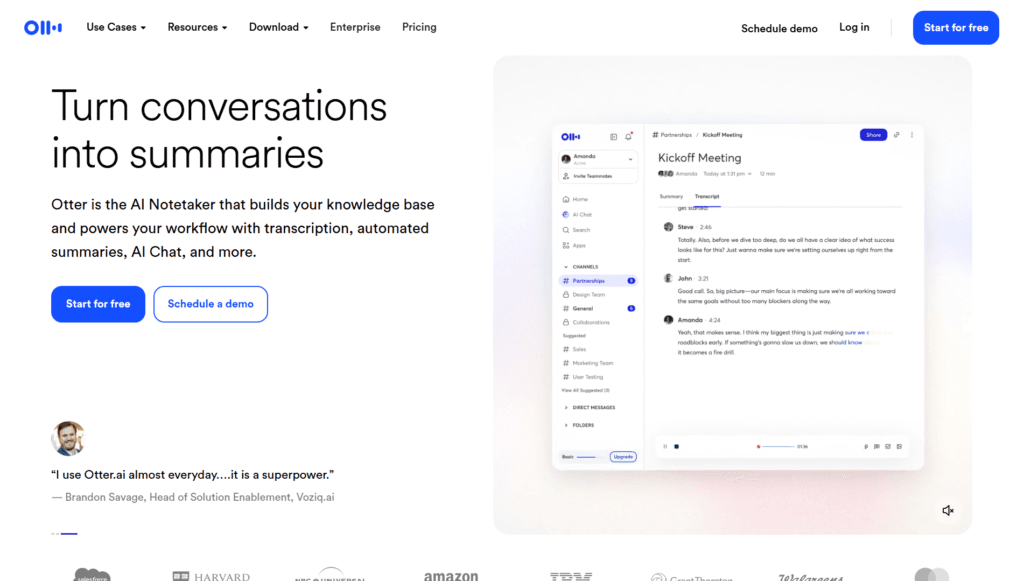
Otter AI is a powerful AI-powered meeting assistant that transcribes conversations in real-time with up to 95% accuracy, identifies speakers, and generates automated summaries, action items, insights, and customizable content.

It features OtterPilot, a smart AI agent that joins meetings automatically, participates via voice commands, captures key details, and eliminates manual note-taking.

The platform supports live transcription for virtual meetings (Zoom, Google Meet, Microsoft Teams), device recording, and uploaded audio/video files with multi-language support.

Advanced capabilities include AI Chat for querying past meetings, custom workflows, voice-activated queries (‘Hey Otter’), collaboration tools like editable notes and takeaways panels, and integrations to push insights to CRM or workspaces.

Otter builds a centralized voice-first knowledge base from unstructured meeting data, enabling teams to search, retrieve, and activate institutional knowledge efficiently.

Founded in 2016 by Sam Liang and Yun Fu, Otter has processed over 1 billion meetings, serves 35+ million global users, achieved $100M+ ARR in 2025, and delivers massive ROI (e.g., 10:1 for enterprises, saving FTE workload).

It targets professionals in sales, education, media, recruiting, and more, with a freemium model: generous free tier for basics and paid plans for unlimited/high-volume use, advanced agents, and enterprise security.

Key Features

  1. Real-time transcription: Live capture with speaker identification and up to 95% accuracy across languages
  2. OtterPilot AI agent: Auto-joins meetings, participates via voice, captures takeaways automatically
  3. Automated summaries and insights: Generates concise overviews, key points, decisions, and customized content
  4. Action item extraction: Identifies and assigns tasks, follow-ups, and deadlines from discussions
  5. AI Chat querying: Search across meetings, answer questions, generate reports or follow-ups instantly
  6. Voice-activated commands: Use 'Hey Otter' to query or control during/after calls
  7. File import and transcription: Upload audio/video for processing with unlimited in higher tiers
  8. Collaboration tools: Editable transcripts, highlights, comments, images, and takeaways panel
  9. Custom workflows: Tailor summaries, insights, and outputs for specific roles (sales, recruiting, etc.)
  10. Integration ecosystem: Sync with Zoom, Teams, Meet, Slack, Salesforce, HubSpot, Jira, Notion, Asana, and more

Price Plans

  1. Free (Basic) ($0): 300 monthly transcription minutes, 30 min max per meeting, basic integrations (Zoom/Meet/Teams), limited AI Chat queries, 3 lifetime imports
  2. Pro ($8.33/user/Month annual or $16.99 monthly): 1200 transcription minutes/month, 90 min max per meeting, 10 imports/month, unlimited storage, advanced AI workflows, Zapier, higher AI Chat limits
  3. Business ($19.99/user/Month annual or $30 monthly): Unlimited in-app recordings/meetings, 6000 import minutes/month, 4-hour max per meeting, custom workflows, admin tools, prioritized support
  4. Enterprise (Custom): Unlimited everything, custom integrations/agents (Sales/Recruiting), SSO, HIPAA, dedicated manager, domain capture

Pros

  1. Proven scale and impact: Over 1 billion meetings processed, $100M+ ARR, massive user base and ROI
  2. Intelligent agent features: OtterPilot actively participates and automates far beyond basic transcription
  3. Strong time savings: Users reclaim 4+ hours/week; enterprises save FTE equivalents
  4. Seamless integrations: Flows outputs directly into CRM, collaboration tools, and workflows
  5. Freemium accessibility: Solid free tier with live transcription and basics; affordable Pro upgrade
  6. Multi-platform support: Works across web, mobile apps, and major meeting platforms
  7. Enterprise-ready: HIPAA compliance, SSO, custom agents, and dedicated support in higher tiers

Cons

  1. Transcription minute caps: Free limited to 300/month; Pro/Business have monthly pools (no rollover)
  2. Paid for full power: Unlimited/high-volume, advanced agents, and priority features require Pro/Business
  3. Accuracy dependencies: Performance varies with audio quality, accents, noise, or overlapping speech
  4. No offline processing: Requires internet for real-time and most features
  5. Per-user pricing: Costs scale with team size; Enterprise custom but higher entry
  6. Potential privacy concerns: Processes sensitive meeting data (mitigated by encryption and compliance options)

Use Cases

  1. Sales calls: Capture client needs, auto-generate follow-ups and CRM notes
  2. Team meetings: Summarize discussions, assign tasks, and track progress
  3. Interviews/recruiting: Document candidate responses and create action items
  4. Lectures/education: Transcribe classes, highlight key points for students
  5. Media/journalism: Outline interviews, generate drafts or insights
  6. Remote collaboration: Ensure alignment with searchable shared notes
  7. Personal productivity: Turn daily calls into organized actionable plans

Target Audience

  1. Professionals in meetings: Sales, product, engineering, HR needing efficient post-call workflows
  2. Teams and organizations: Medium/large groups requiring collaboration and task tracking
  3. Educators and students: Capturing lectures or discussions accurately
  4. Recruiters and interviewers: Documenting and following up on candidate calls
  5. Media/content creators: Transcribing interviews for stories or outlines
  6. Enterprises: Seeking scalable AI agents with compliance and integrations

How To Use

  1. Sign up: Visit otter.ai and create account (free tier available instantly)
  2. Connect calendar: Link Google/Outlook to auto-join meetings via OtterPilot
  3. Join meeting: Otter attends Zoom/Meet/Teams calls; transcribes live with speaker ID
  4. Record manually: Use app to record in-person or device audio
  5. Review post-meeting: Access transcript, edit, highlight, add comments
  6. Generate outputs: View auto-summary, action items; use AI Chat for queries
  7. Integrate and share: Push notes/tasks to Slack, CRM, or other tools

How we rated Otter AI

  • Performance: 4.7/5
  • Accuracy: 4.6/5
  • Features: 4.8/5
  • Cost-Efficiency: 4.5/5
  • Ease of Use: 4.7/5
  • Customization: 4.4/5
  • Data Privacy: 4.6/5
  • Support: 4.5/5
  • Integration: 4.8/5
  • Overall Score: 4.7/5

Otter AI integration with other tools

  1. Video Conferencing: Native auto-join and transcription for Zoom, Google Meet, Microsoft Teams
  2. Productivity Tools: Push summaries/action items to Slack, Notion, Asana, Jira
  3. CRM Systems: Integrate with Salesforce, HubSpot for sales insights and follow-ups
  4. Calendar: Google Calendar/Outlook sync for automatic meeting capture
  5. Other: Zapier for 5000+ app connections, Dropbox/Google Drive for file imports

Best prompts optimised for Otter AI

  1. Not applicable - Otter AI is an automatic meeting transcription and analysis tool that processes live/recorded calls without requiring user prompts for content generation. It works passively on meetings.
  2. N/A - Core functionality is AI-driven extraction from audio/video; no manual text/image/video prompts needed like generative tools.
  3. N/A - Best 'prompt' is enabling OtterPilot to join calls; it handles summarization/action items automatically.
Otter AI excels as a leading meeting transcription tool with real-time accuracy, smart summaries, action items, and voice agents that save significant time. Its integrations and enterprise features make it powerful for teams, while the free tier suits individuals. At $8.33/month Pro, it delivers strong ROI for meeting-heavy professionals and businesses.

FAQs

  • What is Otter AI?

    Otter AI is an AI meeting assistant that provides real-time transcription, automated summaries, action items, insights, and voice-activated agents for Zoom, Teams, Meet, and recordings.

  • How many users does Otter AI have?

    Otter AI has over 35 million global users as of late 2025, with more than 1 billion meetings processed and $100M+ ARR.

  • Is Otter AI free to use?

    Yes, the Basic plan is free forever with 300 transcription minutes/month; Pro starts at $8.33/user/month (annual) for 1200 minutes and advanced features.

  • When was Otter AI founded?

    Otter AI was founded in 2016 by Sam Liang and Yun Fu as AISense, rebranded to Otter.ai, with OtterPilot launched in 2023.

  • What are Otter AI’s key features?

    Real-time transcription, speaker ID, AI summaries/action items, OtterPilot agent, AI Chat for queries, integrations with Zoom/Teams/Meet/Slack/CRM, and custom workflows.

  • How accurate is Otter AI transcription?

    It achieves up to 95% accuracy with speaker identification, performing well in clear audio but varying with noise, accents, or overlaps.

  • What integrations does Otter AI support?

    Native with Zoom, Google Meet, Microsoft Teams; pushes to Slack, Salesforce, HubSpot, Jira, Notion, Asana, Google Calendar/Docs, and Zapier for more.

  • Who is Otter AI best for?

    Sales teams (CRM follow-ups), educators (lecture notes), recruiters (interview summaries), media/journalists (interview outlines), and any meeting-heavy professionals/teams.


Newly Added Tools​

CodeRabbit

$0/Month

Code Genius

$0/Month

AskCodi

$20/Month

PearAI

$0/Month
Otter AI Alternatives

Cognosys AI

$0/Month

AI Perfect Assistant

$17/Month

Intern-S1-Pro

$0/Month

Otter AI Reviews

0.0
0.0 out of 5 stars (based on 0 reviews)
Excellent0%
Very good0%
Average0%
Poor0%
Terrible0%

There are no reviews yet. Be the first one to write one.