
What is Pocket TTS?
Pocket TTS is a 100 million parameter text-to-speech model from Kyutai that runs in real-time on CPU with high-quality voice cloning from 5 seconds of audio.
When was Pocket TTS released?
Pocket TTS was officially released on January 13, 2026, with announcement, technical report, code, and weights made public.
Is Pocket TTS free to use?
Yes, it is completely free and open-source under MIT license with full model weights, code, and demos available on GitHub and Hugging Face.
Does Pocket TTS require a GPU?
No, it is specifically designed to run efficiently in real-time on standard CPU (e.g., Intel Core Ultra or Apple M3), no GPU needed.
How does voice cloning work in Pocket TTS?
Provide about 5 seconds of reference audio; the model encodes the voice (tone, emotion, accent) and generates speech in that cloned voice from any text input.
What languages does Pocket TTS support?
It is trained exclusively on English public datasets and performs best in English; no multilingual support is included in the base model.
Where can I try or download Pocket TTS?
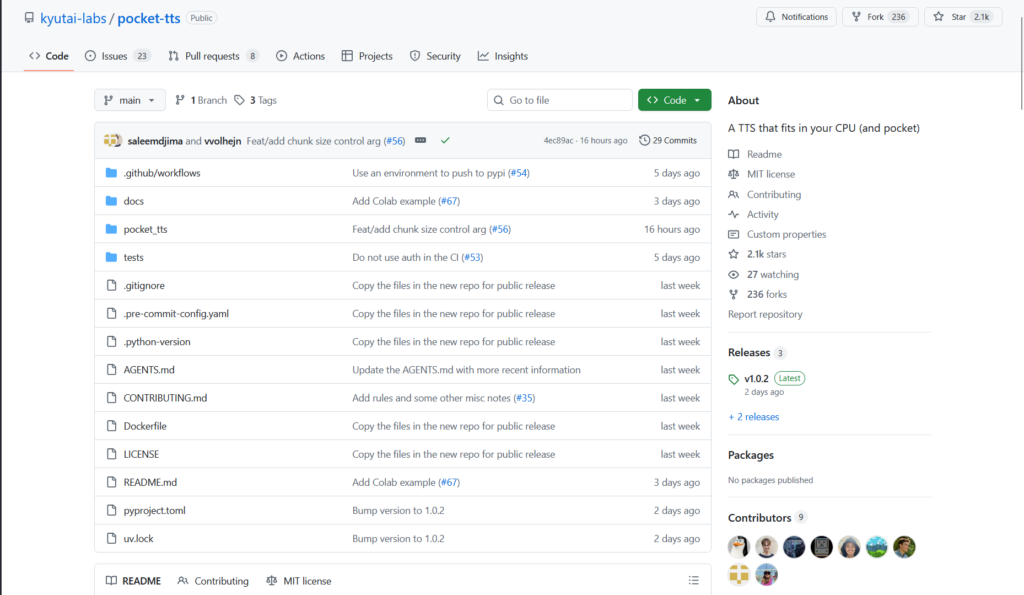
Online demo on kyutai.org/tts; local installation via GitHub repo (kyutai-labs/pocket-tts) or Hugging Face (kyutai/pocket-tts); pip/uvx install available.
How does Pocket TTS compare to other TTS models?
It matches or exceeds larger GPU-based models in quality while being lightweight and CPU-only; outperforms competitors like F5-TTS and Kokoro in WER and CPU speed.

Pocket TTS

About This AI
Pocket TTS is a compact 100 million parameter text-to-speech model developed by Kyutai, released in January 2026, that delivers high-fidelity speech synthesis and voice cloning entirely on CPU.
It supports real-time, faster-than-real-time inference on standard laptop processors like Intel Core Ultra or Apple M3, eliminating the need for GPU acceleration.
The model clones voices accurately (including tone, emotion, accent, cadence, and acoustic conditions like reverb) from just 5 seconds of reference audio, outperforming larger GPU-dependent models in quality while remaining lightweight.
Built on continuous audio latents (inspired by Mimi codec), it uses a causal transformer backbone with innovations like Head Batch Multiplier for efficiency, Gaussian Temperature Sampling, and Latent Classifier-Free Guidance for better generation.
Trained exclusively on public English datasets (88,000 hours from sources like LibriHeavy, GIGASpeech, VoxPopuli), it achieves top WER (1.84 on Librispeech test-clean) and strong ELO scores for audio quality and speaker similarity.
Fully open-source under MIT license with weights on Hugging Face, GitHub repo for local deployment, online demo, and CLI/server options via pip/uvx.
Ideal for local/offline TTS applications, voice cloning in apps, accessibility tools, content creation, and research without cloud dependency or high compute costs.
No user statistics reported yet due to very recent release; focuses on accessibility and reproducibility.
Key Features
- 100M parameter model: Extremely lightweight for real-time CPU inference without GPU
- Voice cloning from 5 seconds: Captures tone, emotion, accent, cadence, and acoustic conditions accurately
- Faster-than-real-time speed: Generates speech quicker than input duration on standard laptops
- High audio quality: Outperforms larger models in WER (1.84) and ELO scores for fidelity/similarity
- Continuous latents codec: Uses Mimi-inspired neural audio codec with continuous representations for efficiency
- Text conditioning: SentencePiece tokenizer for robust text embedding
- Inference modes: Supports CLI generation, local server, and online demo
- English-only training: Focused on public datasets for reproducibility
- Open MIT license: Full code, weights, and reproducibility on GitHub/Hugging Face
- Easy installation: Pip install or uvx for quick local setup
Price Plans
- Free ($0): Completely open-source under MIT license with full model weights, code, CLI tools, and online demo; no fees or subscriptions required
- Cloud/Hosted (Custom): Potential future hosted options via Kyutai or third-parties (not currently available)
Pros
- GPU-free real-time TTS: Runs efficiently on any modern CPU, enabling offline/local use
- Exceptional voice cloning: Matches or exceeds larger models in speaker similarity from minimal audio
- High quality output: Best-in-class WER and ELO among lightweight TTS models
- Fully open-source: MIT license with complete code and weights for free use/modification
- Fast and lightweight: Ideal for edge devices, laptops, or resource-constrained environments
- Accessible deployment: Simple pip/uvx install, online demo, and Hugging Face integration
- Research reproducibility: Trained only on public data with detailed technical report
Cons
- English-only support: Trained exclusively on English datasets; multilingual extension not included
- Recent release: Very new (January 2026), so limited community integrations or fine-tuned variants yet
- Setup for advanced use: Requires Python environment and dependencies for local running
- No built-in GUI: Primarily CLI/server; demo is online or requires local serve
- Potential quality variance: Voice cloning depends on reference audio quality and length
- Limited pre-built voices: Small catalog available; custom cloning is primary strength
- Hardware sensitivity: Best performance on modern CPUs; older machines may be slower
Use Cases
- Local/offline voice synthesis: Run TTS on devices without internet or GPU
- Voice cloning applications: Create personalized voices for apps, audiobooks, or assistants
- Accessibility tools: Real-time screen reading or speech output on low-power hardware
- Content creation: Generate narration or dubbing locally for videos/podcasts
- Research and development: Experiment with lightweight TTS or extend for new languages
- Edge AI integrations: Embed in mobile/desktop apps for on-device speech
- Prototyping assistants: Build custom voice interfaces without cloud dependency
Target Audience
- Developers and hobbyists: Building local TTS apps or voice features without GPU
- AI researchers: Studying efficient TTS, voice cloning, or continuous latents
- Content creators: Needing offline narration or personalized voice generation
- Accessibility advocates: Creating tools for screen readers on low-end hardware
- Privacy-focused users: Preferring on-device processing without cloud APIs
- Open-source enthusiasts: Extending or fine-tuning the model freely
How To Use
- Install via uvx: Run uvx pocket-tts serve for local server or uvx pocket-tts generate for CLI
- Pip install: Use pip install pocket-tts for manual setup if needed
- Run online demo: Visit Kyutai TTS page for browser-based testing
- Voice cloning: Provide 5-second audio sample; model encodes and stores embedding
- Generate speech: Input text via CLI/server; output WAV file or stream audio
- Local server: Use serve command for web interface or API calls
- Explore repo: Check GitHub for advanced options, voices, or fine-tuning
How we rated Pocket TTS
- Performance: 4.8/5
- Accuracy: 4.7/5
- Features: 4.6/5
- Cost-Efficiency: 5.0/5
- Ease of Use: 4.5/5
- Customization: 4.4/5
- Data Privacy: 5.0/5
- Support: 4.3/5
- Integration: 4.5/5
- Overall Score: 4.7/5
Pocket TTS integration with other tools
- Hugging Face: Model weights and inference pipelines hosted for easy download and testing
- GitHub Repository: Full open-source code, CLI tools, server setup, and community contributions
- Local Applications: Embed in Python scripts, desktop apps, or voice assistants for on-device TTS
- Web Demos: Online demo on Kyutai site; community ONNX web spaces for browser-based use
- Third-Party Tools: Compatible with any TTS frontend or pipeline that supports custom models (e.g., via local server)
Best prompts optimised for Pocket TTS
- Not applicable - Pocket TTS is a text-to-speech model that takes input text (and optional voice reference audio) rather than complex prompts. It generates speech directly from plain text input.
- N/A - No prompting required beyond the text to speak and optional 5-second voice sample for cloning.
- N/A - Usage is straightforward: provide text string and reference audio file for cloning; no descriptive prompt engineering needed like in generative models.
FAQs
Newly Added Tools







About Author