
What is TurboScribe AI?
TurboScribe is an AI transcription tool that converts audio and video files to text with 99.8% accuracy using Whisper, supporting unlimited paid usage, 98+ languages, speaker ID, and translation to 134+ languages.
Is TurboScribe free to use?
Yes, the free plan allows 3 transcripts daily (up to 30 minutes each); Unlimited plan is $10/month (yearly) or $20/month for uncapped transcription, larger files, and priority.
How accurate is TurboScribe?
It claims 99.8% accuracy powered by Whisper, performing well with accents, noise (via restoration), and various languages, often better than human transcription per users.
What file sizes and formats does TurboScribe support?
Up to 10 hours/5 GB per file on Unlimited (30 min free), supports MP3, MP4, WAV, YouTube links, and many others like M4A, MOV, AAC.
Does TurboScribe support speaker identification?
Yes, automatic speaker recognition labels different speakers in conversations (adds minor processing time).
Can TurboScribe transcribe YouTube videos?
Yes, paste YouTube URLs directly for transcription without downloading the video.
When was TurboScribe founded?
TurboScribe was founded by Leif Foged in 2023, with initial release on August 31, 2023.
How much audio can I transcribe on Unlimited?
Truly unlimited with no caps; systems support at least 720 hours/month, and users regularly do hundreds of hours; special guide for very high volumes.

TurboScribe

About This AI
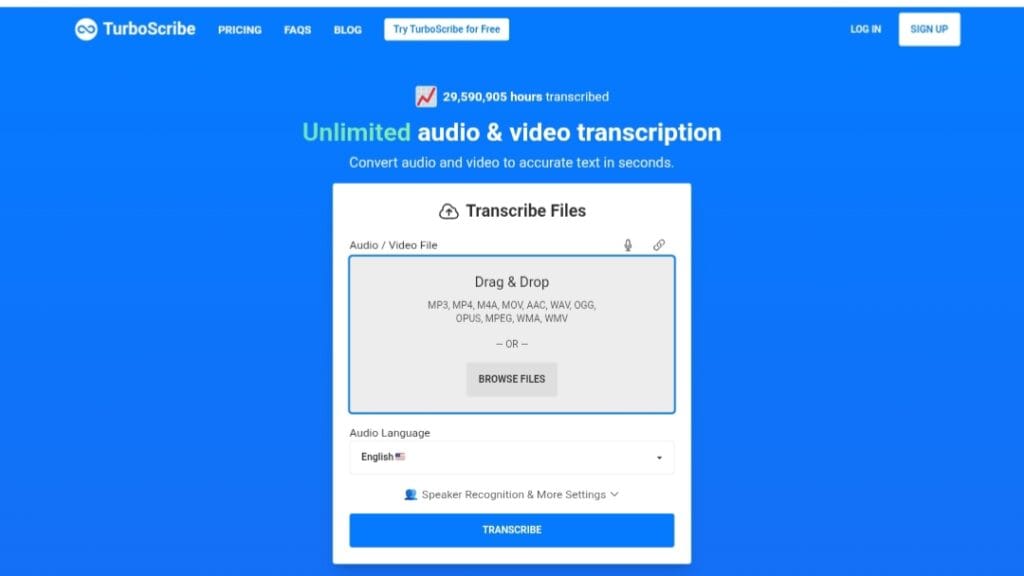
TurboScribe is a fast, unlimited AI transcription service that converts audio and video files to highly accurate text in seconds.
Powered by OpenAI’s Whisper technology, it achieves up to 99.8% accuracy, supports 98+ languages for transcription, and offers built-in translation to 134+ languages.
Users can upload files up to 10 hours long and 5 GB (50 at a time on paid), including formats like MP3, MP4, WAV, YouTube links, and more.
Features include automatic speaker recognition and diarization (labels speakers), audio restoration to reduce noise and enhance speech clarity, fast GPU-powered processing, and multiple export formats such as DOCX, PDF, TXT, SRT/VTT subtitles, and CSV.
The tool emphasizes privacy with encrypted storage, user-only access to files/transcripts, and easy deletion.
Founded by Leif Foged in 2023 (initial release August 31, 2023), it has transcribed over 31 million hours and is praised for handling accents, noise, and large volumes efficiently.
The free tier allows 3 transcripts daily (up to 30 minutes each) with lower priority, while the Unlimited plan provides truly uncapped usage, higher file limits, all features, and top priority.
Ideal for podcasters, journalists, researchers, students, content creators, and high-volume users needing reliable, affordable transcription without caps or hidden costs.
Key Features
- 99.8% transcription accuracy: Powered by OpenAI Whisper for near-human performance, especially in English with accents and noise
- Unlimited transcriptions on paid: No caps on total usage or minutes; designed for hundreds of hours per month
- 98+ languages supported: Transcription in dozens of languages including English, Spanish, French, German, Chinese, Japanese, Arabic, Hindi, and more
- Built-in translation: Translate transcripts/subtitles to 134+ languages post-transcription
- Speaker recognition and diarization: Automatically labels different speakers in conversations
- Audio restoration: Removes background noise and enhances speech for clearer results
- Large file support: Up to 10 hours/5 GB per file, upload 50 at once on Unlimited
- Multiple export formats: DOCX, PDF, TXT, SRT, VTT subtitles, CSV; bulk exports available
- Fast GPU processing: Transcribes in seconds with highest priority for paid users
- YouTube link support: Transcribe videos directly from YouTube URLs
- Secure and private: Encrypted files/transcripts, deletable at any time, no data sharing
Price Plans
- Free ($0): 3 transcripts daily, up to 30 minutes per file, 1 file at a time, lower priority processing, basic features
- Unlimited ($10/Month billed yearly $120, or $20/Month): Unlimited transcriptions, 10-hour/5 GB files, 50 files at once, all features (speaker ID, restoration, translation, bulk exports), highest priority, unlimited storage
Pros
- Truly unlimited usage: No per-minute or monthly caps on paid plan; ideal for heavy users
- Top-tier accuracy: 99.8% claimed, excels with noise, accents, and poor quality via restoration
- Affordable flat pricing: $10/month yearly or $20 monthly beats per-hour competitors
- Generous free tier: 3 daily transcripts (30 min each) with no card required
- Fast and scalable: GPU speed and bulk uploads handle large volumes efficiently
- Strong multilingual: 98+ transcription languages and 134+ translation options
- Privacy focused: Encrypted, user-controlled data with easy deletion
- Positive user feedback: Praised for saving time, accuracy over human transcription, and ease
Cons
- Free tier restrictions: Only 3 transcripts/day, 30-min limit, lower priority/wait times
- Accuracy varies by language: Best in major languages; lower-resource ones may be less reliable
- No real-time/live transcription: File upload only; not for live meetings/streams
- Processing add-ons time: Speaker ID/restoration adds 1-3 min per hour
- Web-only interface: No native desktop/mobile apps mentioned
- Account sharing prohibited: Unlimited is single-user; teams need custom
- High-volume guide needed: For >720 hours/month, special instructions apply
Use Cases
- Podcasting and content creation: Transcribe episodes quickly for editing, captions, or show notes
- Journalism and research: Convert interviews, lectures, or field recordings to searchable text
- Education and students: Transcribe classes, seminars, or study audio for notes and review
- Business meetings: Summarize recorded calls or internal discussions for action items
- Accessibility and subtitles: Generate accurate captions in multiple languages for videos
- High-volume archiving: Process large audio libraries or historical recordings efficiently
- Multilingual projects: Transcribe foreign audio and translate to preferred language
Target Audience
- Podcasters and YouTubers: Needing fast, accurate episode transcription and captions
- Journalists and researchers: Handling interviews, talks, or field audio
- Students and academics: Transcribing lectures, seminars, or research material
- Business professionals: Summarizing meetings, calls, or training sessions
- Content creators: Generating subtitles or text for videos in multiple languages
- High-volume users: Anyone transcribing hundreds of hours monthly affordably
How To Use
- Visit site: Go to turboscribe.ai and sign up free (no card needed)
- Upload file: Drag/drop audio/video or paste YouTube link
- Select options: Choose language, enable speaker ID/restoration/translation if needed
- Transcribe: Submit; wait for processing (faster on paid)
- Review results: View/edit transcript, check speakers, add notes
- Export: Download in DOCX, PDF, SRT, etc., or translate further
- Upgrade if needed: Go to pricing for Unlimited access and priority
How we rated TurboScribe
- Performance: 4.7/5
- Accuracy: 4.8/5
- Features: 4.6/5
- Cost-Efficiency: 4.9/5
- Ease of Use: 4.8/5
- Customization: 4.4/5
- Data Privacy: 4.7/5
- Support: 4.5/5
- Integration: 4.3/5
- Overall Score: 4.7/5
TurboScribe integration with other tools
- YouTube Direct Link: Paste YouTube URLs for instant transcription without downloading
- Export Formats Compatibility: Outputs SRT/VTT for video editors like Premiere or YouTube captions
- Bulk Processing: Handles multiple files at once for workflow integration with storage tools
- Manual Copy-Paste: Easy export to Notion, Google Docs, or any note-taking app
- No native third-party: Standalone web tool; no direct Zapier/Slack integrations mentioned
Best prompts optimised for TurboScribe
- N/A - TurboScribe is an automated transcription tool for audio/video files; no text prompts are required. Upload files directly and select options like language or speaker ID.
- N/A - This tool processes uploaded media automatically with Whisper AI; no generative prompting like text-to-image/video tools.
FAQs
Newly Added Tools







About Author