
As a content creator always hunting for the next efficient AI video tool, I recently dove deep into Haiper AI, the platform that’s turning heads with its realistic text-to-video and image-to-video generations. One of the first questions I ask about any tool is: “How much does this actually cost to use regularly?”
Haiper’s credit-based system feels fair and flexible, especially for hobbyists who don’t want to commit to huge monthly fees upfront. In this detailed review, I’ll walk you through everything you need to know about Haiper AI pricing as of January 2026, so you can decide if it fits your workflow without surprises.
1. Tool Pricing Overview
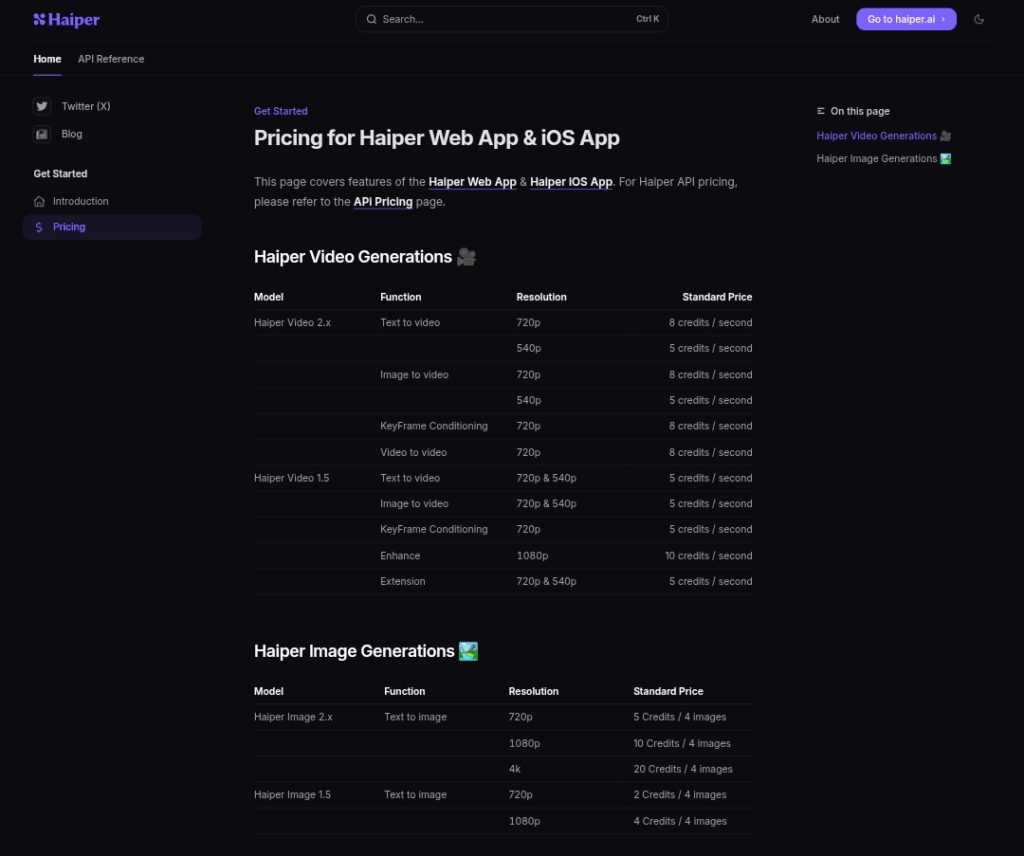
Haiper AI operates on a credit-based system for both its web app (haiper.ai) and iOS app. Credits determine how many generations you can create, each video or image costs a set number depending on model, resolution, and length.
- Free tier exists with daily limits and basic access.
- Paid memberships (beta plans) unlock higher credit allowances, unlimited basic creations in some tiers, watermark removal, and commercial rights.
- API has separate pay-per-use pricing for developers.
No hidden per-second overages in the main app once you’re on a plan, but credits are the currency for advanced or longer outputs.
2. Free Trial Features, Limitations, and Free Tier Daily Limit
Haiper keeps things accessible with a solid Free (Beta) Plan, perfect for testing before committing.
- Haiper Ai Free Credits Daily Limit: Around 10 video creations per day (this can vary slightly based on current promotions or server load).
- Total credits: 300 non-expiring credits included (great for occasional use without losing them).
- Features included:
- Text-to-video and image-to-video generations.
- Basic resolutions (up to 720p on newer models).
- Access to Haiper Video 2.x and older models.
- Limitations:
- All outputs include watermarks.
- No commercial use allowed.
- Generated content may not be private (shared model).
- Slower queue times during peak hours.
- Limited to basic features, no priority processing or advanced controls.
This free tier is generous compared to many competitors, enough for 5-10 short clips daily if you’re efficient with prompts. I use it regularly for quick social media tests without spending a rupee!
3. Paid Plans Details
Haiper offers tiered subscriptions (currently in beta) billed monthly or annually (annual saves ~20-30%). Prices and perks increase with higher tiers.
Here’s a clear comparison:
| Plan | Monthly Price (Billed Yearly) | Key Benefits | Credits/Month | Best For |
|---|---|---|---|---|
| Free (Beta) | $0 | 10 creations/day, 300 non-expiring credits, basic models | 300 total | Beginners, testing, casual use |
| Explorer (Beta) | $8/month | Unlimited basic video creations, higher daily allowance | 1,500 | Regular creators, hobbyists |
| Pro (Beta) | $24/month | Unlimited basic creations, watermark-free, commercial use, private creations | 5,000 | Professional content creators, businesses |
- Unlimited basic means you can generate short/standard videos without burning credits quickly.
- Higher credits cover premium resolutions (720p+), longer clips, or advanced features like keyframe conditioning.
- Pro perks include no watermarks (crucial for client work) and full commercial licensing.
Annual billing drops the effective cost (e.g., Pro ~$20/month equivalent). Plans auto-renew, and you can upgrade/downgrade anytime.
4. API Pricing
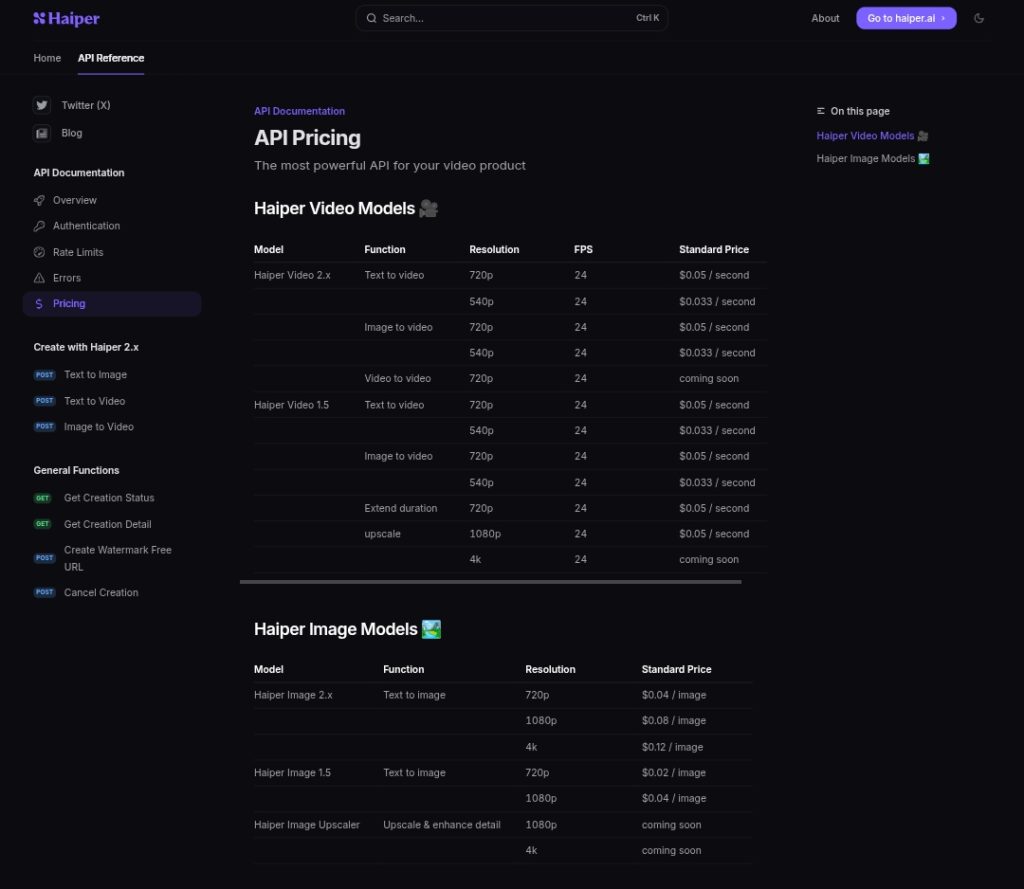
For developers integrating Haiper into apps or automating workflows, the API is pay-per-use, no subscription required, just top-up credits.
Pricing (as of early 2026):
- Haiper Video 2.x:
- Text-to-video / Image-to-video: $0.05/second at 720p (24 FPS)
- 540p: $0.033/second
- Video-to-video: Coming soon (similar rates expected)
- Image generation (Haiper Image 2.x): Around $0.04 per image (720p)
This is competitive for high-volume use, much cheaper than building your own model. You buy credits in bulk via the API dashboard, with no minimums mentioned.
5. Best Alternatives
If Haiper’s credit system or limits don’t fit, here are strong 2026 alternatives for Haiper AI:
- Runway ML: Excellent motion control and editing tools. Free tier limited; paid starts at $12/month (Standard) up to $76/month (Unlimited). Great for pros needing granular tweaks.
- Pika Labs: Playful effects and fast generations. Free plan with credits; paid from $8-10/month for watermark-free and more volume.
- Kling AI: Strong physics and realism. Free limited; paid $6.99–$127.99/month depending on credits/speed.
- Luma Labs (Dream Machine): Photoreal focus. Free monthly allotment; paid from $7.99/month for extras.
- Pollo AI: Simple interface, good for quick experiments. Competitive free tier; paid plans similar to Haiper (~$10+/month).
Each has strengths, Runway for editing depth, Pika for creativity but Haiper AI often wins on realism and ease for beginners.
In summary, Haiper AI strikes a great balance: a usable free tier for dipping your toes, affordable paid plans for serious creators, and transparent API costs for scaling.
If you’re creating content on a budget, start with the free plan today, it’s one of the most creator-friendly options out there right now.